Build Once, Run Everywhere: Handling Next.js Environment Variables in Docker with AWS Parameter Store
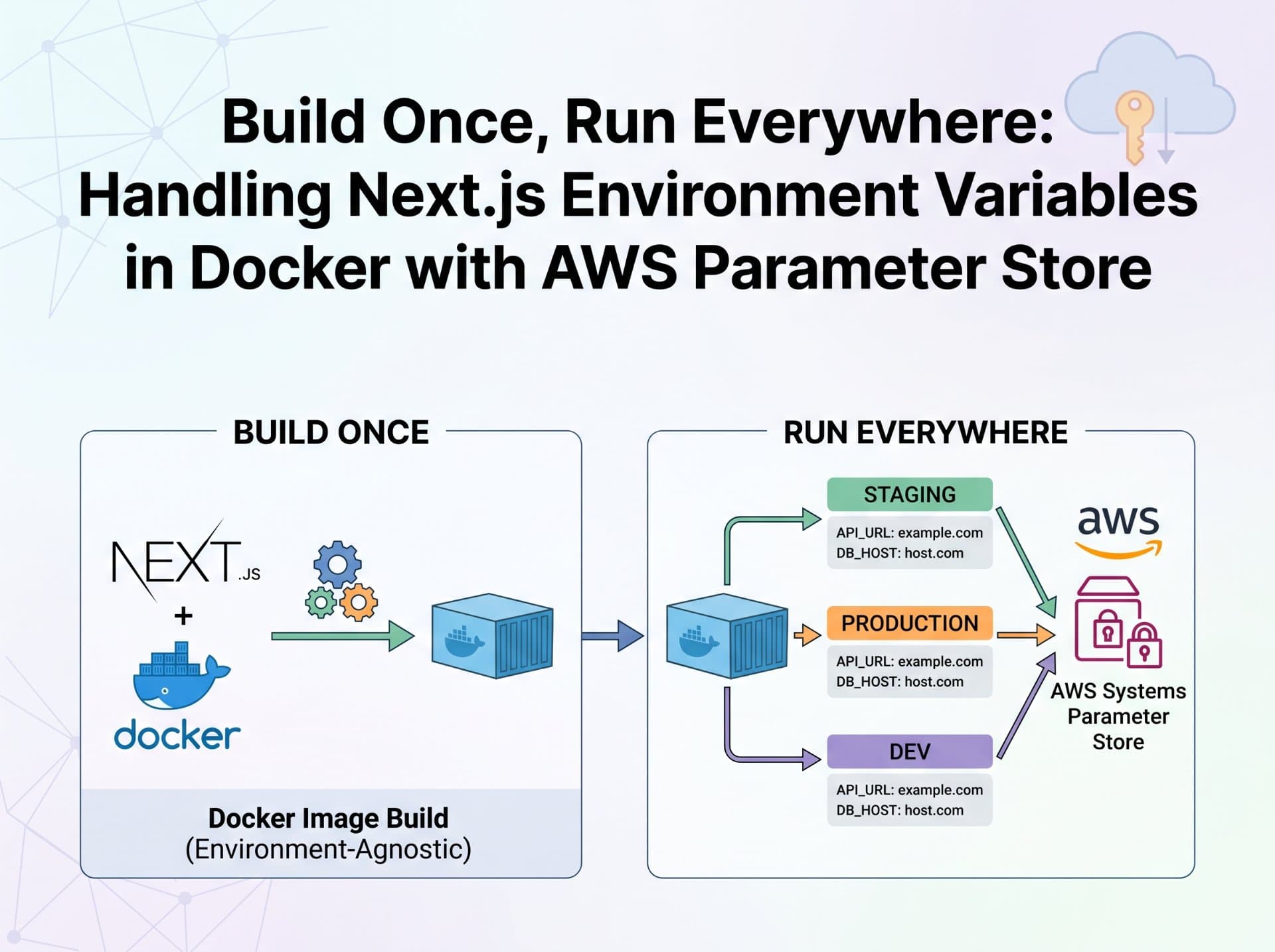
Why does the standard container runtime injection pattern fail with Next.js? Explore how Next.js inlines environment variables at build time, and learn how to use an entrypoint.sh script to dynamically pull variables from AWS Parameter Store at runtime without rebuilding your Doc

Advertisements
The Problem Nobody Warns You About
You've containerized a dozen services. You know the drill: pass environment variables at runtime via docker run -e or your Kubernetes ConfigMap, and the app picks them up. Works perfectly for your Go services, your Python FastAPI backends, your Node.js APIs.
Then you try it with Next.js, and your frontend still points at the old API endpoint. You rebuild the image, redeploy same issue. You exec into the container, echo the variable it's there. But the browser is fetching from a URL hardcoded into the bundle that was compiled at build time.
The Core Trap
Next.js is not a server-rendered runtime that reads env vars on each request. Any variable prefixed NEXT_PUBLIC_ is statically inlined into the JavaScript bundle during next build. By the time your container starts, that value is frozen in the compiled output. Runtime injection has no effect.
This is not a bug; it's a deliberate architectural decision. Next.js bakes NEXT_PUBLIC_* variables into the client bundle so the browser can access them without a server round-trip. The consequence for DevOps is significant: the standard "immutable image, runtime config" pattern breaks completely for frontend variables.
Why Next.js Inlines at Build Time
To understand the fix, you need to understand why Next.js makes this trade-off in the first place.
Browsers cannot access server-side environment variables. When your Next.js app runs in a user's browser, there's no Node.js process to call process.env.NEXT_PUBLIC_API_URL against. Next.js solves this by replacing every reference to process.env.NEXT_PUBLIC_* at compile time with the literal string value. The webpack bundler performs a static text substitution the variable name is gone from the output entirely.
What you write
const url = process.env.NEXT_PUBLIC_API_URLWhat webpack emits into the bundle
onst url = "https://api.production.example.com"This substitution happens once at next build. The string is then minified, chunked, and distributed across your static JS assets. There is no mechanism for that string to change at container startup time.
Server-side variables (without the NEXT_PUBLIC_ prefix) behave differently they're read at request time on the Node.js server process and are never sent to the browser. Those can be injected at runtime normally. The problem is exclusively with browser-accessible variables.
The Naïve Pattern and Why It Breaks
Here's what most engineers try first when they containerize a Next.js app. The Dockerfile looks correct, the compose file looks correct, but the runtime injection is arriving too late.
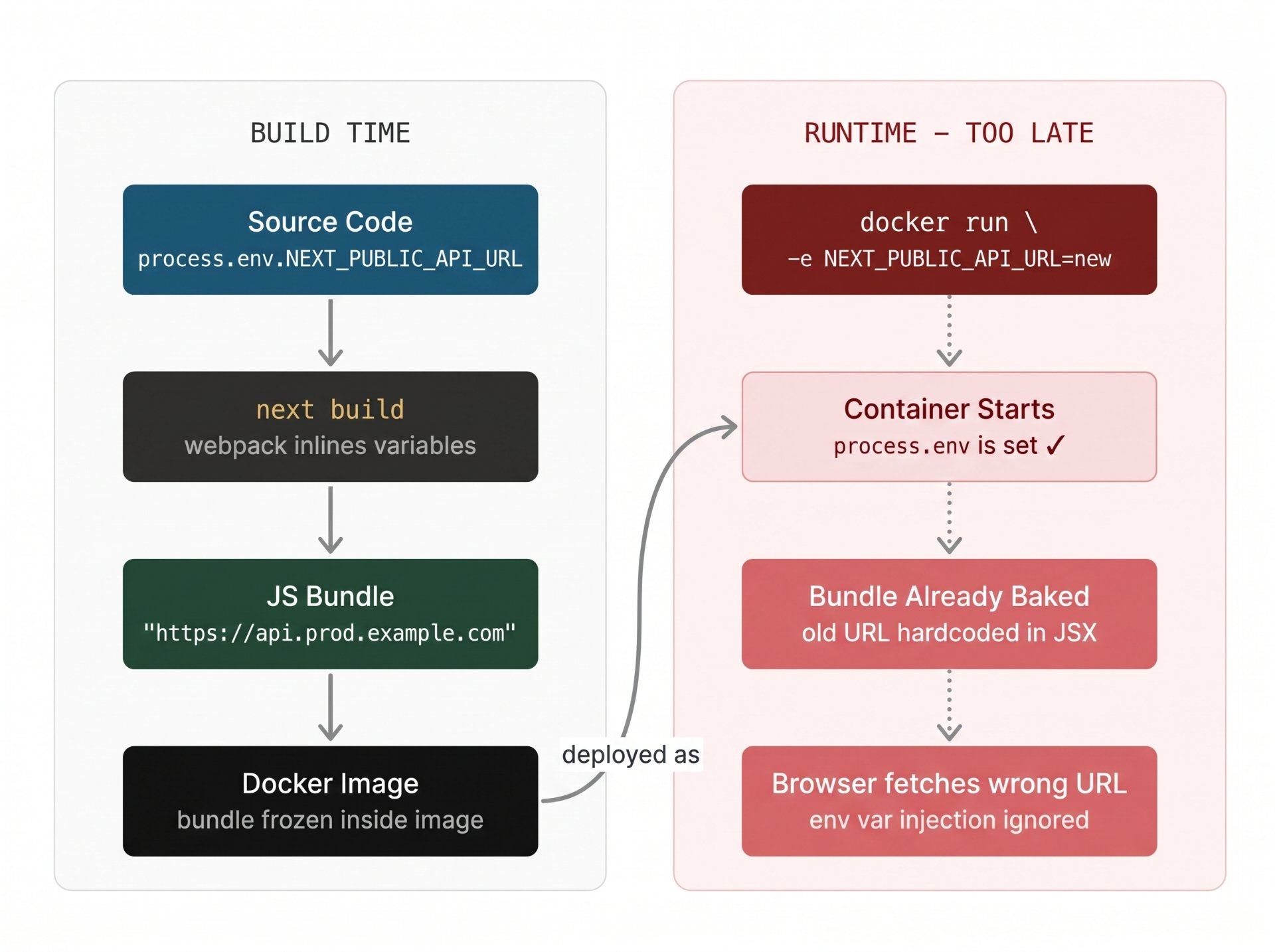
The failure mode is subtle because nothing throws an error. The container starts, the app runs, process.env.NEXT_PUBLIC_API_URL is correctly set inside Node.js but the browser bundle already has the old value compiled in. The variable is shadowed by its own baked-in copy.
The Correct Mental Model: Shift Left
The standard DevOps pattern is "build once, configure at runtime." For most services this works because configuration is read when the process starts. Next.js inverts this for public variables: build-time is the configuration moment.
You have two legitimate options:
1. Build per environment — pass NEXT_PUBLIC_* vars as Docker ARG values during docker build. Each environment (staging, prod) gets its own image. Simple, but breaks immutability you're shipping different artifacts to staging vs production.
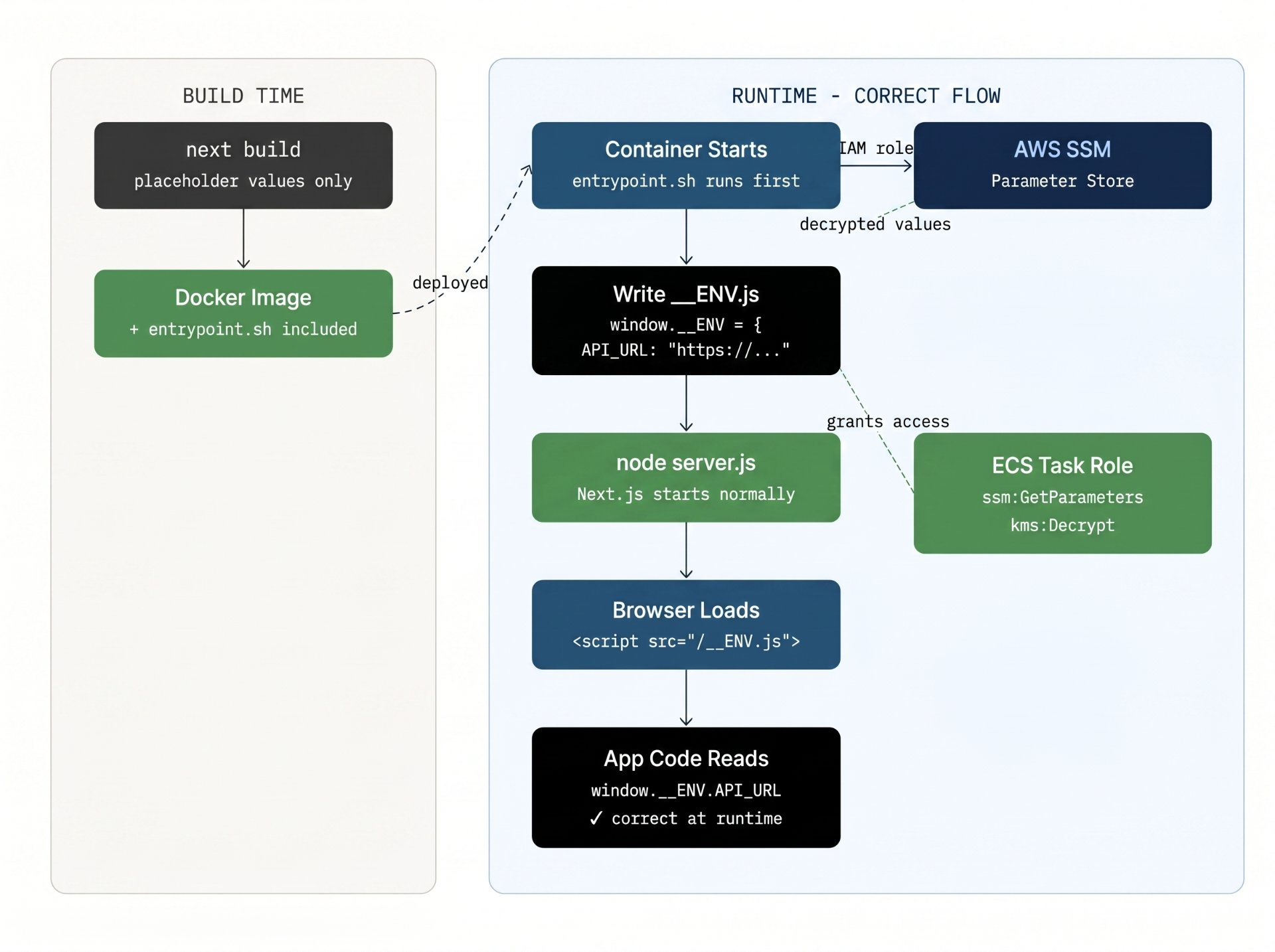
Runtime shim via entrypoint.sh — build the image with placeholder values, then use a startup script to pull real values from AWS Parameter Store, write them to a config file that Next.js loads before hydration, and start the app. One image, any environment. This is the correct production pattern.
Option 2 is what this article implements. Option 1 is simpler and acceptable for small teams, but violates the core principle that the artifact you test is the artifact you ship.
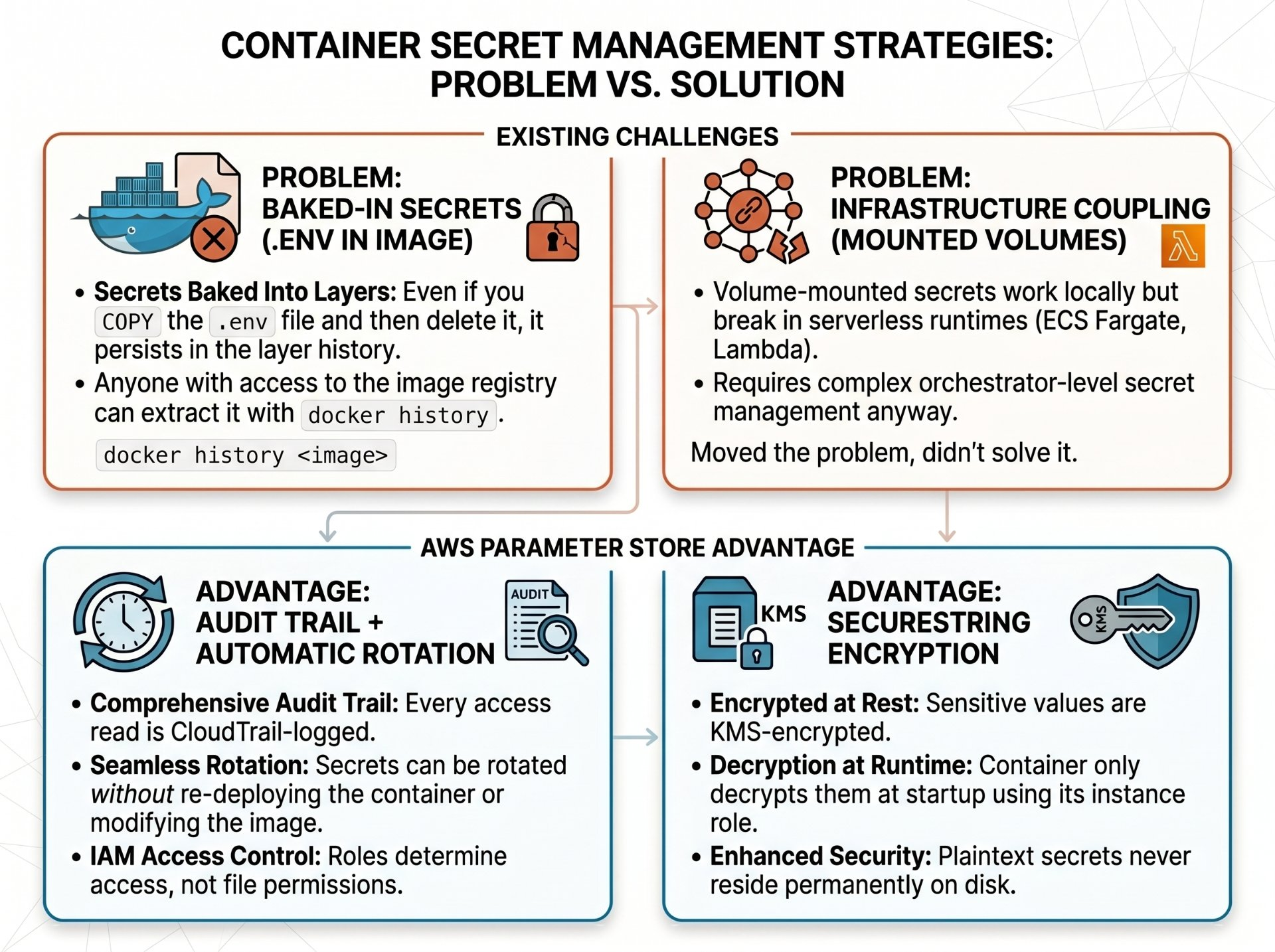
Why AWS Parameter Store, Not .env Files
Before getting to the implementation, it's worth understanding why Parameter Store is the right tool here instead of just baking .env files into the image or mounting them as volumes.
The Implementation: entrypoint.sh + SSM
The pattern works like this: your Next.js app is built with placeholder values. At container startup, entrypoint.sh calls the AWS SSM API, writes the real values into a __ENV.js file served as a static asset, and Next.js loads that file before hydration via a <script> tag in _document.tsx.
Code: The Full Implementation
1. The Dockerfile
Use a multi-stage build. The builder stage runs next build with placeholder values these get inlined into the bundle but will be overridden at runtime. The runner stage is minimal Alpine, with the AWS CLI installed for SSM calls.
# ── Stage 1: Builder ──────────────────────────────────────────
FROM node:20-alpine AS builder
WORKDIR /app

# Build-time ARGs — placeholder values only, NOT secrets
ARG NEXT_PUBLIC_API_URL=""
ARG NEXT_PUBLIC_APP_ENV="production"

COPY package*.json ./
RUN npm ci --only=production

COPY . .

# Build with empty/placeholder public vars
# They'll be overridden at runtime by the shim
ENV NEXT_PUBLIC_API_URL=$NEXT_PUBLIC_API_URL
ENV NEXT_PUBLIC_APP_ENV=$NEXT_PUBLIC_APP_ENV
RUN npm run build

# ── Stage 2: Runner ───────────────────────────────────────────
FROM node:20-alpine AS runner
WORKDIR /app

# Install AWS CLI v2 (for SSM calls in entrypoint)
RUN apk add --no-cache aws-cli bash

# Run as non-root
RUN addgroup -g 1001 -S nodejs && \
    adduser  -S nextjs -u 1001 -G nodejs

# Copy only built output from builder
COPY --from=builder --chown=nextjs:nodejs /app/.next  ./.next
COPY --from=builder /app/node_modules         ./node_modules
COPY --from=builder /app/package.json         ./package.json
COPY --from=builder /app/public               ./public

# Copy the entrypoint script
COPY entrypoint.sh /entrypoint.sh
RUN chmod +x /entrypoint.sh

USER nextjs
EXPOSE 3000

ENTRYPOINT ["/entrypoint.sh"]
CMD ["node_modules/.bin/next", "start"]
2. entrypoint.sh
This is the core of the pattern. It uses aws ssm get-parameters-by-path to pull all variables under a namespace prefix, then writes them as window.__ENV assignments into a JavaScript file served as a static asset.
#!/bin/bash
set -euo pipefail

# The SSM path prefix for this service + environment
# e.g. /myapp/production/ or /myapp/staging/
SSM_PATH="${SSM_PATH:-/myapp/production}"
ENV_JS_PATH="/app/public/__ENV.js"

echo "[entrypoint] Pulling config from SSM: $SSM_PATH"

# Pull all parameters under the path (handles pagination)
PARAMS=$(aws ssm get-parameters-by-path \
  --path "$SSM_PATH" \
  --with-decryption \
  --recursive \
  --query "Parameters[*].{Name:Name,Value:Value}" \
  --output json)

# Write the JS shim — browser reads window.__ENV at runtime
echo "window.__ENV = {" > "$ENV_JS_PATH"

# Parse each Name/Value pair and emit JS key-value
echo "$PARAMS" | jq -r '.[] |
  .Name |= ltrimstr("'"$SSM_PATH"'/") |
  "  \(.Name): \"\(.Value)\","' >> "$ENV_JS_PATH"

echo "};" >> "$ENV_JS_PATH"

echo "[entrypoint] __ENV.js written. Starting Next.js..."

# Hand off to the CMD (node server.js / next start)
exec "$@"
exec "$@" matters
The final exec "$@" replaces the shell process with the Next.js server instead of spawning a child. This ensures that signals (SIGTERM from ECS/Kubernetes during graceful shutdown) reach the Node.js process directly; not a bash parent that might ignore them.
3. The __ENV.js consumer in Next.js
Add the script tag to your custom _document.tsx so it loads before any Next.js hydration, then create a typed utility to read from it with a process.env fallback for local development.
pages/_document.tsx
import { Html, Head, Main, NextScript } from 'next/document'

export default function Document() {
  return (
    <Html>
      <Head>
        {/* Load runtime config BEFORE hydration */}
        <script src="/__ENV.js" />
      </Head>
      <body>
        <Main />
        <NextScript />
      </body>
    </Html>
  )
}
lib/env.ts — typed runtime config accessor
/**
 * Read a public env var at runtime.
 * Prefers window.__ENV (injected by entrypoint.sh)
 * Falls back to process.env for local `next dev` usage.
 */
export function getPublicEnv(key: string): string {
  if (
    typeof window !== 'undefined' &&
    (window as any).__ENV &&
    key in (window as any).__ENV
  ) {
    return (window as any).__ENV[key]
  }

  // Fallback: process.env for local dev (next dev still inlines normally)
  const val = process.env[`NEXT_PUBLIC_${key}`]
  if (!val) {
    throw new Error(`[env] Missing config key: ${key}`)
  }
  return val
}

// Usage:
// const apiUrl = getPublicEnv('API_URL')
4. IAM Policy for the Task Role
Your ECS task role (or EC2 instance profile) needs the minimum permissions to call SSM and KMS. Scope the resource ARN to only the parameters your service owns.
iam-policy.json — least-privilege SSM access
{
  "Version": "2012-10-17",
  "Statement": [
    {
      "Sid": "SSMParameterRead",
      "Effect": "Allow",
      "Action": [
        "ssm:GetParameter",
        "ssm:GetParameters",
        "ssm:GetParametersByPath"
      ],
      "Resource": "arn:aws:ssm:*:*:parameter/myapp/production/*"
    },
    {
      "Sid": "KMSDecrypt",
      "Effect": "Allow",
      "Action": "kms:Decrypt",
      "Resource": "arn:aws:kms:*:*:key/<your-ssm-kms-key-id>"
    }
  ]
}Security Hardening and What Goes Wrong Without It
The pattern is sound, but it introduces several attack surfaces if implemented carelessly. Engineers who skip these steps typically discover them during a penetration test or, worse, an incident.
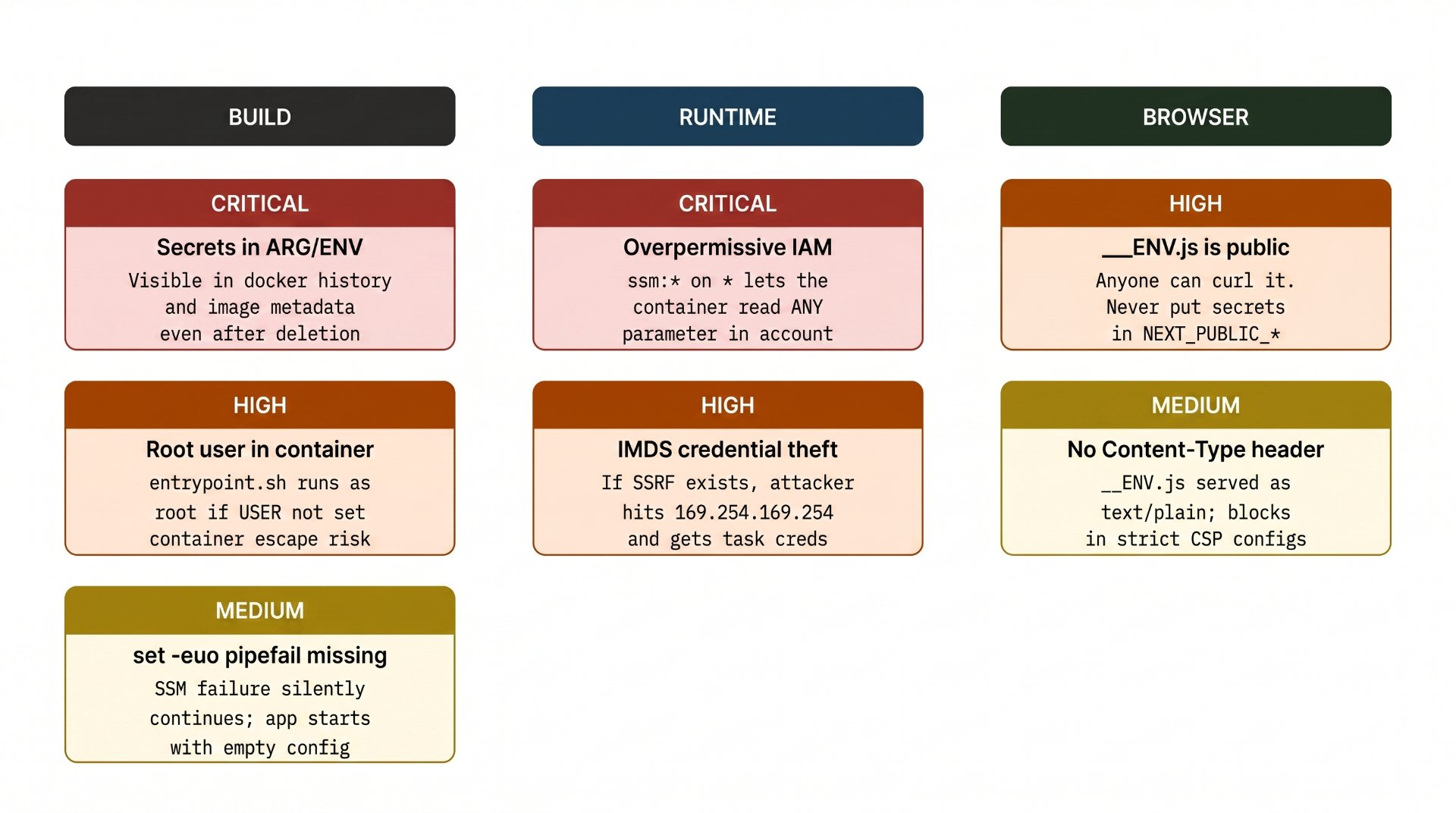
Vulnerability Breakdown
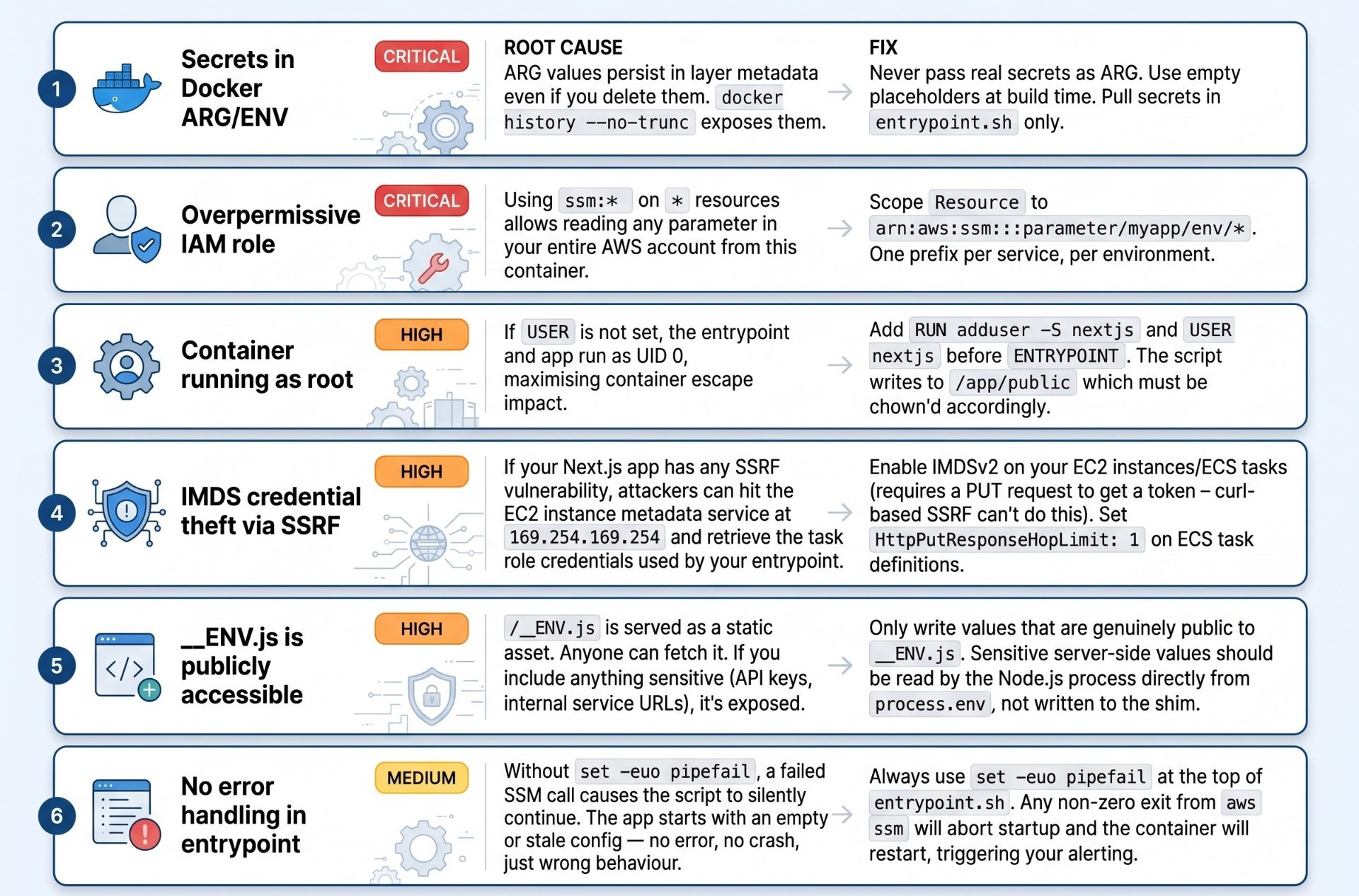
Best Practices for Production
Parameter naming conventions
Use a consistent hierarchy that encodes service, environment, and variable name. This makes IAM scoping clean and allows you to pull all config for a service in one API call.
# Pattern: /{app}/{env}/{key}
/myapp/production/API_URL
/myapp/production/FEATURE_FLAGS_URL
/myapp/staging/API_URL
/myapp/staging/FEATURE_FLAGS_URL

# Secrets get SecureString type; public config uses String
aws ssm put-parameter \
  --name "/myapp/production/API_URL" \
  --value "https://api.production.example.com" \
  --type String        # not secret, String is fine

aws ssm put-parameter \
  --name "/myapp/production/STRIPE_SECRET" \
  --value "sk_live_..." \
  --type SecureString  # encrypted at rest with KMS
SecureString ≠ safe to send to browser
SecureString encrypts the value at rest in SSM and in transit to your container. Once your entrypoint.sh writes it to __ENV.js, it's plaintext in a public file. SecureString is for server-side secrets only. Never route a secret through the __ENV.js shim.
Startup latency and caching
The SSM API call adds startup latency typically 100–400ms for a small parameter set. For most deployments this is acceptable. If you have many parameters or strict cold-start requirements, consider:
Batch-fetch with
get-parameters-by-path(one call, any number of params) rather than individualget-parametercalls.Cache the output to
/tmp/env-cache.jsonand only re-fetch if the file is older than your rotation interval.Use the AWS Parameters and Secrets Lambda Extension if running on Lambda it provides a local HTTP endpoint that caches SSM values in memory.
Local development
The pattern needs to degrade gracefully in local development where there's no ECS task role. The getPublicEnv() utility shown earlier handles this by falling back to process.env. For local SSM access, developers can use an SSM profile with AWS_PROFILE set, or simply provide a local .env.local file and skip the SSM path entirely.
docker-compose.override.yml — local dev without SSM
services:
  web:
    environment:
      # Skip SSM in local dev; entrypoint reads these directly
      - SKIP_SSM=true
      - NEXT_PUBLIC_API_URL=http://localhost:3001
entrypoint.sh — guard clause for local dev
if [[ "${SKIP_SSM:-false}" == "true" ]]; then
  echo "[entrypoint] SKIP_SSM=true, writing env from process environment"
  # Write from shell env instead of SSM
  echo "window.__ENV = {" > "$ENV_JS_PATH"
  echo "  API_URL: \"${NEXT_PUBLIC_API_URL:-}\"," >> "$ENV_JS_PATH"
  echo "};" >> "$ENV_JS_PATH"
else
  # ... normal SSM path
fi
IMDSv2 enforcement for ECS
This is the single most impactful security control you can add alongside this pattern. IMDSv2 requires a session token obtained via a PUT request before any metadata or credentials can be accessed this blocks SSRF-based credential theft since a naive curl to the metadata endpoint returns 401.
# In your ECS task definition
{
  "containerDefinitions": [...],
  "ipcMode": "none",
  "requiresCompatibilities": ["FARGATE"]
}

# Enforce IMDSv2 on the ECS cluster's container instances
aws ec2 modify-instance-metadata-options \
  --instance-id <id> \
  --http-tokens required \
  --http-put-response-hop-limit 1
Security Checklist
Before shipping this pattern to production: ✓ No real secrets in Dockerfile ARG/ENV | ✓ IAM role scoped to specific SSM path | ✓ Container runs as non-root user | ✓ IMDSv2 required on all ECS hosts | ✓ set -euo pipefail in entrypoint.sh | ✓ exec "$@" for signal propagation | ✓ No secrets in __ENV.js (public endpoint)
Author's Note
Chamath P.
DevOps Engineer
DevOps Engineer writing practical guides on Kubernetes, CI/CD, IaC, and SRE — based on real production experience.
This article was written with AI assistance. All technical claims and code examples have been personally verified before publishing.
Advertisements