The Laravel Env Chain: PHP-FPM, Apache, and AWS Parameter Store in Docker
PHP reads environment variables at request time so does the standard Docker injection pattern just work? Not quite. Between Laravel's Dotenv bootstrap, PHP-FPM's clear_env stripping, Apache's proxy boundary, and config:cache freezing values at build time, there are four places

Advertisements
PHP Is Not Next.js — But It's Not Simple Either
In Article 12 we worked around a fundamental build-time limitation: Next.js inlines NEXT_PUBLIC_* variables into the JavaScript bundle during next build, so runtime injection arrives too late. PHP has no such constraint. When a request hits your Laravel application, PHP reads $_ENV and getenv() from the live process environment, nothing is baked into compiled output.
This means the standard Docker env injection pattern is architecturally valid for Laravel. But "valid" and "working in production" are different things. There are four independent layers between a Docker environment variable and env('DB_HOST') returning the correct value inside your Laravel controller. Each layer has a default behaviour that silently discards or freezes your config if you don't explicitly account for it.
The Four Break Points
1. PHP-FPM's clear_env — strips the Docker environment before spawning workers by default.
2. Apache's proxy boundary — SetEnv directives don't cross the FastCGI socket into PHP-FPM.
3. Laravel's .env file priority — Dotenv reads the file first and ignores actual environment variables if the file exists.
4. config:cache — freezes all env() calls at build time, identical to the Next.js build-time problem.
How Laravel Actually Reads Configuration
Before addressing Docker, you need a precise picture of how Laravel bootstraps its configuration. Most engineers know Laravel uses a .env file few know exactly when and how that file is read, or what wins when both the file and a real environment variable are present.
The bootstrap sequence on every request (without config cache):
public/index.php — application bootstrap
The entry point creates the Laravel application instance and loads the kernel. No configuration is read yet.
Illuminate\Foundation\Bootstrap\LoadEnvironmentVariables
vlucas/phpdotenv is invoked here. It looks for .env in the project root. If found, it reads the file and populates $_ENV, $_SERVER, and putenv() — but only for keys that are not already setin the real environment. Dotenv's default is "immutable": real env vars win over file values.
Illuminate\Foundation\Bootstrap\LoadConfiguration
All files under config/ are executed. Each one calls env('KEY', 'default'), which reads from $_ENV / getenv(). These calls happen live on every request unless config is cached.
config/cache (if present)
If bootstrap/cache/config.php exists (generated by php artisan config:cache), Laravel skips steps 1 and 2 entirely and loads the serialised config directly. All env() calls were resolved when the cache was generated they are now frozen strings.
The critical takeaway: Dotenv is designed so that real environment variables win over .env file values. This is intentional and correct behaviour for production. The implication is that if you correctly inject variables into the PHP-FPM worker environment, you don't need a .env file in production at all and you shouldn't have one.
The Full Environment Chain
Let's trace exactly how an environment variable travels from AWS Parameter Store through Docker, through Apache, through PHP-FPM, and finally into a Laravel env() call. Understanding this chain makes every subsequent problem obvious.
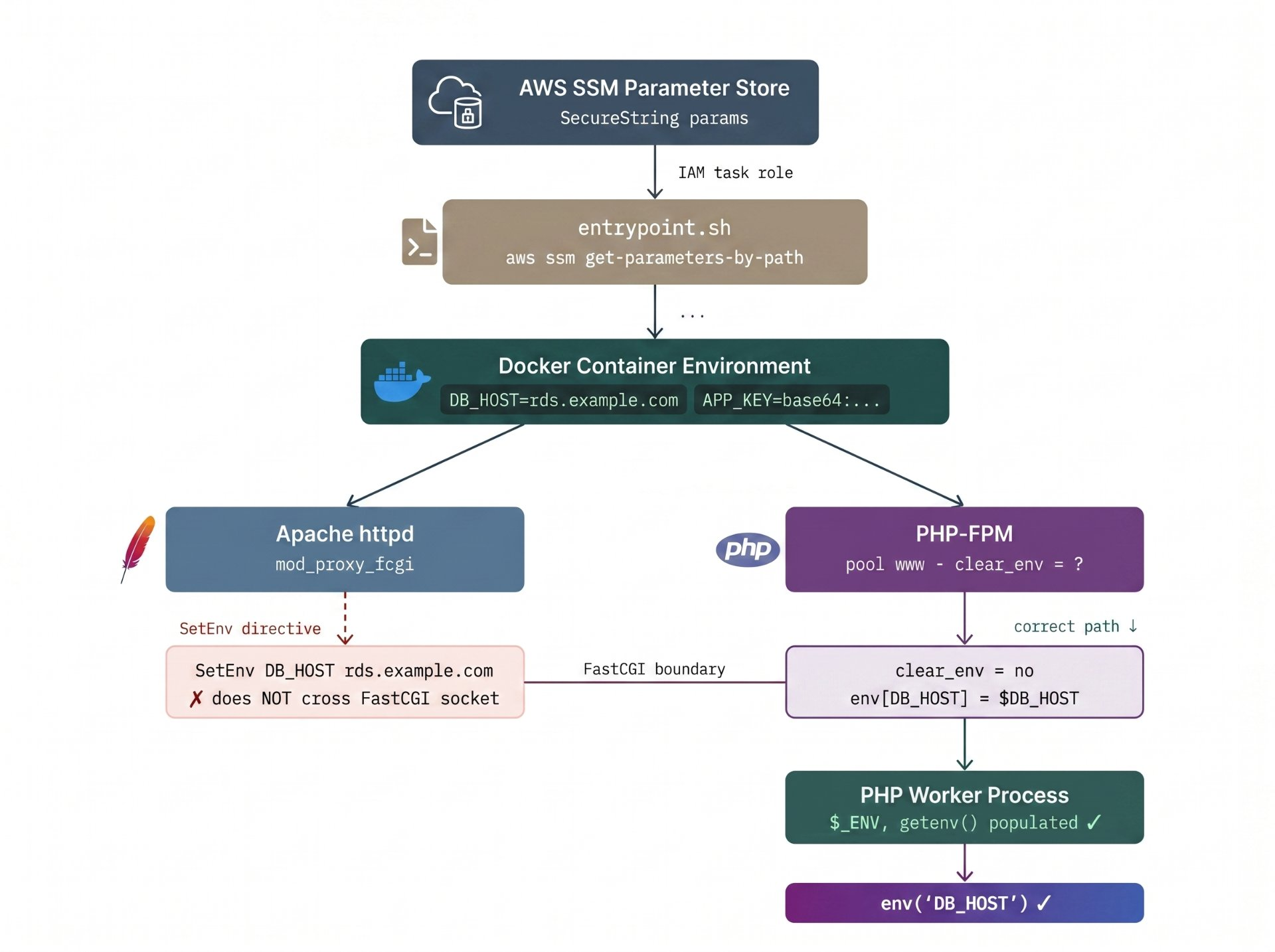
SetEnv directives don't cross the FastCGI socket. PHP-FPM must be explicitly configured to pass env vars into workers.Break Point 1: PHP-FPM's clear_env
This is the most common silent failure in containerised PHP deployments. PHP-FPM's default configuration includes clear_env = yes in the pool definition. Before spawning each worker process, FPM wipes the entire environment it inherited from the Docker container. getenv('DB_HOST') returns false. No error is thrown. The app runs with empty config.
Default Behaviour — Reads as Working, Isn't
PHP-FPM with clear_env = yes (the default) strips all inherited environment variables silently. Laravel's env() returns the default fallback value often null or an empty string with no exception. Database connections fail with authentication errors, not env errors. Teams spend hours debugging the wrong layer.
You have two options for fixing this. Option A is blunt but reliable; Option B gives you fine-grained control and is preferred for production:
www.conf — Option A: disable clearing entirely
; /etc/php/8.2/fpm/pool.d/www.conf
[www]
; Inherit everything from the Docker environment
; Simple but passes ALL container env vars to every worker
clear_env = no
www.conf — Option B: explicit passthrough (preferred)
; /etc/php/8.2/fpm/pool.d/www.conf
[www]
; Keep clear_env = yes (default), explicitly pass only what PHP needs
; The $VAR syntax reads from the FPM master process environment
clear_env = yes

env[APP_ENV]       = $APP_ENV
env[APP_KEY]       = $APP_KEY
env[APP_DEBUG]     = $APP_DEBUG
env[DB_HOST]       = $DB_HOST
env[DB_PORT]       = $DB_PORT
env[DB_DATABASE]   = $DB_DATABASE
env[DB_USERNAME]   = $DB_USERNAME
env[DB_PASSWORD]   = $DB_PASSWORD
env[REDIS_HOST]    = $REDIS_HOST
env[CACHE_DRIVER]  = $CACHE_DRIVER
env[SESSION_DRIVER] = $SESSION_DRIVER
env[QUEUE_CONNECTION] = $QUEUE_CONNECTION
Option B is preferred because it creates an explicit contract: your www.conf documents exactly which variables PHP-FPM workers expect, making deployments auditable and preventing unintended leakage of internal Docker variables (AWS credential env vars, orchestrator metadata) into the PHP process.
Break Point 2: Apache's FastCGI Boundary
With mod_php (Apache loads PHP as a module directly), SetEnv in a VirtualHost does inject into the PHP environment. With the modern stack Apache + mod_proxy_fcgi forwarding to a PHP-FPM socket Apache and PHP-FPM are separate processes. Apache's environment does not propagate across the FastCGI socket.
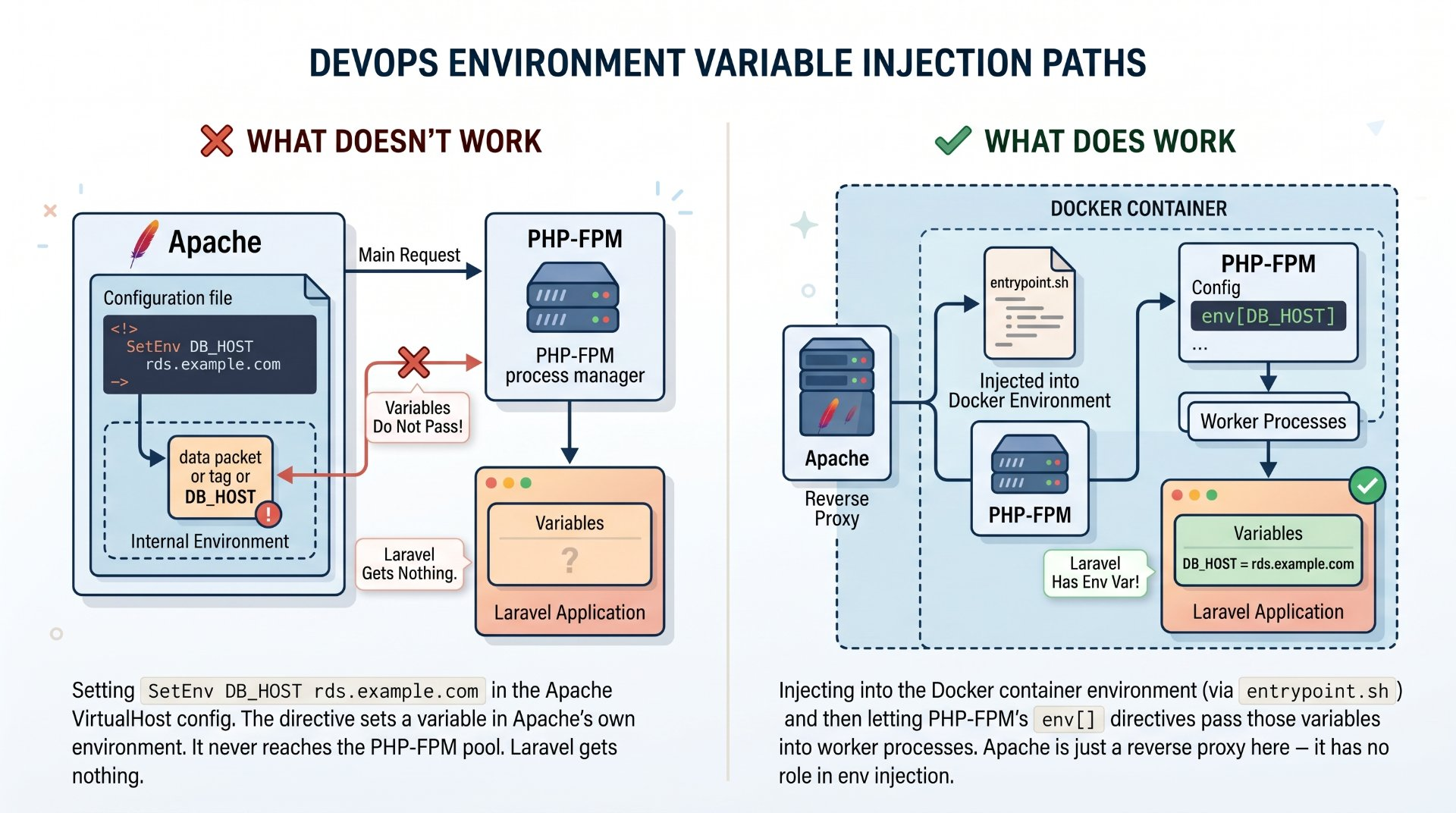
Apache's only job in this stack is receiving HTTP requests and forwarding them over the FastCGI socket to PHP-FPM. Configuration that belongs to the application runtime environment variables, PHP settings belongs in the FPM pool config, not the Apache VirtualHost. If you find SetEnv directives in your Apache config for PHP vars, remove them; they're doing nothing.
apache/vhost.conf — the correct, minimal VirtualHost
<VirtualHost *:80>
    ServerName app.example.com
    DocumentRoot /var/www/html/public

    # Standard Laravel: all requests route through index.php
    <Directory /var/www/html/public>
        AllowOverride None
        Require all granted
        FallbackResource /index.php
    </Directory>

    # Proxy PHP requests to PHP-FPM over Unix socket
    <FilesMatch \.php$>
        SetHandler "proxy:unix:/run/php/php8.2-fpm.sock|fcgi://localhost"
    </FilesMatch>

    # Do NOT add SetEnv here for application config.
    # It does not cross the FastCGI boundary into PHP-FPM workers.
    # Env vars belong in /etc/php/8.2/fpm/pool.d/www.conf
</VirtualHost>Break Point 3: The .env File in Docker
The third break point isn't a failure — it's a false sense of security. Teams ship a .env.production file, COPY it into the image as .env, and everything works. The application reads config correctly. The problem is not functionality; it's the security model.
Layer History Exposure
Even if you RUN rm .env after copying it, the file persists in the image layer. docker history --no-trunc <image> exposes every layer command. Anyone with pull access to your registry can extract the secrets. This is the same attack vector as the ARG exposure issue in Article 12 — different mechanism, identical outcome.
The correct position is: no .env file exists in the production image. The production Dockerfile explicitly excludes it. The .dockerignore ensures it can never be accidentally included. All config comes from the environment, which comes from the entrypoint pulling SSM at startup.
.dockerignore — explicitly exclude all env files
# Never bake env files into the image
.env
.env.*
.env.local
.env.production
.env.staging

# Also exclude development-only files
tests/
.git/
docker-compose*.yml
*.md
Dotenv's immutable mode (the Laravel default) means real environment variables always take precedence over .env file values. So even for local development where a .env file exists, if you set a real environment variable it wins. The behaviour is consistent: injected env vars are always authoritative.
Break Point 4: php artisan config:cache at Build Time
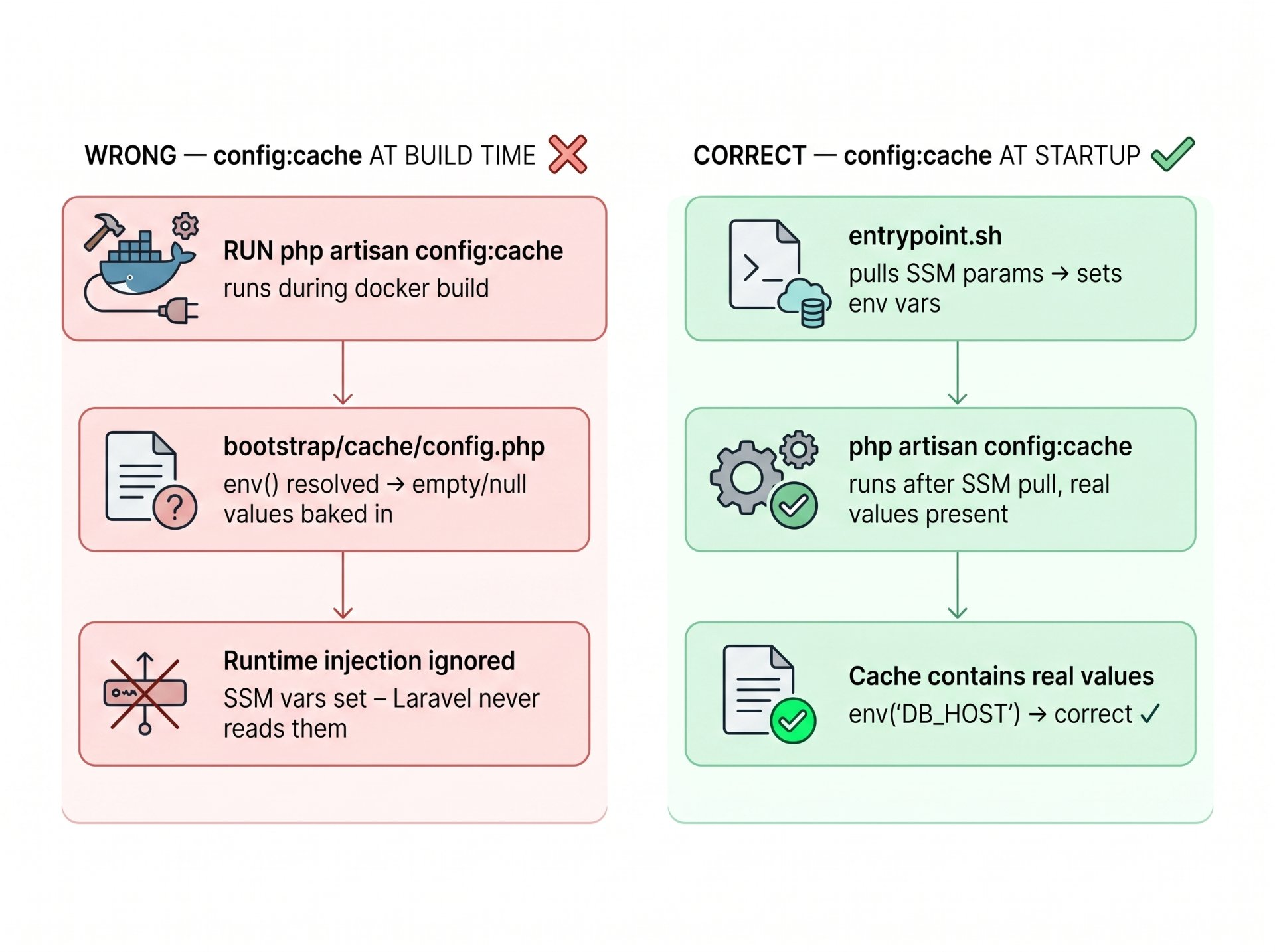
This is the Laravel-specific footgun that mirrors the Next.js build-time problem precisely. Many production Dockerfiles include RUN php artisan config:cache as a build step — it's in the Laravel documentation as a production optimisation, and it genuinely is one. The problem is when you run it.
When config:cache runs, Laravel executes every file in config/ and resolves every env() call against whatever environment is present at that moment. The results are serialised into bootstrap/cache/config.php. On every subsequent request, Laravel loads this file instead of reading config/ or calling env() at all. The bootstrap chain steps 1 and 2 described earlier are skipped entirely.
The Artisan Cache Interaction Rule
If you run php artisan config:cache, it must execute after your SSM pull in entrypoint.sh. If you run it in the Dockerfile as a RUN instruction, it resolves env() calls against a build environment with no real secrets — and freezes those empty strings permanently. Also note: once config is cached, calling env() directly in application code outside of config files always returns null. All env reads must go through config('key').
The Full Implementation
1. Dockerfile
Multi-stage build. The builder installs Composer dependencies. The runner stage is a clean Apache + PHP-FPM image with the AWS CLI for SSM calls. Critically, no config:cache runs here that moves to entrypoint.sh.
# ── Stage 1: Composer dependencies ────────────────────────────
FROM composer:2 AS vendor
WORKDIR /app
COPY composer.json composer.lock ./
RUN composer install \
    --no-dev \
    --no-scripts \
    --no-autoloader \
    --prefer-dist

COPY . .
RUN composer dump-autoload --optimize --no-dev

# ── Stage 2: Runtime ──────────────────────────────────────────
FROM php:8.2-apache

# System deps + PHP extensions
RUN apt-get update && apt-get install -y \
    libpng-dev libzip-dev libpq-dev \
    unzip curl jq awscli \
    && docker-php-ext-install pdo pdo_mysql pdo_pgsql zip gd opcache \
    && a2enmod rewrite proxy proxy_fcgi \
    && apt-get clean && rm -rf /var/lib/apt/lists/*

# Install PHP-FPM alongside Apache
RUN apt-get update && apt-get install -y php8.2-fpm && apt-get clean

# PHP-FPM pool config: explicit env passthrough
COPY docker/php/www.conf /etc/php/8.2/fpm/pool.d/www.conf

# Apache VirtualHost
COPY docker/apache/vhost.conf /etc/apache2/sites-available/000-default.conf

# PHP production config
COPY docker/php/php.ini /usr/local/etc/php/php.ini

# Laravel application (no .env — see .dockerignore)
COPY --from=vendor /app /var/www/html
RUN chown -R www-data:www-data /var/www/html/storage /var/www/html/bootstrap/cache

# Generate application key placeholder (real APP_KEY comes from SSM)
RUN php artisan key:generate --force --no-interaction 2>/dev/null || true

# DO NOT run config:cache here — env vars aren't available at build time

COPY docker/entrypoint.sh /entrypoint.sh
RUN chmod +x /entrypoint.sh

EXPOSE 80
ENTRYPOINT ["/entrypoint.sh"]
2. entrypoint.sh
This script does four things in order: pull from SSM, export every parameter as a real environment variable, run config:cache now that real values are present, then start PHP-FPM and Apache.
#!/bin/bash
set -euo pipefail

SSM_PATH="${SSM_PATH:-/myapp/production}"

echo "[entrypoint] Pulling parameters from SSM: $SSM_PATH"

# Pull all params under path, decrypt SecureStrings
PARAMS=$(aws ssm get-parameters-by-path \
  --path "$SSM_PATH" \
  --with-decryption \
  --recursive \
  --query "Parameters[*].{Name:Name,Value:Value}" \
  --output json)

# Export each parameter as a real environment variable
# Strip the SSM path prefix → DB_HOST, APP_KEY, etc.
while IFS="=" read -r key value; do
  export "${key}=${value}"
done < <(echo "$PARAMS" | jq -r '.[] |
  .Name |= ltrimstr("'"$SSM_PATH"'/") |
  "\(.Name)=\(.Value)"')

echo "[entrypoint] SSM parameters exported as env vars"

# Clear any stale config cache from the image build
php /var/www/html/artisan config:clear --quiet 2>/dev/null || true

# Generate config cache NOW — real env vars are present
echo "[entrypoint] Running config:cache with live SSM values"
php /var/www/html/artisan config:cache

# Optional: cache routes for production performance
php /var/www/html/artisan route:cache
php /var/www/html/artisan view:cache

# Start PHP-FPM in background
php-fpm8.2 --daemonize

echo "[entrypoint] PHP-FPM started. Starting Apache..."

# exec replaces this shell — Apache gets PID 1 and receives SIGTERM cleanly
exec apache2-foreground
Why exec apache2-foreground matters
exec replaces the shell process with Apache, giving Apache PID 1. When Kubernetes or ECS sends SIGTERM for graceful shutdown, it goes directly to Apache not to a bash parent that might buffer or ignore it. This is identical to the exec "$@" pattern from Article 12 but targeting Apache rather than Node.js.
3. PHP-FPM pool config
[www]
user  = www-data
group = www-data

listen = /run/php/php8.2-fpm.sock
listen.owner = www-data
listen.group = www-data
listen.mode  = 0660

; Worker process settings
pm = dynamic
pm.max_children      = 20
pm.start_servers     = 4
pm.min_spare_servers = 2
pm.max_spare_servers = 6
pm.max_requests      = 500

; Keep the environment clean — only pass what Laravel needs
; These are read from the FPM master process environment
; which was populated by entrypoint.sh before FPM started
clear_env = yes

env[APP_NAME]         = $APP_NAME
env[APP_ENV]          = $APP_ENV
env[APP_KEY]          = $APP_KEY
env[APP_DEBUG]        = $APP_DEBUG
env[APP_URL]          = $APP_URL
env[DB_CONNECTION]    = $DB_CONNECTION
env[DB_HOST]          = $DB_HOST
env[DB_PORT]          = $DB_PORT
env[DB_DATABASE]      = $DB_DATABASE
env[DB_USERNAME]      = $DB_USERNAME
env[DB_PASSWORD]      = $DB_PASSWORD
env[REDIS_HOST]       = $REDIS_HOST
env[REDIS_PASSWORD]   = $REDIS_PASSWORD
env[CACHE_DRIVER]     = $CACHE_DRIVER
env[SESSION_DRIVER]   = $SESSION_DRIVER
env[QUEUE_CONNECTION] = $QUEUE_CONNECTION
env[MAIL_HOST]        = $MAIL_HOST
env[MAIL_USERNAME]    = $MAIL_USERNAME
env[MAIL_PASSWORD]    = $MAIL_PASSWORD

; PHP tuning
php_admin_value[error_log]        = /var/log/php8.2-fpm.log
php_admin_flag[log_errors]        = on
php_admin_value[memory_limit]     = 256M
php_admin_value[upload_max_filesize] = 20M
php_admin_value[post_max_size]    = 20M
4. IAM Policy
Identical principle to Article 12 — scope the resource ARN to the specific SSM path this service owns. Laravel applications often pull both String (non-sensitive config) and SecureString (database passwords, API keys) parameters, so both SSM and KMS permissions are required.
{
  "Version": "2012-10-17",
  "Statement": [
    {
      "Sid": "LaravelSSMRead",
      "Effect": "Allow",
      "Action": [
        "ssm:GetParameter",
        "ssm:GetParameters",
        "ssm:GetParametersByPath"
      ],
      "Resource": "arn:aws:ssm:*:*:parameter/myapp/production/*"
    },
    {
      "Sid": "KMSDecryptSecureStrings",
      "Effect": "Allow",
      "Action": "kms:Decrypt",
      "Resource": "arn:aws:kms:*:*:key/<your-kms-key-id>"
    }
  ]
}Security Hardening and Vulnerability Map
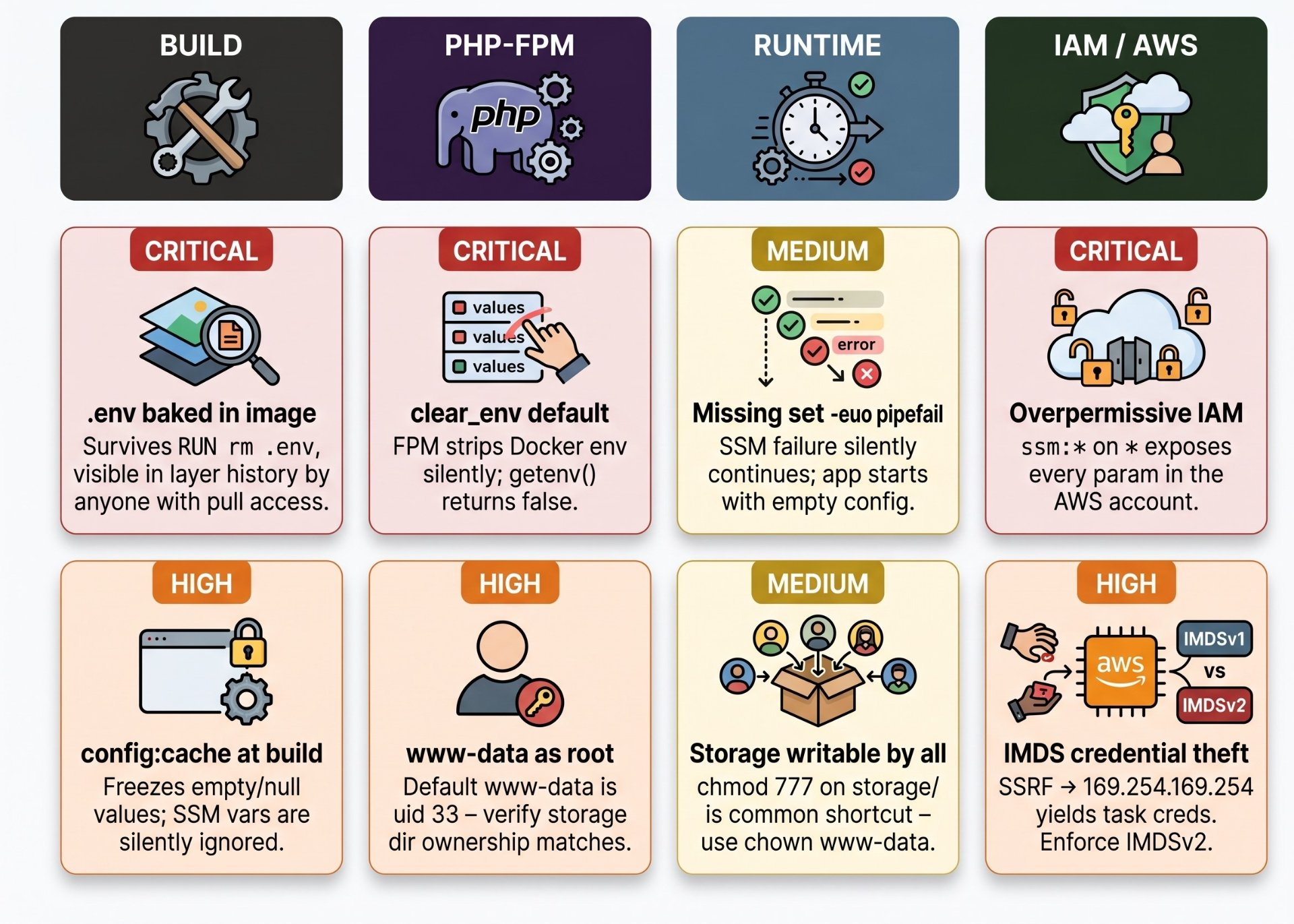
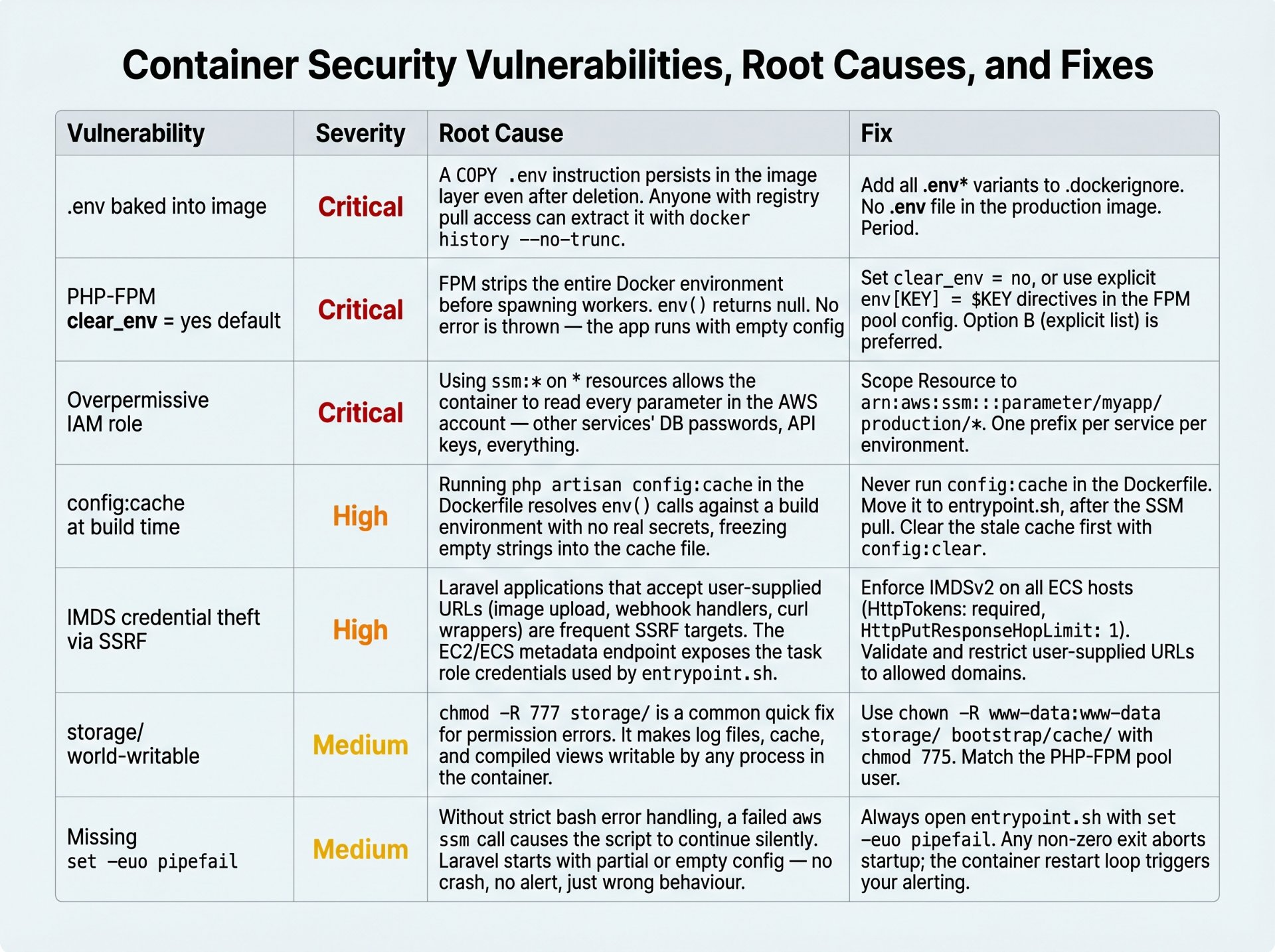
Best Practices
SSM Parameter naming
Follow the same hierarchical convention as the Next.js article. Sensitive values (DB passwords, APP_KEY, mail credentials) use SecureString. Non-sensitive config (APP_ENV, CACHE_DRIVER, queue connection names) can use String.
# Non-sensitive — String type
/myapp/production/APP_ENV          → "production"
/myapp/production/APP_URL          → "https://app.example.com"
/myapp/production/DB_CONNECTION    → "mysql"
/myapp/production/DB_HOST          → "rds.internal.example.com"
/myapp/production/CACHE_DRIVER     → "redis"
/myapp/production/SESSION_DRIVER   → "redis"

# Sensitive — SecureString type, encrypted with KMS
/myapp/production/APP_KEY          → "base64:..."
/myapp/production/DB_PASSWORD      → "..."
/myapp/production/REDIS_PASSWORD   → "..."
/myapp/production/MAIL_PASSWORD    → "..."
Local development without SSM
Developers use a standard .env file locally via docker-compose.override.yml. The SKIP_SSM=true guard in the entrypoint skips the AWS API call and reads directly from the container environment, which Docker Compose populates from the env_file directive.
services:
  app:
    env_file:
      - .env.local         # local dev only — never committed
    environment:
      - SKIP_SSM=true
entrypoint.sh — guard clause for local dev
if [[ "${SKIP_SSM:-false}" == "true" ]]; then
  echo "[entrypoint] SKIP_SSM=true — using container environment directly"
else
  # ... SSM pull logic
fi

# config:cache and startup run regardless
php /var/www/html/artisan config:clear --quiet 2>/dev/null || true
php /var/www/html/artisan config:cache
OPcache and config:cache interaction
Enable OPcache in production — it dramatically reduces PHP execution time by caching compiled bytecode. The combination of OPcache + config:cache + route:cache is what makes a containerised Laravel app perform at production scale. The key constraint: if you redeploy the container with updated config, the entrypoint's config:clear call must run before OPcache can serve the stale cached file. Because the container restarts entirely on redeployment, this is handled automatically.
docker/php/php.ini — production OPcache settings
; Disable expose_php — don't advertise PHP version to attackers
expose_php = Off
display_errors = Off
log_errors = On

; OPcache for production
opcache.enable = 1
opcache.memory_consumption = 128
opcache.interned_strings_buffer = 8
opcache.max_accelerated_files = 10000
opcache.revalidate_freq = 0       ; no stat check in production
opcache.fast_shutdown = 1
opcache.enable_cli = 1
Production Checklist
✓ No .env* files in .dockerignore — verified
✓ PHP-FPM pool has explicit env[] directives — no clear_env = no shortcut
✓ config:cache runs in entrypoint.sh, not the Dockerfile
✓ config:clear precedes config:cache in entrypoint to flush stale build-time cache
✓ IAM role scoped to /myapp/{env}/* — not wildcard
✓ IMDSv2 required on ECS hosts — HttpTokens: required
✓ set -euo pipefail in entrypoint.sh
✓ exec apache2-foreground as final statement — signal propagation
✓ storage/ and bootstrap/cache/ owned by www-data, not world-writable
✓ expose_php = Off in php.ini
Author's Note
Chamath P.
DevOps Engineer
DevOps Engineer writing practical guides on Kubernetes, CI/CD, IaC, and SRE — based on real production experience.
This article was written with AI assistance. All technical claims and code examples have been personally verified before publishing.
Advertisements