Docker Compose Deep Dive
Beyond docker-compose up. Health checks, dependency ordering, profiles, override files, secrets, and production-grade patterns, everything the docs gloss over.


Advertisements
Compose v1 vs v2 — what actually changed
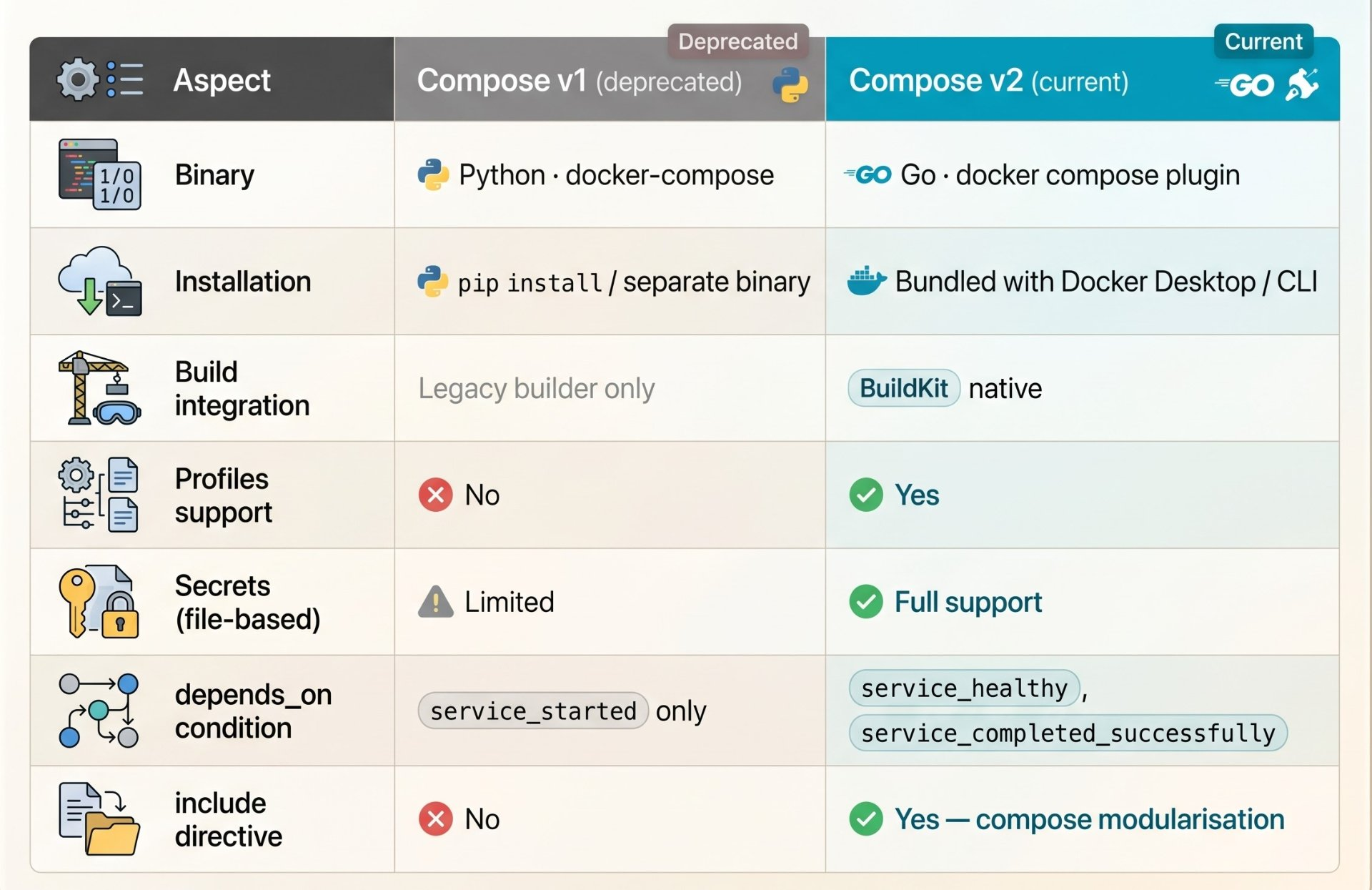
If you still call it docker-compose (with a hyphen), you are on Compose v1 a Python tool that has been deprecated since July 2023. Compose v2 is a Go binary, ships as a Docker CLI plugin, and is invoked as docker compose (no hyphen). The difference is not cosmetic.
Migration note
Replace every
docker-composecall in your scripts, Makefiles, and CI configs withdocker compose. The spec is mostly compatible but subtle behaviours differ, especially around networking and variable interpolation. Rundocker compose versionto confirm you are on v2.
Every top-level key in a compose file
A compose.yaml file (the canonical name — docker-compose.yml still works but is legacy) has six top-level keys. Most engineers only use two of them regularly.
name: myapp   # project name — scopes all resource names

services:    # the containers (required)
  api: ...
  db: ...
  cache: ...

networks:    # custom networks (optional — default created automatically)
  internal:
    driver: bridge
    internal: true

volumes:     # named volumes (optional)
  pgdata:
    driver: local

configs:     # non-secret config files mounted into services
  nginx_conf:
    file: ./nginx/nginx.conf

secrets:     # sensitive values — never in env vars
  db_password:
    file: ./secrets/db_password.txt

include:     # modularise — import other compose files
  - path: ./observability/compose.yaml
  - path: ./auth/compose.yaml
The service block — all the fields that matter
services:
  api:
    image: myapp/api:1.4.2          # pin — never use :latest in compose
    build:                          # OR build context (not both)
      context: .
      dockerfile: Dockerfile
      target: production             # multi-stage target
      args:
        BUILD_VERSION: "${APP_VERSION}"
    restart: unless-stopped         # on-failure:3 for prod, no for dev
    ports:
      - "127.0.0.1:8080:3000"       # bind to loopback — NOT 0.0.0.0
    environment:                    # non-sensitive config only
      NODE_ENV: production
      LOG_LEVEL: info
    env_file:                       # loads a .env file into the container
      - .env.production
    secrets:                        # mounted at /run/secrets/<name>
      - db_password
      - jwt_secret
    volumes:
      - type: bind
        source: ./config
        target: /app/config
        read_only: true             # always read_only for config mounts
      - type: volume
        source: uploads
        target: /app/uploads
    networks:
      - public
      - internal
    depends_on:                     # proper dependency with condition
      db:
        condition: service_healthy
      cache:
        condition: service_healthy
    healthcheck:
      test: ["CMD", "curl", "-f", "http://localhost:3000/health"]
      interval: 10s
      timeout: 5s
      retries: 5
      start_period: 30s             # grace period before first check
    deploy:                         # resource limits (Compose v2)
      resources:
        limits:
          cpus: '1.5'
          memory: 512M
        reservations:
          cpus: '0.25'
          memory: 128M
    logging:
      driver: json-file
      options:
        max-size: "10m"
max-file: "3"Service dependencies done right
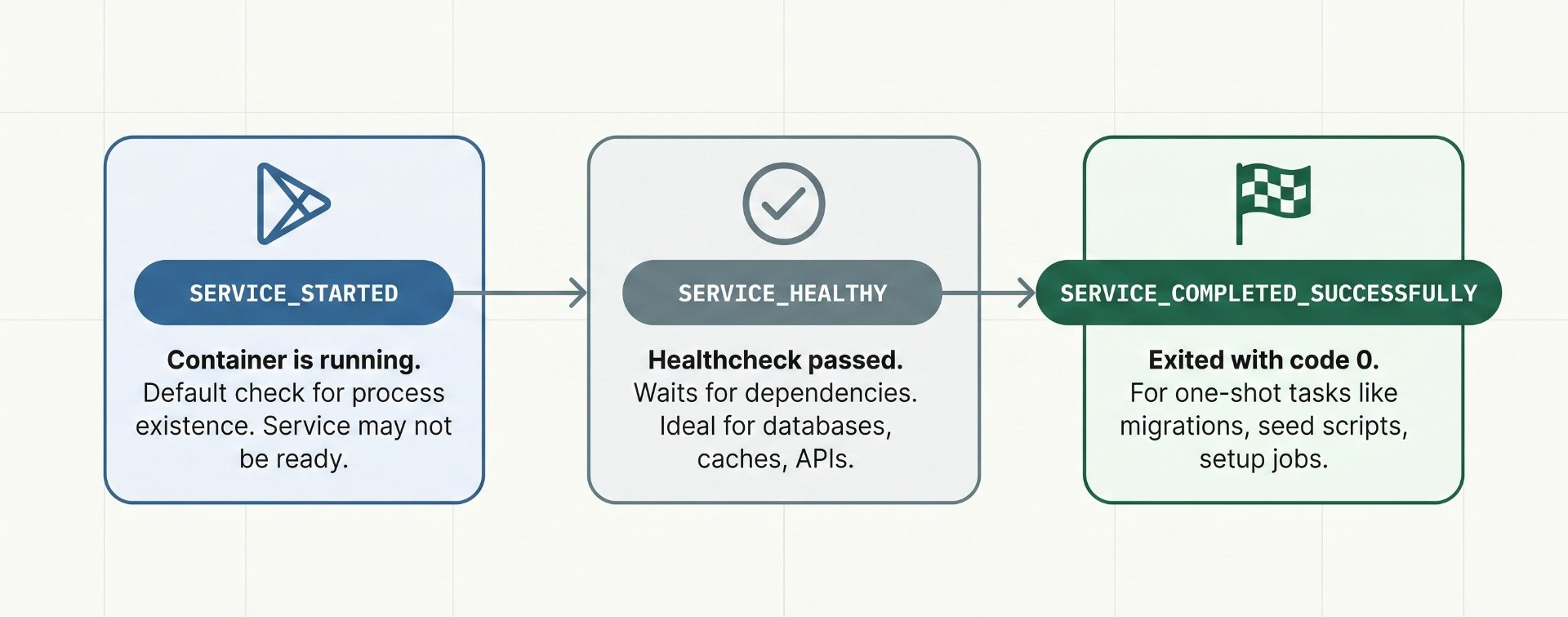
This is the most misunderstood part of Compose. depends_on with no condition only waits for the container to start, not for the service inside it to be ready. Your API starts, tries to connect to Postgres which hasn't finished initializing, and crashes. You've seen this. Everyone has seen this.
The analogy
Waiting for a container to start without a health check is like checking that a restaurant's front door is open and assuming the kitchen is ready to cook. The door being open just means the building exists. You need to wait for the chef to say "ready".
The fix is condition: service_healthy but that requires the dependency to have a healthcheck defined. The three conditions available in Compose v2:
services:

  db:
    image: postgres:16-alpine
    healthcheck:
      test: ["CMD-SHELL", "pg_isready -U postgres"]
      interval: 5s
      timeout: 3s
      retries: 10
      start_period: 10s

  migrate:                        # one-shot migration container
    image: myapp/api:1.4.2
    command: ["npm", "run", "db:migrate"]
    depends_on:
      db:
        condition: service_healthy   # wait for db to be truly ready
    restart: "no"                    # run once and exit

  api:
    image: myapp/api:1.4.2
    depends_on:
      db:
        condition: service_healthy
      migrate:
        condition: service_completed_successfully  # wait for migrations
      cache:
        condition: service_healthy
Health checks — per-service recipes
Every service that other services depend on must have a health check. Here are production-tested health check commands for the most common services:
# PostgreSQL
healthcheck:
  test: ["CMD-SHELL", "pg_isready -U ${POSTGRES_USER} -d ${POSTGRES_DB}"]
  interval: 5s
  timeout: 3s
  retries: 10
  start_period: 15s

# MySQL / MariaDB
healthcheck:
  test: ["CMD", "mysqladmin", "ping", "-h", "localhost", "-u", "root", "-p${MYSQL_ROOT_PASSWORD}"]
  interval: 5s
  timeout: 5s
  retries: 10

# Redis
healthcheck:
  test: ["CMD", "redis-cli", "ping"]
  interval: 5s
  timeout: 3s
  retries: 5

# Generic HTTP API
healthcheck:
  test: ["CMD", "curl", "-f", "-s", "http://localhost:3000/health"]
  interval: 10s
  timeout: 5s
  retries: 5
  start_period: 30s    # give app time to boot before first check

# RabbitMQ
healthcheck:
  test: ["CMD", "rabbitmq-diagnostics", "-q", "ping"]
  interval: 10s
  timeout: 10s
  retries: 5
  start_period: 30s

# Elasticsearch
healthcheck:
  test: ["CMD-SHELL", "curl -f http://localhost:9200/_cluster/health || exit 1"]
  interval: 15s
  timeout: 10s
  retries: 10
  start_period: 60s
The start_period field is critical
start_perioddefines a grace window after container start during which failed health checks do not count toward the retry limit. Without it, a slow-starting database might exhaust all retries before it's had a chance to initialize. Set it to at least the service's typical cold-start time.
Profiles — turn services on and off by context
Profiles let you tag services so they only start when explicitly activated. This solves the classic problem of having debug tools, mock services, seed scripts, and observability stacks in the same compose file but not wanting them all running in every context.
services:

  # Core services — always start (no profile tag)
  api:
    image: myapp/api:latest

  db:
    image: postgres:16-alpine

  # Dev-only: hot-reload, debug port, mock services
  mailhog:
    image: mailhog/mailhog
    profiles: [dev]
    ports: ["8025:8025"]    # web UI for catching emails

  seed:
    image: myapp/api:latest
    command: ["npm", "run", "db:seed"]
    profiles: [dev, test]
    restart: "no"

  # Observability stack — activate in staging/prod
  prometheus:
    image: prom/prometheus:latest
    profiles: [observability]

  grafana:
    image: grafana/grafana:latest
    profiles: [observability]

  # Debug tools — activate only when investigating issues
  pgadmin:
    image: dpage/pgadmin4
    profiles: [debug]
# Start only core services (no profiles)
docker compose up -d
# Start core + dev tools
docker compose --profile dev up -d
# Start core + dev + observability
docker compose --profile dev --profile observability up -d
# Use COMPOSE_PROFILES env var in CI
COMPOSE_PROFILES=test docker compose up -d
docker compose run seed
# Start a specific profile service without its deps
docker compose --profile debug up pgadmin -dOverride files — one codebase, many environments
The -f flag lets you layer compose files. Compose merges them deeply, the later file wins on conflicts. This pattern gives you a clean base definition that is overridden per-environment, without duplicating service definitions.
compose.yaml              # base — shared across all environments
compose.dev.yaml          # dev overrides — bind mounts, debug ports
compose.test.yaml         # test overrides — mock services, in-memory DBs
compose.prod.yaml         # prod overrides — resource limits, real secrets
services:
api:
image: myapp/api:${APP_VERSION:-latest}
environment:
NODE_ENV: production
networks: [internal]
db:
image: postgres:16-alpine
volumes:
- pgdata:/var/lib/postgresql/data
networks: [internal]
volumes:
pgdata:
networks:
internal:services:
api:
build: . # build locally instead of pulling
command: npm run dev # hot-reload dev server
volumes:
- .:/app # bind mount source for live reload
- /app/node_modules # anonymous vol to preserve container modules
environment:
NODE_ENV: development
DEBUG: "*"
ports:
- "3000:3000" # expose to host for browser
- "9229:9229" # Node.js debugger port
db:
ports:
- "5432:5432" # expose db for local tools (TablePlus etc)# Development
docker compose -f compose.yaml -f compose.dev.yaml up -d
# Compose auto-merges: compose.override.yaml is loaded automatically
# if it exists alongside compose.yaml — useful for local developer overrides
# Production
docker compose -f compose.yaml -f compose.prod.yaml up -d
# Preview the merged result without running it
docker compose -f compose.yaml -f compose.dev.yaml configSecrets in Compose — never use environment variables for sensitive values
Environment variables are visible in docker inspect, in process listings, in crash dumps, and in many logging systems. Compose has a proper secrets mechanism that mounts values as files into /run/secrets/ invisible to inspection, never written to image layers.
secrets:
  db_password:
    file: ./secrets/db_password.txt    # read from file on host
  jwt_secret:
    environment: JWT_SECRET            # read from host env var
  api_key:
    file: ./secrets/api_key.txt

services:
  api:
    image: myapp/api:latest
    secrets:
      - db_password                    # mounted at /run/secrets/db_password
      - jwt_secret                     # mounted at /run/secrets/jwt_secret
    environment:
      # Tell the app WHERE to read from — not the value itself
      DB_PASSWORD_FILE: /run/secrets/db_password
      JWT_SECRET_FILE: /run/secrets/jwt_secret

  db:
    image: postgres:16-alpine
    secrets:
      - db_password
    environment:
      # Postgres supports _FILE suffix natively
      POSTGRES_PASSWORD_FILE: /run/secrets/db_password
App-side: reading from files
Your application must be written to read secrets from files, not environment variables. In Node.js:
fs.readFileSync('/run/secrets/db_password', 'utf8').trim(). Most database clients accept a password file path. Postgres, MySQL, and Redis all have official_FILEsuffix support for their official Docker images.
Volumes & bind mounts — choosing the right type
services:
  app:
    volumes:

      # 1. Named volume — Docker manages location, survives container removal
      #    Best for: database data, persistent app state
      - type: volume
        source: pgdata
        target: /var/lib/postgresql/data

      # 2. Bind mount — maps a host path directly
      #    Best for: dev source code, config files
      - type: bind
        source: ./config/nginx.conf
        target: /etc/nginx/nginx.conf
        read_only: true              # always read_only for config

      # 3. tmpfs — in-memory, fastest, lost on restart
      #    Best for: session stores, temp files, test isolation
      - type: tmpfs
        target: /tmp
        tmpfs:
          size: 67108864             # 64 MB

volumes:
  pgdata:
    driver: local
    driver_opts:                   # NFS example for shared storage
      type: nfs
      o: addr=10.0.0.10,rw
device: ":/path/to/nfs/share"Networking internals — DNS, aliases, and isolation
Every Compose project gets a default network named {project}_default. Services on the same network reach each other by service name, Compose registers each service name as a DNS entry in Docker's embedded DNS resolver. This is how http://api:3000 works from inside another container without any host configuration.
networks:
  frontend:                          # internet-facing tier
    driver: bridge
  backend:                           # internal app tier
    driver: bridge
  data:                              # database tier — no egress
    driver: bridge
    internal: true                   # blocks outbound internet

services:
  nginx:
    networks: [frontend]             # only on frontend
    ports: ["80:80", "443:443"]

  api:
    networks: [frontend, backend]    # bridges frontend and backend
    networks:
      backend:
        aliases: [app, application]  # reachable by multiple DNS names

  worker:
    networks: [backend]             # only internal, no frontend exposure

  db:
    networks: [data]                # isolated — only api and worker can reach it
# No 'ports' — never exposed to host or internetProduction-grade Compose patterns
The YAML anchor pattern — DRY service definitions
# Define reusable blocks with anchors (&) and aliases (*)
x-common-env: &common-env
  NODE_ENV: production
  LOG_FORMAT: json
  TZ: UTC

x-common-deploy: &common-deploy
  resources:
    limits:
      cpus: '1.0'
      memory: 512M

x-common-logging: &common-logging
  driver: json-file
  options:
    max-size: "10m"
    max-file: "5"

services:
  api:
    environment:
      <<: *common-env             # merge the anchor
      PORT: "3000"               # add service-specific keys
    deploy: *common-deploy
    logging: *common-logging

  worker:
    environment:
      <<: *common-env
      QUEUE_CONCURRENCY: "5"
    deploy: *common-deploy
    logging: *common-logging
Essential Compose CLI commands for production ops
# Rolling update for a single service without downtime
docker compose up -d --no-deps --build api

# Scale a service horizontally
docker compose up -d --scale worker=5

# View merged config (debug overrides and variable substitution)
docker compose config

# Tail logs from multiple services simultaneously
docker compose logs -f api worker --since 1h

# Run a one-off command in a service's environment
docker compose run --rm api npm run db:migrate

# Execute a command in a running service
docker compose exec api sh

# Show running services and their health status
docker compose ps

# Pull all updated images without restarting
docker compose pull

# Restart only unhealthy services
docker compose ps --status=unhealthy -q | xargs docker compose restart

# Remove everything including volumes (DESTRUCTIVE — data loss)
docker compose down --volumes --remove-orphans
The include directive — composing Compose files
For large stacks, use
include:to split your compose file into domain-specific modules. Each team owns their services file, and a rootcompose.yamlassembles them. This is far cleaner than a single 400-line compose file and it means the auth team can update their services without touching the payments team's config.
name: platform

include:
  - path: ./services/api/compose.yaml
    env_file: ./services/api/.env
  - path: ./services/auth/compose.yaml
  - path: ./services/payments/compose.yaml
  - path: ./infra/compose.yaml      # db, cache, queue
  - path: ./observability/compose.yaml
profiles: [observability]Author's Note
Chamath P.
DevOps Engineer
DevOps Engineer writing practical guides on Kubernetes, CI/CD, IaC, and SRE — based on real production experience.
This article was written with AI assistance. All technical claims and code examples have been personally verified before publishing.
Advertisements