Docker in CI/CD — The Right Way
Most CI pipelines build Docker images slowly, insecurely, and without reproducibility. This article covers every layer of getting it right.

Advertisements
The anatomy of a correct CI pipeline
Most Docker CI pipelines do two things: build an image and push it. That is the wrong scope. A production-grade pipeline has five concerns, in this order:
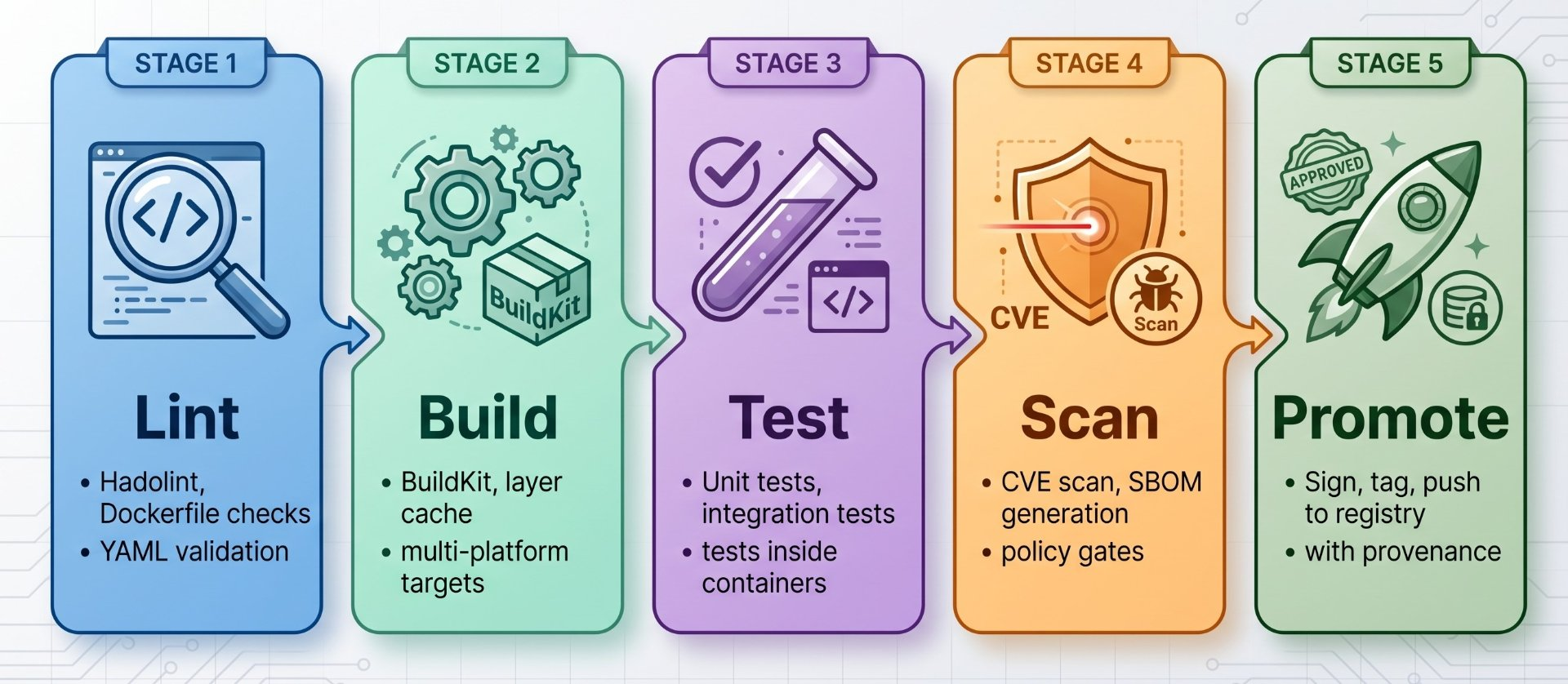
The order is deliberate. Each gate must pass before the next stage runs. An image that fails a CVE scan must never reach the registry. An image that fails tests must never be scanned. An image whose Dockerfile has a critical misconfiguration must never be built. Fail fast, fail early, fail loudly.
The assembly line analogy
A car factory has an assembly line where each station checks the work of the previous one before adding its own. If the chassis has a defect, the line stops, you do not continue installing the engine, upholstery, and paint on top of a bad frame. A CI/CD pipeline is the same: each stage gates the next. The goal is not to build fast it is to fail as early and cheaply as possible, so defects never reach production where they cost ten times as much to fix.
BuildKit — the only build engine to use in CI
BuildKit is Docker's next-generation build engine, enabled by default since Docker 23. In CI, it is not optional; it is the foundation of everything: parallel stage execution, cache mounts, inline secrets, multi-platform builds, and reproducible outputs. If your CI pipeline uses the legacy builder, you are leaving speed, security, and correctness on the table.
What BuildKit gives you that the legacy builder cannot
Parallel build stages (independent stages run simultaneously), cache mounts that persist between builds without polluting image layers, --mount=type=secret for build-time secrets that never appear in layer history, SSH agent forwarding for private repos, inline cache embedding, multi-platform manifests with docker buildx, and deterministic layer ordering for reproducible builds.
# BuildKit is the default in Docker 23+ — verify
docker buildx version
github.com/docker/buildx v0.17.1 ...

# For older Docker versions, enable explicitly
export DOCKER_BUILDKIT=1

# Create a builder instance (required for multi-platform builds)
docker buildx create \
  --name ci-builder \
  --driver docker-container \
  --driver-opt network=host \
  --bootstrap \
  --use

# Verify builder is active and what platforms it supports
docker buildx inspect --bootstrap
Name:   ci-builder
Driver: docker-container
Platforms: linux/amd64, linux/arm64, linux/arm/v7

# Build with BuildKit — the --load flag loads into local Docker daemon
docker buildx build \
  --file Dockerfile \
  --tag myapp:latest \
  --load \
  .

# Build AND push directly to registry (no local load needed)
docker buildx build \
  --tag registry.example.com/myapp:latest \
  --push \
.Layer cache strategies in CI — from slow to fast
The single biggest lever on CI build speed is caching. A cold build that takes 8 minutes can become a warm build of 45 seconds with the right cache strategy. The right strategy depends on where you store the cache and there are four fundamentally different options.
Cache strategy 1 — inline cache (simple, limited)
Inline cache embeds cache metadata directly into the pushed image. The next build pulls the image and reuses its layers. Simple to set up, but only works as long as the tagged image is available and doesn't survive tag promotion well.
# Build with inline cache embedded in the image
docker buildx build \
  --cache-from type=registry,ref=registry.io/myapp:cache \
  --cache-to   type=registry,ref=registry.io/myapp:cache,mode=max \
  --tag registry.io/myapp:latest \
  --push \
  .

# mode=max caches ALL intermediate layers, not just the final stage
# mode=min (default) only caches the final exported layers
# Always use mode=max in CI for maximum cache reuse
Cache strategy 2 — registry cache (recommended for most teams)
A dedicated cache image in your registry, separate from your production image. Survives image promotion, tag changes, and multi-branch workflows. This is the right default for most teams.
# Cache key: registry + branch name
# Each branch gets its own cache — main branch cache stays clean
BRANCH=$(echo $CI_COMMIT_BRANCH | tr '/' '-')
CACHE_REF="registry.io/myapp/cache:${BRANCH}"

docker buildx build \
  --cache-from type=registry,ref=${CACHE_REF} \
  --cache-from type=registry,ref=registry.io/myapp/cache:main \
  --cache-to   type=registry,ref=${CACHE_REF},mode=max \
  --tag registry.io/myapp:${GIT_SHA} \
  --push \
  .

# --cache-from can list MULTIPLE sources
# Order matters: first match wins
# Branch cache first, then fall back to main branch cache
# This ensures PRs benefit from main's warm cache on first run
Cache strategy 3 — GitHub Actions cache (best for GitHub)
BuildKit can use GitHub Actions' native cache storage directly. This is the fastest option for GitHub-hosted runners because the cache is stored in GitHub's infrastructure, co-located with the runner.
# In your GitHub Actions workflow:
- name: Build with GitHub Actions cache
  uses: docker/build-push-action@v6
  with:
    context: .
    push: true
    tags: ghcr.io/myorg/myapp:latest
    cache-from: type=gha             # read from GHA cache
    cache-to: type=gha,mode=max    # write to GHA cache

# This uses GitHub's Actions Cache API under the hood
# No registry credentials needed for the cache itself
# Cache is automatically scoped to branch + Dockerfile content hash
# Evicted after 7 days of inactivity (GitHub's cache retention policy)
Cache strategy 4 — cache mounts (fastest for dependencies)
BuildKit cache mounts let package manager caches persist between builds without entering image layers at all. This is the fastest cache for dependency-heavy builds and works on any runner with a persistent volume.
# syntax=docker/dockerfile:1.6
FROM node:20-alpine AS builder
WORKDIR /app
COPY package.json package-lock.json ./

# --mount=type=cache: npm cache persists between builds
# It is NEVER included in the image layer
# On a warm runner, npm ci completes in ~8 seconds instead of ~90 seconds
RUN --mount=type=cache,target=/root/.npm,id=npm-cache \
    npm ci --prefer-offline

COPY . .
RUN --mount=type=cache,target=/root/.npm,id=npm-cache \
    npm run build

# Same pattern for other package managers:
# Go:  --mount=type=cache,target=/go/pkg/mod
#      --mount=type=cache,target=/root/.cache/go-build
# pip: --mount=type=cache,target=/root/.cache/pip
# Maven: --mount=type=cache,target=/root/.m2
# Gradle: --mount=type=cache,target=/root/.gradle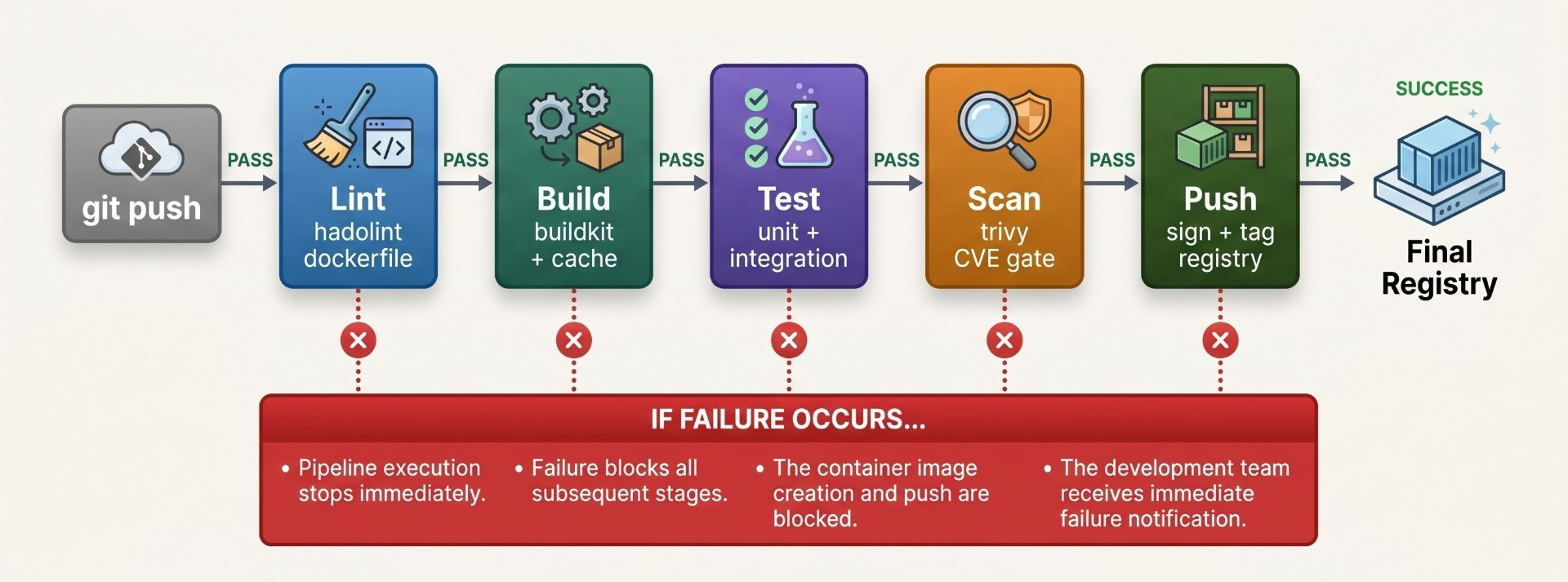
Never mount the Docker socket in CI
This is the most critical security mistake in CI pipelines. Mounting /var/run/docker.sock into a CI runner container gives that container unlimited control over the host's Docker daemon and therefore the host itself. Any job that runs inside that runner, including one triggered by a malicious pull request, can escape and own the machine.
The socket is root on the host
A container with access to /var/run/docker.sock can run docker run --privileged -v /:/host alpine chroot /host and gain root on the host in under five seconds. In shared CI environments where multiple teams' pipelines run on the same runners, this is a cross-tenant privilege escalation. Never mount the socket. Full stop.
The alternatives depend on what you need to do in CI:
# ── Option 1: Kaniko — builds without any daemon ─────────────
# Kaniko runs as a container, builds from Dockerfile,
# pushes to registry. No daemon. No socket. No root.
# Used by Google Cloud Build, many Kubernetes CI setups
# In a Kubernetes CI pod spec:
# containers:
#   - name: kaniko
#     image: gcr.io/kaniko-project/executor:latest
#     args: ["--dockerfile=Dockerfile",
#             "--context=git://github.com/org/repo",
#             "--destination=registry.io/myapp:latest"]

# ── Option 2: Buildah — rootless, no daemon ──────────────────
# Buildah builds OCI images without any daemon
# Works inside a rootless container in Kubernetes
buildah bud \
  --file Dockerfile \
  --tag registry.io/myapp:latest \
  .
buildah push registry.io/myapp:latest

# ── Option 3: Docker-in-Docker (DinD) — isolated daemon ──────
# Runs a separate Docker daemon inside the CI container
# More secure than socket mounting — isolation is at daemon level
# But the inner daemon still runs as root — use with caution
# GitLab CI example (see Section 11 for full pipeline)
# services:
#   - name: docker:dind
#     command: ["--tls=false"]

# ── Option 4: Buildx with remote builder ─────────────────────
# Point buildx at a remote builder daemon
# The build happens on a dedicated build server, not the runner
docker buildx create \
  --name remote-builder \
  --driver remote \
tcp://build-server:1234Image tagging strategies — immutability is the goal
Tags are mutable by default. :latest today is different from :latest tomorrow. In a CI/CD system, mutable tags cause non-reproducible deployments: two identical pipeline runs can deploy different images if someone pushed a new :latest between them.
The golden rule: tag with the Git SHA
The Git commit SHA is immutable, unique, and directly traceable to source code. Every image built in CI must be tagged with its full or short SHA. This creates a permanent, auditable link: given any running image, you can identify exactly which commit produced it, run the same pipeline again to reproduce it, and diff it against any other version.
# ── Primary tag: full Git SHA (immutable, always unique) ──────
SHA=$(git rev-parse HEAD)
SHORT_SHA=$(git rev-parse --short HEAD)

# Full SHA: registry.io/myapp:a3f8b2c9d1e4f7a0b5c8d2e1f3a4b5c6d7e8f9a0
# Short SHA: registry.io/myapp:a3f8b2c — readable, still unique enough

# ── Secondary tags: human-readable aliases ────────────────────
# Branch name (mutable — points to latest build of this branch)
BRANCH=$(git rev-parse --abbrev-ref HEAD | tr '/' '-')
# registry.io/myapp:main
# registry.io/myapp:feature-auth-service

# Semantic version tag (for release builds only)
# registry.io/myapp:v2.4.1
# registry.io/myapp:v2.4   ← floating minor version
# registry.io/myapp:v2     ← floating major version

# ── Build all tags simultaneously with --tag ──────────────────
docker buildx build \
  --tag registry.io/myapp:${SHORT_SHA} \
  --tag registry.io/myapp:${BRANCH} \
  --tag registry.io/myapp:latest \
  --push \
  .

# ── OCI labels: bake provenance into the image itself ─────────
docker buildx build \
  --label org.opencontainers.image.created="$(date -u +%Y-%m-%dT%H:%M:%SZ)" \
  --label org.opencontainers.image.revision="${SHA}" \
  --label org.opencontainers.image.source="https://github.com/org/repo" \
  --label org.opencontainers.image.version="${SHORT_SHA}" \
  --tag registry.io/myapp:${SHORT_SHA} \
  --push \
.Multi-platform builds — amd64 and arm64 from one pipeline
With Apple Silicon Macs ubiquitous in development teams and AWS Graviton / Ampere instances popular in production, building for both linux/amd64 and linux/arm64 is now standard practice. BuildKit's buildx handles this with QEMU emulation one command produces a multi-platform manifest that Docker automatically selects the right image from on pull.
# Set up QEMU for cross-architecture emulation
docker run --privileged --rm tonistiigi/binfmt --install all

# Create a multi-platform builder
docker buildx create \
  --name multiplatform \
  --driver docker-container \
  --platform linux/amd64,linux/arm64 \
  --use

# Build for both platforms in one command
# Produces a manifest list — Docker picks the right one on pull
docker buildx build \
  --platform linux/amd64,linux/arm64 \
  --tag registry.io/myapp:latest \
  --push \
  .

# Verify the manifest contains both architectures
docker buildx imagetools inspect registry.io/myapp:latest
Name: registry.io/myapp:latest
MediaType: application/vnd.oci.image.index.v1+json
Manifests:
  linux/amd64   sha256:abc123...   62.1MB
  linux/arm64   sha256:def456...   58.4MB

# In GitHub Actions — the build-push-action handles this natively
# platforms: linux/amd64,linux/arm64
# (see the full pipeline in Section 10)
QEMU vs native builders — performance
QEMU emulation is convenient but slow. Building an arm64 image on amd64 via QEMU can be 10-20x slower than building natively. For large projects, use a native ARM builder node in a buildx multi-node setup. GitHub Actions provides native ARM runners (ubuntu-latest-arm64) as of 2024. This brings arm64 build time from 15 minutes to under 2 minutes for typical applications.
Image scanning gates — blocking on CVEs
Vulnerability scanning must be a blocking gate in CI not a notification. An image with a CRITICAL CVE that only generates a Slack alert will eventually reach production. An image that fails --exit-code 1 on a CRITICAL CVE will never be pushed. The distinction matters enormously in practice.
# ── Basic scan — informational ────────────────────────────────
trivy image --severity HIGH,CRITICAL myapp:latest

# ── CI gate — fails the pipeline on CRITICAL CVEs ────────────
trivy image \
  --exit-code 1 \           # non-zero exit = pipeline fails
  --severity CRITICAL \     # only block on CRITICAL (adjust as needed)
  --ignore-unfixed \        # skip CVEs with no available fix
  --no-progress \           # cleaner CI log output
  myapp:latest

# ── Generate an SBOM (Software Bill of Materials) ────────────
# SPDX format — widely accepted by compliance teams
trivy image \
  --format spdx-json \
  --output sbom.spdx.json \
  myapp:latest

# CycloneDX format — popular with security tools
trivy image \
  --format cyclonedx \
  --output sbom.cdx.json \
  myapp:latest

# ── Scan the Dockerfile BEFORE building ──────────────────────
# Catches misconfigurations at source — cheaper than scanning images
trivy config \
  --exit-code 1 \
  --severity HIGH,CRITICAL \
  ./Dockerfile

# ── Lint Dockerfile with Hadolint ─────────────────────────────
hadolint \
  --failure-threshold warning \
  --format json \
  Dockerfile
Managing false positives with .trivyignore
Not every CRITICAL CVE is exploitable in your context. Use a .trivyignore file to suppress specific CVEs with documented justification. Include the CVE ID, the justification reason, and an expiry date. This prevents the ignore list from becoming a permanent dumping ground and forces periodic review of suppressed findings.
# CVE ID       Justification                                     Review by
CVE-2023-44487  # HTTP/2 Rapid Reset — not exploitable, no HTTP server  2024-06-01
CVE-2024-12345  # OpenSSL — fixed in next base image update              2024-03-15

# Always document: which CVE, why it is acceptable, when to re-review
# Undocumented ignores are a compliance and security audit failureImage signing with Cosign — provenance you can verify
Signing an image creates a cryptographic proof that it was built by a specific identity (your CI pipeline) at a specific time from a specific commit. This closes a critical supply chain gap: without signing, anyone with push access to your registry could swap an image and you would have no way to detect it at deploy time.
# ── Generate a signing key pair (one time, store key as CI secret) ─
cosign generate-key-pair
Private key written to cosign.key
Public key written to cosign.pub
# Store cosign.key as a CI secret (COSIGN_PRIVATE_KEY)
# Commit cosign.pub to the repository — used for verification

# ── Sign an image after pushing (in CI) ──────────────────────
cosign sign \
  --key env://COSIGN_PRIVATE_KEY \
  registry.io/myapp:${SHA}
# The signature is stored as an OCI artifact in the registry
# alongside the image — no external storage needed

# ── Keyless signing with OIDC (GitHub Actions) ───────────────
# No private key needed — identity is proved by the OIDC token
# The signature is tied to the GitHub Actions workflow identity
cosign sign \
  --yes \                              # consent to Sigstore transparency log
  registry.io/myapp:${SHA}
# Signature includes: repo, branch, commit, workflow name
# Verification proves who built it AND when

# ── Verify before deploying ───────────────────────────────────
cosign verify \
  --key cosign.pub \
  registry.io/myapp:${SHA}

# Keyless verification — check identity from OIDC
cosign verify \
  --certificate-identity-regexp "https://github.com/myorg/myrepo" \
  --certificate-oidc-issuer "https://token.actions.githubusercontent.com" \
  registry.io/myapp:${SHA}

# ── Attach SBOM to image (keep provenance together) ──────────
cosign attach sbom \
  --sbom sbom.spdx.json \
  --type spdx \
registry.io/myapp:${SHA}Image promotion workflows — build once, deploy everywhere
The worst CI/CD pattern is rebuilding the same image for each environment: build for dev, rebuild for staging, rebuild for production. Each rebuild is a different image even from the same commit, subtle differences in base image availability, dependency resolution, or build environment can cause the prod image to differ from the image that passed testing. This is how "it worked in staging" bugs happen.
The assembly stamp analogy
A car leaves the factory floor fully assembled, stamped with a serial number. It goes to a dealership lot (staging), is test-driven and inspected, and then sold to a customer (production). The customer receives the exact same car that was inspected not a freshly assembled copy of the car built to the same spec. Image promotion is identical: build once, stamp with a SHA, test that exact image, and promote it through environments by re-tagging never rebuilding.
# ── The promotion model ──────────────────────────────────────
# CI builds ONCE and tags with SHA → pushed to staging registry
# After passing staging tests → promote (re-tag) to prod registry
# The SHA never changes — same image, different tags

# ── Promote with Skopeo (copies without pulling to disk) ──────
SHA=a3f8b2c

# Copy from staging to production registry (no rebuild)
skopeo copy \
  docker://staging-registry.io/myapp:${SHA} \
  docker://prod-registry.io/myapp:${SHA}

# Also add the :latest tag in prod
skopeo copy \
  docker://prod-registry.io/myapp:${SHA} \
  docker://prod-registry.io/myapp:latest

# ── Re-tag using Docker (if Skopeo unavailable) ───────────────
docker pull staging-registry.io/myapp:${SHA}
docker tag  staging-registry.io/myapp:${SHA} prod-registry.io/myapp:${SHA}
docker tag  staging-registry.io/myapp:${SHA} prod-registry.io/myapp:latest
docker push prod-registry.io/myapp:${SHA}
docker push prod-registry.io/myapp:latest

# ── Verify digest matches (prove no tampering) ────────────────
STAGING_DIGEST=$(skopeo inspect \
  docker://staging-registry.io/myapp:${SHA} \
  | jq -r '.Digest')

PROD_DIGEST=$(skopeo inspect \
  docker://prod-registry.io/myapp:${SHA} \
  | jq -r '.Digest')

[ "$STAGING_DIGEST" = "$PROD_DIGEST" ] && \
  echo "Promotion verified — same image" || \
echo "MISMATCH — images differ, promotion failed"GitHub Actions — the complete production pipeline
name: Docker build and push

on:
  push:
    branches: [main, develop]
    tags: ['v*']
  pull_request:
    branches: [main]

env:
  REGISTRY: ghcr.io
  IMAGE_NAME: ${{ github.repository }}

jobs:
  lint:
    name: Lint Dockerfile
    runs-on: ubuntu-latest
    steps:
      - uses: actions/checkout@v4

      - name: Lint with Hadolint
        uses: hadolint/[email protected]
        with:
          dockerfile: Dockerfile
          failure-threshold: warning

  build-test-scan:
    name: Build, test and scan
    runs-on: ubuntu-latest
    needs: lint
    permissions:
      contents: read
      packages: write
      id-token: write    # required for keyless cosign signing
      security-events: write  # for SARIF upload to GitHub Security

    steps:
      - uses: actions/checkout@v4

      # Set up QEMU for multi-platform emulation
      - name: Set up QEMU
        uses: docker/setup-qemu-action@v3

      # Set up BuildKit via buildx
      - name: Set up Docker Buildx
        uses: docker/setup-buildx-action@v3

      # Authenticate to GitHub Container Registry
      - name: Log in to GHCR
        if: github.event_name != 'pull_request'
        uses: docker/login-action@v3
        with:
          registry: ghcr.io
          username: ${{ github.actor }}
          password: ${{ secrets.GITHUB_TOKEN }}

      # Compute image tags and labels from git context
      - name: Extract metadata
        id: meta
        uses: docker/metadata-action@v5
        with:
          images: ${{ env.REGISTRY }}/${{ env.IMAGE_NAME }}
          tags: |
            type=sha,format=short
            type=ref,event=branch
            type=semver,pattern={{version}}
            type=semver,pattern={{major}}.{{minor}}
            type=raw,value=latest,enable={{is_default_branch}}

      # Build — load locally for testing, don't push yet
      - name: Build image for testing
        uses: docker/build-push-action@v6
        with:
          context: .
          platforms: linux/amd64      # amd64 only for test stage (faster)
          load: true                  # load into local daemon for testing
          push: false
          tags: myapp:test
          cache-from: type=gha
          cache-to: type=gha,mode=max

      # Run tests inside the built image
      - name: Run tests
        run: |
          docker run --rm myapp:test npm run test:ci

      # Scan for vulnerabilities — blocks on CRITICAL
      - name: Scan with Trivy
        uses: aquasecurity/trivy-action@master
        with:
          image-ref: myapp:test
          format: sarif
          output: trivy-results.sarif
          exit-code: 1
          severity: CRITICAL
          ignore-unfixed: true

      # Upload scan results to GitHub Security tab
      - name: Upload Trivy results
        if: always()
        uses: github/codeql-action/upload-sarif@v3
        with:
          sarif_file: trivy-results.sarif

      # Multi-platform build and push (only on non-PR events)
      - name: Build and push multi-platform image
        if: github.event_name != 'pull_request'
        id: push
        uses: docker/build-push-action@v6
        with:
          context: .
          platforms: linux/amd64,linux/arm64
          push: true
          tags: ${{ steps.meta.outputs.tags }}
          labels: ${{ steps.meta.outputs.labels }}
          cache-from: type=gha
          cache-to: type=gha,mode=max
          provenance: true   # attach SLSA provenance attestation
          sbom: true        # attach SBOM as OCI artifact

      # Keyless sign with Cosign (OIDC — no keys to manage)
      - name: Install Cosign
        if: github.event_name != 'pull_request'
        uses: sigstore/cosign-installer@v3

      - name: Sign the image
        if: github.event_name != 'pull_request'
        run: |
          cosign sign --yes \
${{ env.REGISTRY }}/${{ env.IMAGE_NAME }}@${{ steps.push.outputs.digest }}GitLab CI — the complete production pipeline
stages:
  - lint
  - build
  - test
  - scan
  - push

variables:
  REGISTRY: $CI_REGISTRY
  IMAGE_TAG: $CI_REGISTRY_IMAGE:$CI_COMMIT_SHORT_SHA
  DOCKER_TLS_CERTDIR: ""    # disable TLS for DinD service

# ── Stage 1: Lint ─────────────────────────────────────────────
lint:dockerfile:
  stage: lint
  image: hadolint/hadolint:latest-debian
  script:
    - hadolint --failure-threshold warning Dockerfile

# ── Stage 2: Build ────────────────────────────────────────────
build:image:
  stage: build
  image: docker:26
  services:
    - name: docker:26-dind    # Docker-in-Docker — isolated daemon
      alias: docker
      command: ["--tls=false"]
  before_script:
    - docker login -u $CI_REGISTRY_USER -p $CI_REGISTRY_PASSWORD $CI_REGISTRY
  script:
    - |
      docker buildx create --use --driver docker-container --bootstrap
      docker buildx build \
        --platform linux/amd64,linux/arm64 \
        --cache-from type=registry,ref=$CI_REGISTRY_IMAGE:cache-$CI_COMMIT_REF_SLUG \
        --cache-from type=registry,ref=$CI_REGISTRY_IMAGE:cache-main \
        --cache-to   type=registry,ref=$CI_REGISTRY_IMAGE:cache-$CI_COMMIT_REF_SLUG,mode=max \
        --tag $IMAGE_TAG \
        --output type=image,push=true \
        .

# ── Stage 3: Test ─────────────────────────────────────────────
test:unit:
  stage: test
  image: $IMAGE_TAG    # run tests INSIDE the built image
  script:
    - npm run test:ci
  coverage: '/Lines\s*:\s*(\d+\.?\d*%)/'
  artifacts:
    reports:
      coverage_report:
        coverage_format: cobertura
        path: coverage/cobertura-coverage.xml

# ── Stage 4: Scan ─────────────────────────────────────────────
scan:trivy:
  stage: scan
  image: aquasec/trivy:latest
  script:
    - "trivy image --exit-code 1 --severity CRITICAL --ignore-unfixed $IMAGE_TAG"
    - "trivy image --format spdx-json --output sbom.spdx.json $IMAGE_TAG"
  artifacts:
    when: always
    paths: [sbom.spdx.json]
    expire_in: 90 days

# ── Stage 5: Push with semantic version tag ───────────────────
push:production:
  stage: push
  image: docker:26
  services:
    - name: docker:26-dind
      alias: docker
  rules:
    - if: $CI_COMMIT_TAG   # only on version tags (v1.2.3)
  before_script:
    - docker login -u $CI_REGISTRY_USER -p $CI_REGISTRY_PASSWORD $CI_REGISTRY
  script:
    - |
      docker pull $IMAGE_TAG
      docker tag $IMAGE_TAG $CI_REGISTRY_IMAGE:$CI_COMMIT_TAG
      docker tag $IMAGE_TAG $CI_REGISTRY_IMAGE:latest
      docker push $CI_REGISTRY_IMAGE:$CI_COMMIT_TAG
docker push $CI_REGISTRY_IMAGE:latestSelf-hosted runners — persistent cache, faster builds
GitHub-hosted and GitLab shared runners are ephemeral they start clean, build your image from scratch (hitting the cache API), and disappear. For large images or high build frequency, the network round-trip to the cache API becomes the bottleneck. Self-hosted runners keep a persistent build cache locally, making warm builds dramatically faster.
# On a self-hosted runner, use a local cache directory
# The cache persists between pipeline runs — no network needed
docker buildx build \
  --cache-from type=local,src=/var/cache/buildkit/myapp \
  --cache-to   type=local,dest=/var/cache/buildkit/myapp,mode=max \
  --tag registry.io/myapp:$SHA \
  --push \
  .

# Prune the cache periodically to prevent disk growth
# Add this as a scheduled CI job or a cron task on the runner
docker buildx prune \
  --keep-storage 20gb \   # keep up to 20 GB
  --filter until=168h \   # remove cache older than 7 days
  --force

# ── Dedicated build server with remote buildx ────────────────
# For teams with many runners sharing one build server

# On the build server: expose buildkitd
docker run -d \
  --name buildkitd \
  --privileged \
  -p 1234:1234 \
  moby/buildkit:latest \
  --addr tcp://0.0.0.0:1234

# On each runner: point buildx at the shared build server
docker buildx create \
  --name shared-builder \
  --driver remote \
  tcp://build-server-ip:1234 \
  --use

# Now all runners share one build cache and one build process
# Two runners building the same image simultaneously deduplicate work
Author's Note
Chamath P.
DevOps Engineer
DevOps Engineer writing practical guides on Kubernetes, CI/CD, IaC, and SRE — based on real production experience.
This article was written with AI assistance. All technical claims and code examples have been personally verified before publishing.
Advertisements