Docker Networking Deep Dive
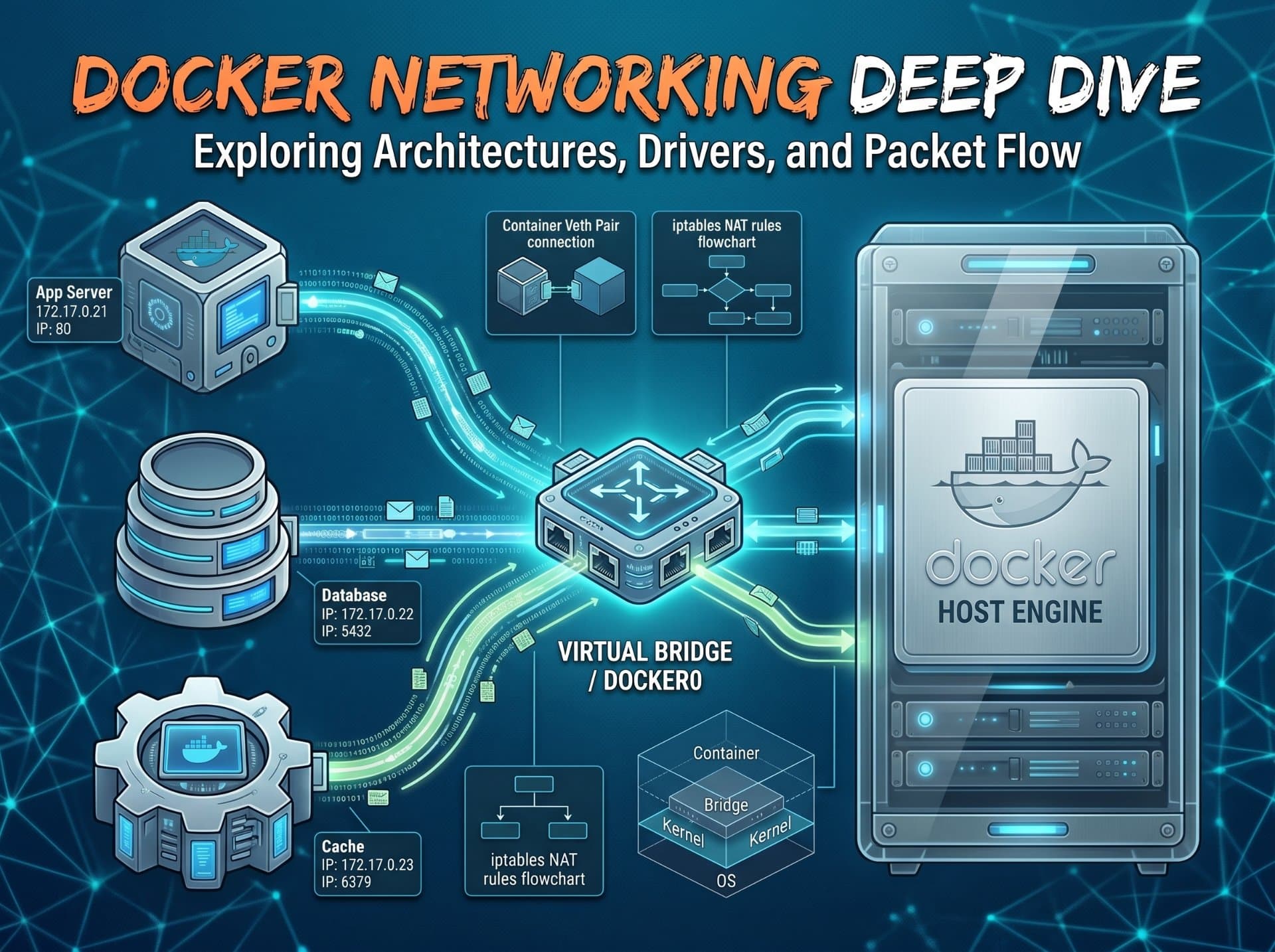
Networking is the part of Docker most engineers treat as magic until something breaks at 2am and they have no mental model to debug with. This article builds that model from scratch: every driver, every primitive, every packet path all with diagrams.

Advertisements
How Docker networking actually works
Docker networking is not a Docker-specific technology. It is built entirely from Linux kernel primitives that have existed for years: network namespaces, virtual ethernet pairs, bridge devices, iptables rules, and the kernel's routing table. Docker's contribution is automating the creation and wiring of these primitives when you run a container.
The mental model is this: every container lives in its own network namespace, a private network stack with its own interfaces, routing table, and port space. The challenge is connecting that private stack to the outside world, and to other containers. Docker solves this differently depending on the network driver you choose.
The city infrastructure analogy
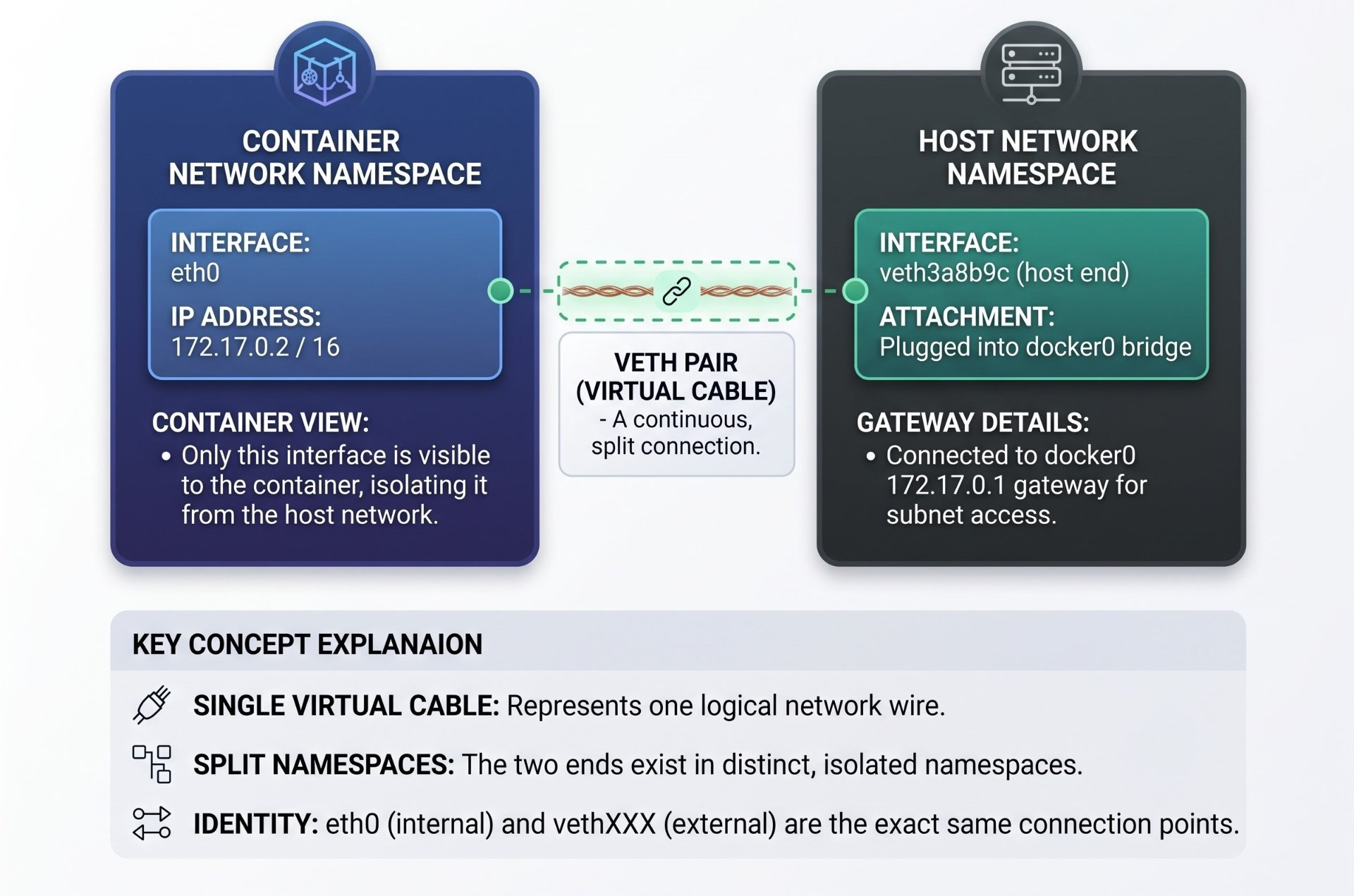
Think of Docker networking like city infrastructure. Each container is a building with its own internal wiring. The network driver is the type of road connecting that building to others. A bridge network is a local neighbourhood street, buildings connect to each other through a shared local exchange. Host networking is a building with no walls it sits directly on the main highway. Overlay networking is an underground tunnel system connecting buildings across different city districts. Macvlan gives a building its own unique street address on the main road, indistinguishable from any other building on that road.
veth pairs — the virtual cable at the heart of everything
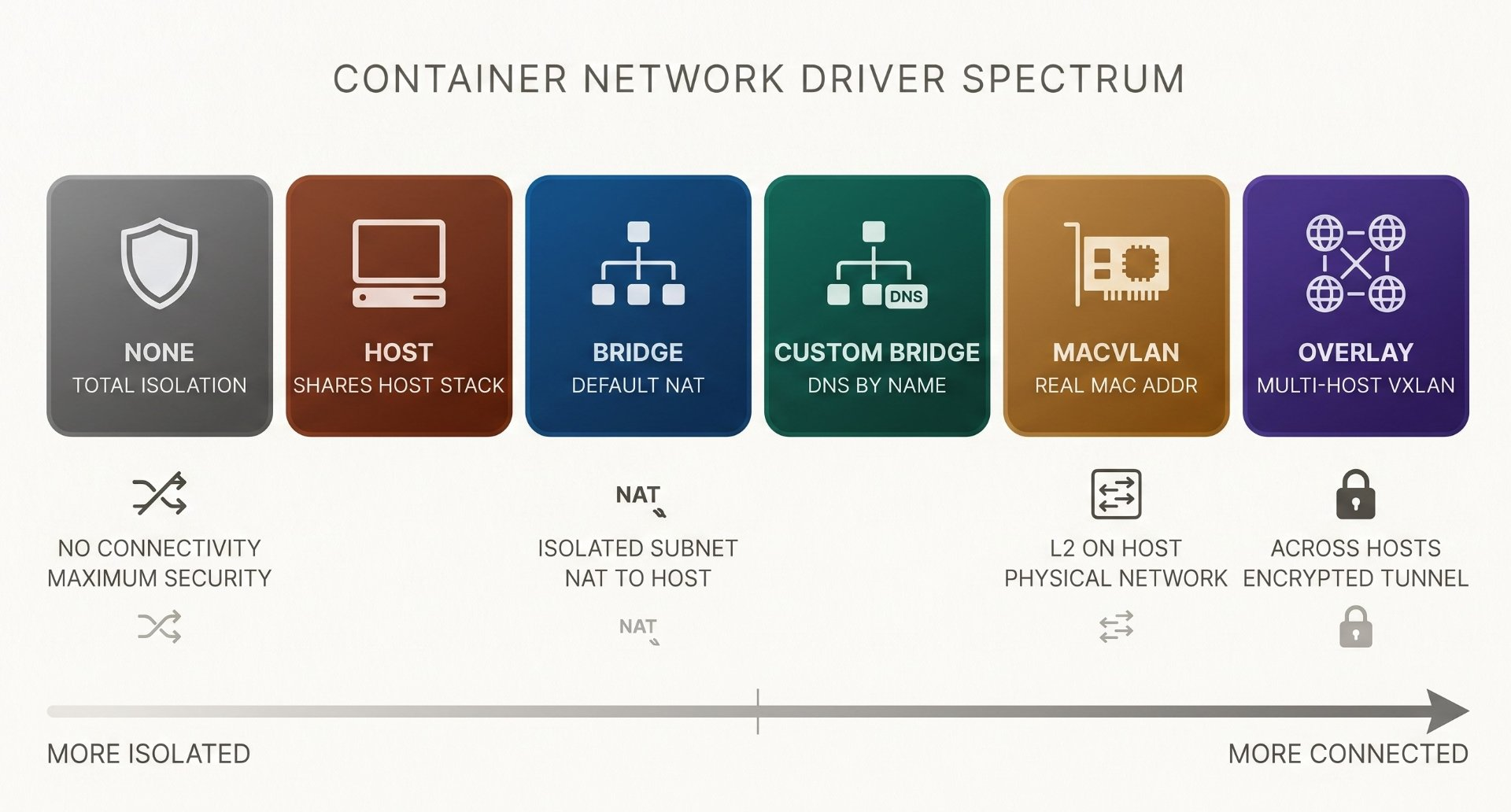
Before understanding any network driver, you must understand the virtual ethernet pair veth. A veth pair is a virtual cable with two ends. What goes into one end comes out the other, just like a real ethernet cable. The key difference: both ends are software kernel objects and each end can live in a different network namespace.
This is how Docker connects a container to the host: one end of the veth pair goes into the container's network namespace (where it appears as eth0), and the other end stays on the host (where it appears as a random name like veth3a8b9c). Packets flow between them at wire speed with no copying the kernel just switches the context of where the packet is visible.
# List all veth pairs on the host
ip link show type veth
4: veth3a8b9c@if3: <BROADCAST,MULTICAST,UP> mtu 1500
    link/ether aa:bb:cc:dd:ee:ff brd ff:ff:ff:ff:ff:ff
    master docker0   ← plugged into the docker0 bridge

# Find the container's eth0 peer index on the host
CPID=$(docker inspect mycontainer --format '{{.State.Pid}}')
sudo nsenter -t $CPID --net -- ip link show eth0
3: eth0@if4: <BROADCAST,MULTICAST,UP>
# "@if4" means "peer is interface index 4 on the other side"
# index 4 = veth3a8b9c on the host — confirmed: same cableBridge network — the default Docker network
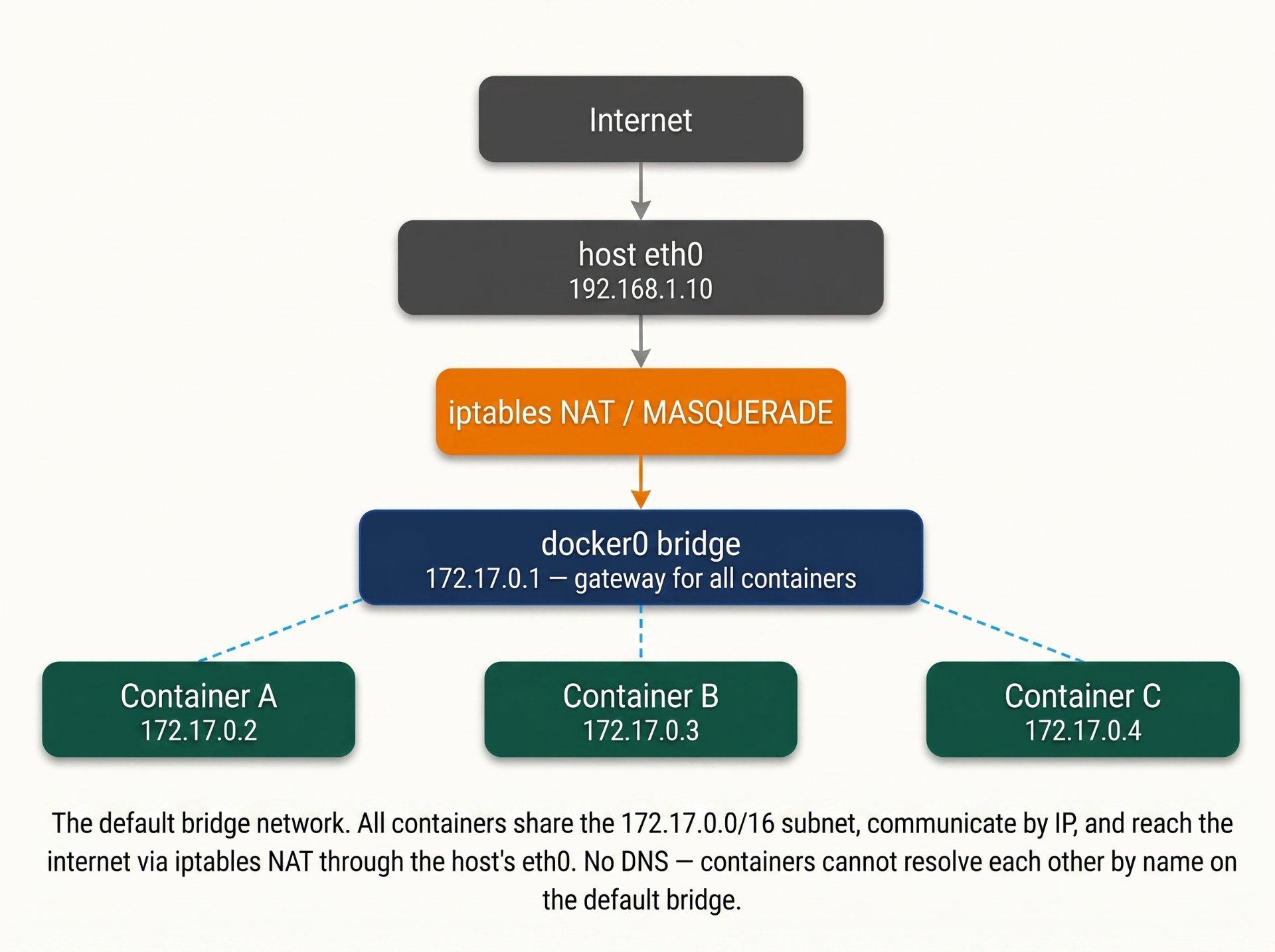
When you run docker run without specifying a network, Docker attaches the container to the default bridge network, a Linux bridge device called docker0. A bridge device is like a network switch: it forwards ethernet frames between all the veth pairs plugged into it, allowing containers on the same bridge to communicate directly at layer 2.
Every container on the docker0 bridge gets an IP address from the 172.17.0.0/16 subnet. The bridge itself is the gateway at 172.17.0.1. Containers can reach each other by IP, but not by name the default bridge has no DNS resolution. This is a critical limitation of the default bridge.
Default bridge limitations
The default docker0 bridge has no automatic DNS resolution containers can only reach each other by IP address, which changes on every restart. It also has no network-level isolation between containers every container on docker0 can reach every other container on docker0, even unrelated ones. For any real workload, use a custom bridge network instead.
NAT and iptables — how port publishing works
When you run docker run -p 8080:3000 myapp, you are asking Docker to make port 3000 inside the container accessible on port 8080 of the host. Docker implements this with a pair of iptables rules: a DNAT rule in the NAT table that redirects incoming packets, and a MASQUERADE rule that handles outbound traffic.
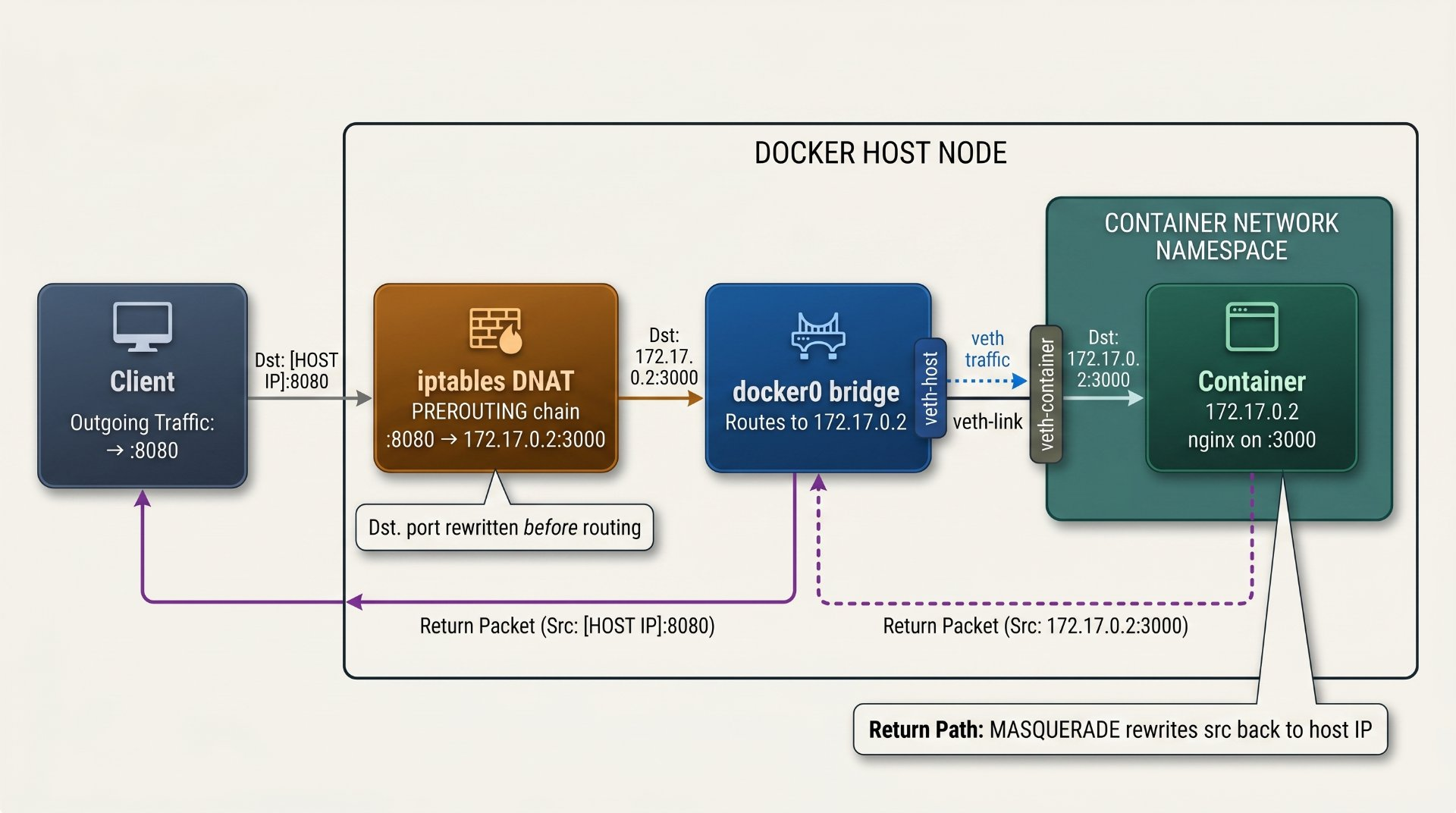
# See all Docker-managed NAT rules
sudo iptables -t nat -L DOCKER -n --line-numbers
Chain DOCKER (2 references)
num  target     prot  opt  source    destination
1    RETURN     all   --   0.0.0.0  0.0.0.0
2    DNAT       tcp   --   0.0.0.0  0.0.0.0   tcp dpt:8080
                                               to:172.17.0.2:3000

# See the MASQUERADE rule for outbound traffic
sudo iptables -t nat -L POSTROUTING -n
MASQUERADE  all  --  172.17.0.0/16  0.0.0.0/0
# All traffic from 172.17.x.x subnet has src rewritten to host IP

# See the FORWARD rules that allow bridge traffic
sudo iptables -L DOCKER-USER -n
sudo iptables -L FORWARD -n | grep dockerCustom bridge networks — DNS, isolation, and scoped connectivity
Custom bridge networks fix everything wrong with the default bridge. When you create a custom bridge, Docker embeds a DNS server that automatically registers every container on that network by its service name. Containers find each other by name no IP addresses needed, no static configuration, no stale entries when containers restart.
Custom bridges also provide network-level isolation. Containers on network-a cannot reach containers on network-b at all, not even if they are on the same host. This is the foundation of secure multi-tier architectures in Docker Compose.
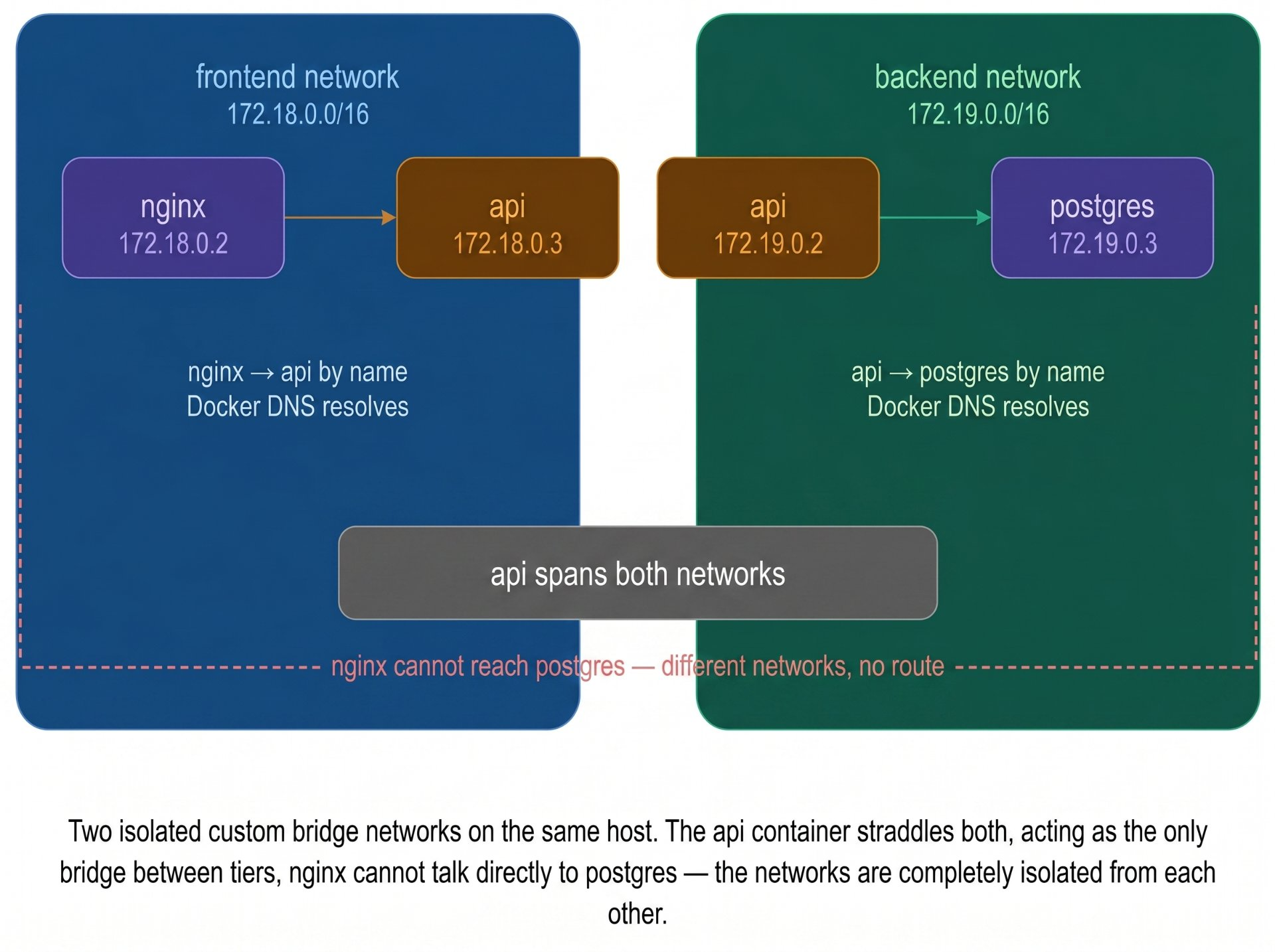
# Create custom networks with specific subnets
docker network create \
  --driver bridge \
  --subnet 172.18.0.0/16 \
  --gateway 172.18.0.1 \
  frontend-network

docker network create \
  --driver bridge \
  --subnet 172.19.0.0/16 \
  --internal \         # blocks outbound internet — backend tier
  backend-network

# Connect a container to multiple networks
docker run -d --name api \
  --network frontend-network \
  myapp/api:latest

docker network connect backend-network api

# Verify DNS works — containers find each other by name
docker exec nginx nslookup api
Name:    api
Address: 172.18.0.3    ← Docker DNS resolved the service name

# Verify isolation — nginx cannot reach postgres
docker exec nginx ping postgres
ping: postgres: Name or service not known
# Correctly fails — not on the same networkHost network — bypassing all isolation
The host network driver removes the container's network namespace entirely. The container shares the host's network stack directly the same interfaces, the same IP address, the same routing table, the same ports. There is no veth pair, no bridge, no NAT. The container process is, from the network's perspective, indistinguishable from any other process on the host.
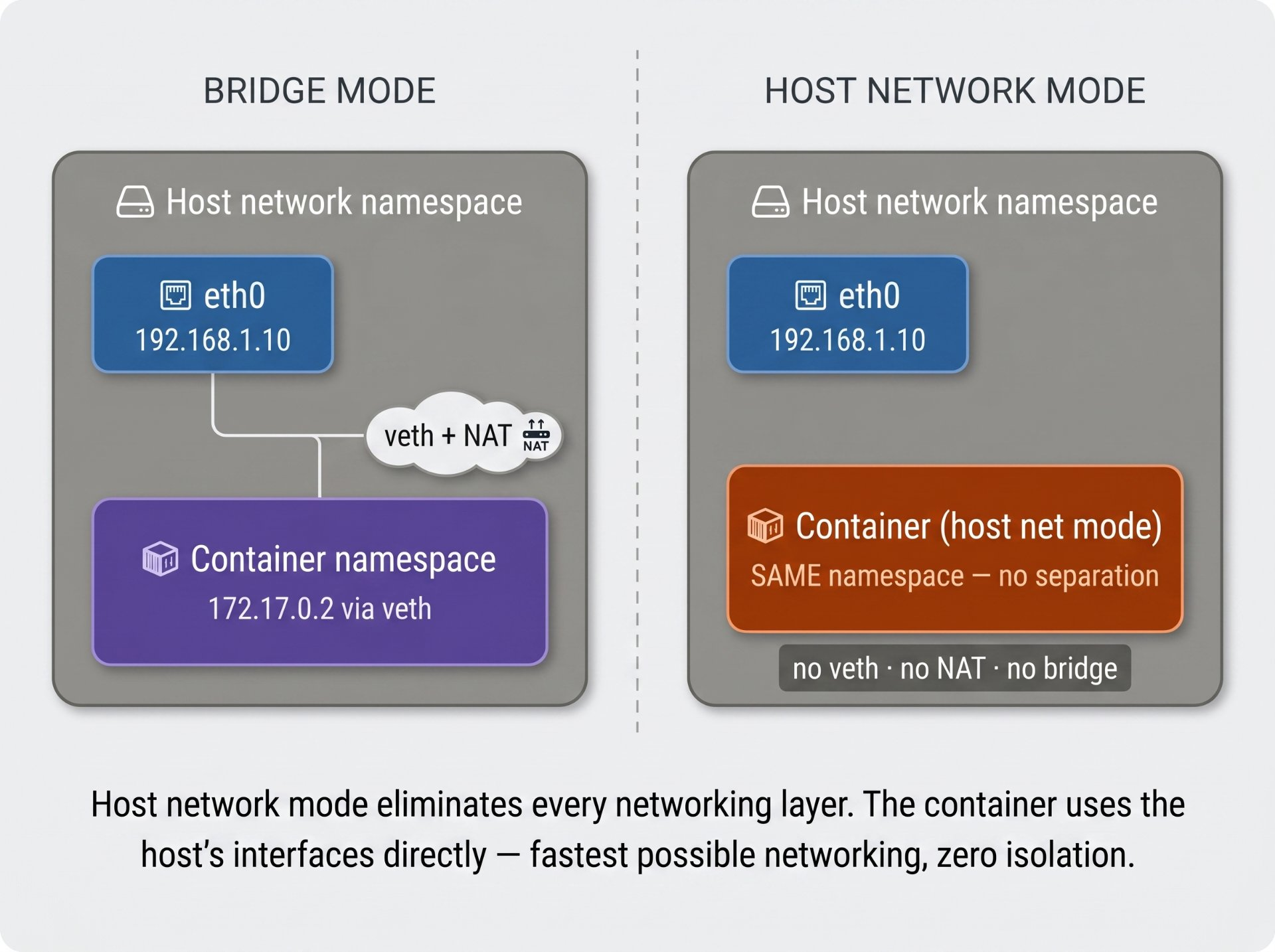
When to use host networking
Host networking is correct for: performance-critical network applications where veth overhead matters (high-throughput load balancers, network monitoring tools), processes that need to manipulate the host network stack directly (VPN clients, network scanners), and legacy applications that bind to specific host interfaces. For everything else any multi-container application, any internet-facing service it is the wrong choice. A compromised container on host network mode has unrestricted access to every service on the host.
None network — total network isolation
The none driver gives the container a network namespace but puts nothing in it no interfaces except loopback (lo), no IP address, no route to anywhere. The container is completely network-isolated. It can communicate with itself via localhost but cannot reach any other container or the internet.
Use cases for none networking
Batch processing jobs that read from a file and write to a file no network needed. Security-sensitive computation like cryptographic operations or data transformation that must not be able to exfiltrate data. Testing that your application gracefully handles network unavailability. Building images with Kaniko or Buildah in a fully air-gapped environment.
# Start a container with no network
docker run --rm --network none alpine sh

# Inside: only loopback exists
$ ip link
1: lo: <LOOPBACK,UP>  mtu 65536
# No eth0. No docker0. Nothing.

$ ping 8.8.8.8
PING 8.8.8.8: Network unreachable

$ ping 172.17.0.1
PING 172.17.0.1: Network unreachable
# Cannot reach anything — not even the docker0 bridgeOverlay network — connecting containers across multiple hosts
The overlay driver creates a virtual layer-2 network that spans multiple Docker hosts. Containers on different physical machines communicate as if they are on the same local network unaware that their traffic is crossing the internet between hosts. Docker implements this using VXLAN (Virtual Extensible LAN): each packet is wrapped in a UDP header and tunnelled between hosts, then unwrapped at the destination.
Overlay networks require either Docker Swarm (which manages the control plane) or an external key-value store. They are the foundation of Docker Swarm's service mesh and the predecessor to Kubernetes pod networking.
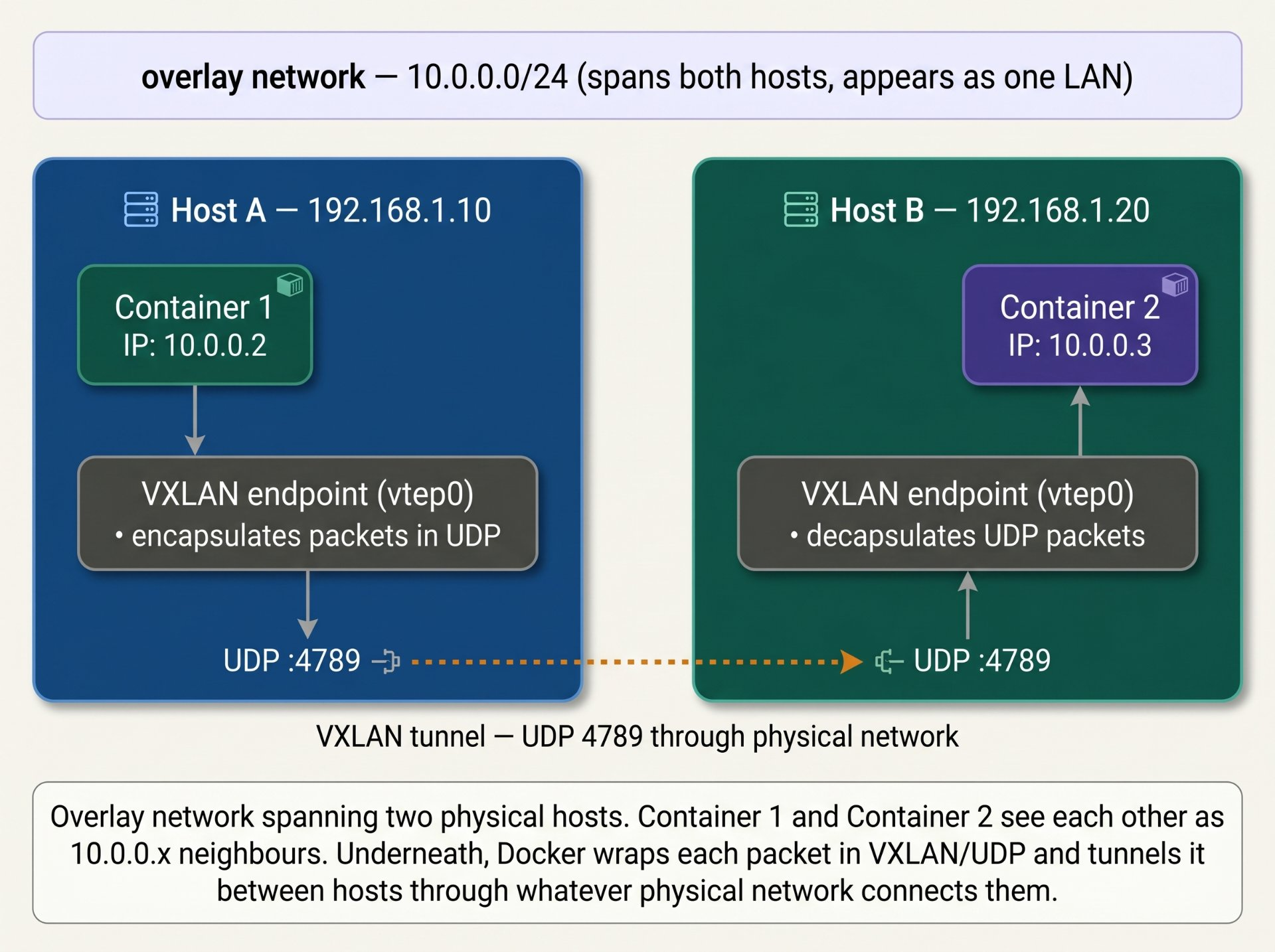
Macvlan — giving containers a real MAC address on the physical network
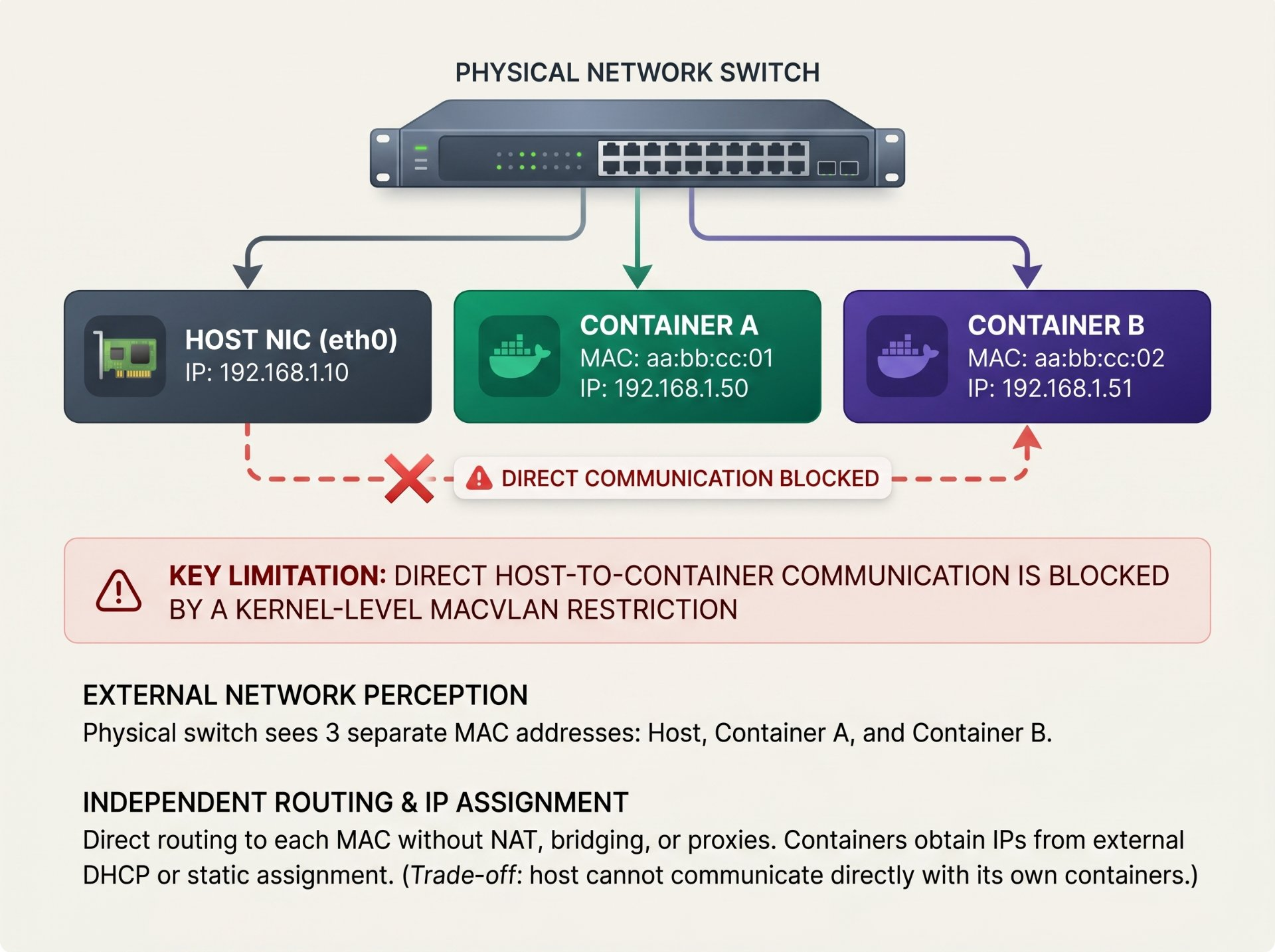
Macvlan creates virtual network interfaces that each have their own unique MAC address. A container with a macvlan interface appears to the physical network as a completely independent machine it gets its own IP directly from the physical network's DHCP server, shows up in ARP tables as a distinct device, and communicates without any NAT or bridge in the path.
This is the right driver when containers must be visible as real hosts on the physical LAN for legacy applications that expect to be directly reachable by IP, for network appliance workloads, or for containers that need multicast or broadcast visibility.
The macvlan host-isolation problem
Due to how the Linux kernel implements macvlan, the host machine cannot communicate with containers on a macvlan network directly. If the host needs to reach its own containers, add a macvlan interface on the host itself and assign it an IP in the same subnet. This creates a bridge between the host's physical NIC and its macvlan containers.
IPvlan — macvlan without the MAC multiplication
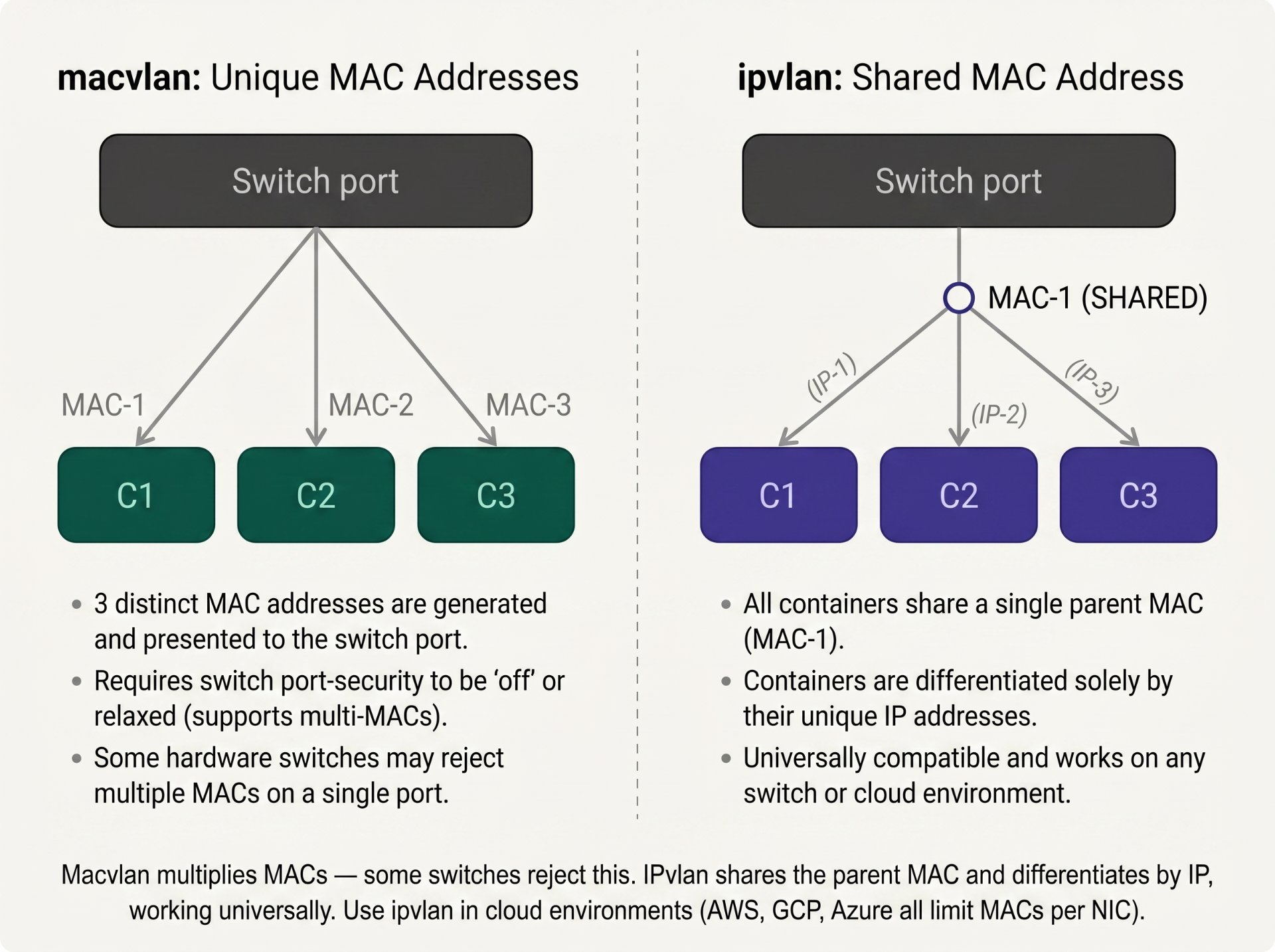
IPvlan is macvlan's sibling. Both create virtual sub-interfaces on a host NIC, but the difference is critical: macvlan assigns a unique MAC address to each sub-interface, while IPvlan shares the parent's MAC address and differentiates by IP only. This matters in environments where the physical switch limits the number of MACs per port (common in cloud environments and managed switches).
IPvlan has two modes: L2 mode (behaves like macvlan but shares MAC) and L3 mode (acts as a router — each container subnet is routed by the host, no broadcast domain participation).
Docker DNS — how container names resolve
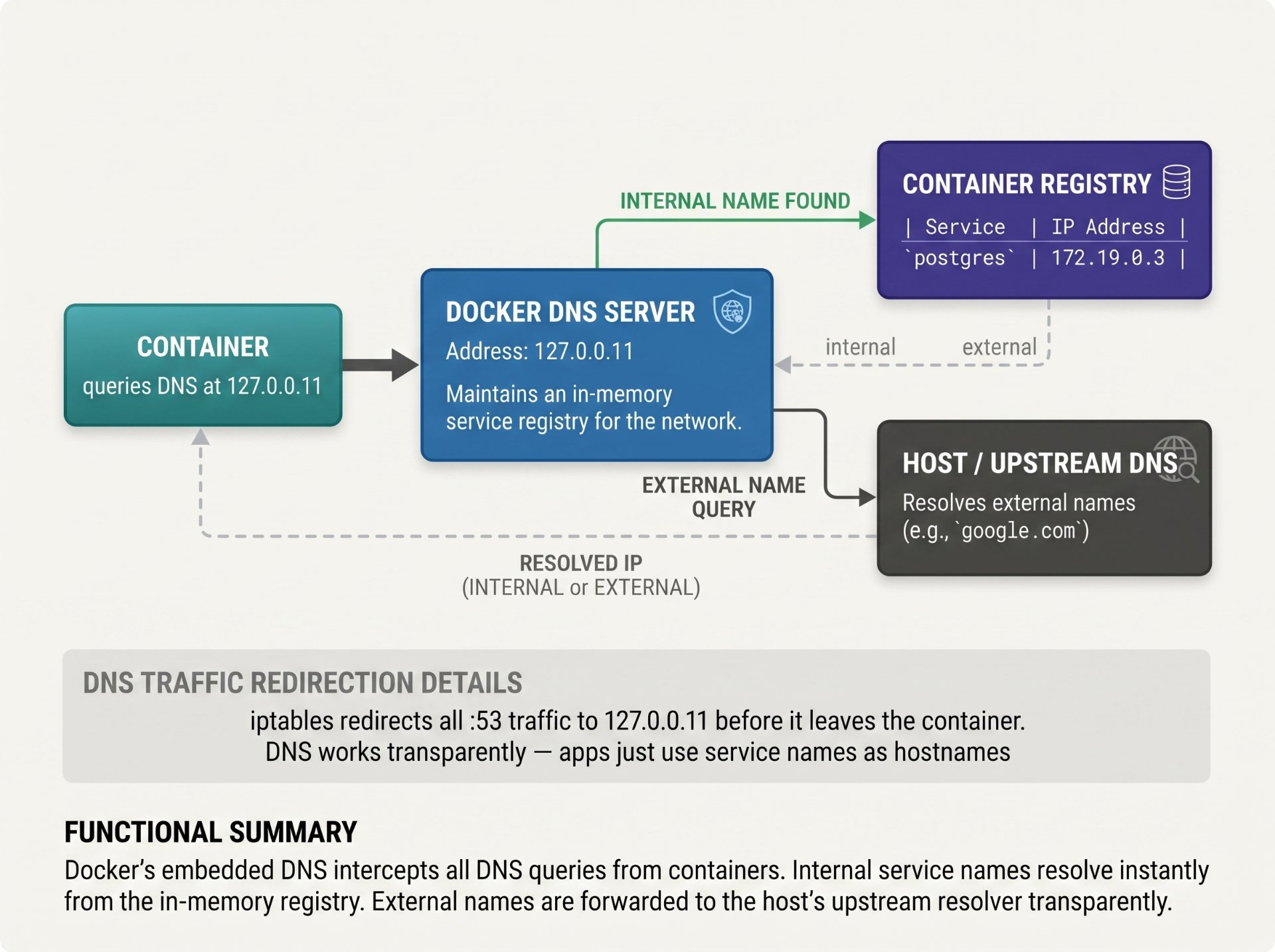
Every custom bridge network has an embedded DNS resolver running at 127.0.0.11. When a container starts on a custom network, Docker registers it with this DNS server using its container name, service name (in Compose), and any aliases you define. Queries to this resolver are intercepted by an iptables rule before they ever leave the container.
# Container is reachable by: container name, service name, aliases
docker run -d \
  --name myapp-container \
  --network mynet \
  --network-alias app \          # also reachable as "app"
  --network-alias api \          # and as "api"
  myapp:latest

# Add custom /etc/hosts entries
docker run --add-host legacy-db:10.0.0.50 myapp:latest

# Use a custom DNS server (overrides Docker's default)
docker run --dns 1.1.1.1 --dns 8.8.8.8 myapp:latest

# Verify DNS from inside the container
docker exec myapp-container cat /etc/resolv.conf
nameserver 127.0.0.11   ← Docker's embedded DNS
options ndots:0

# Resolve a service name manually
docker exec myapp-container nslookup postgres
Server:    127.0.0.11
Address:   127.0.0.11:53
Name:      postgres
Address: 172.19.0.3Debugging network problems — a systematic approach
# ── Layer 1: Can DNS resolve the target? ─────────────────────
docker exec mycontainer nslookup postgres
docker exec mycontainer cat /etc/resolv.conf

# ── Layer 2: Can it reach the IP? ────────────────────────────
docker exec mycontainer ping -c 3 172.19.0.3

# ── Layer 3: Is the port open? ───────────────────────────────
docker exec mycontainer nc -zv postgres 5432
docker exec mycontainer curl -v http://api:3000/health

# ── Layer 4: Is the app actually listening? ──────────────────
docker exec postgres ss -tlnp | grep 5432
# Is it 0.0.0.0:5432 (accepts all) or 127.0.0.1:5432 (localhost only)?

# ── Layer 5: Are they on the same network? ───────────────────
docker network inspect mynet \
  --format '{{range .Containers}}{{.Name}}: {{.IPv4Address}}{{"\n"}}{{end}}'

# ── Layer 6: Capture traffic (requires host access) ──────────
CPID=$(docker inspect mycontainer --format '{{.State.Pid}}')
sudo nsenter -t $CPID --net -- \
  tcpdump -i eth0 -n port 5432

# ── Layer 7: Check iptables rules ────────────────────────────
sudo iptables -t nat -L DOCKER -n
sudo iptables -L FORWARD -n | grep -i drop

# ── Full network state dump for a container ──────────────────
echo "=== Network interfaces ===" && \
  docker exec mycontainer ip addr && \
echo "=== Routes ===" && \
  docker exec mycontainer ip route && \
echo "=== DNS ===" && \
  docker exec mycontainer cat /etc/resolv.conf && \
echo "=== Listening ports ===" && \
  docker exec mycontainer ss -tlnp
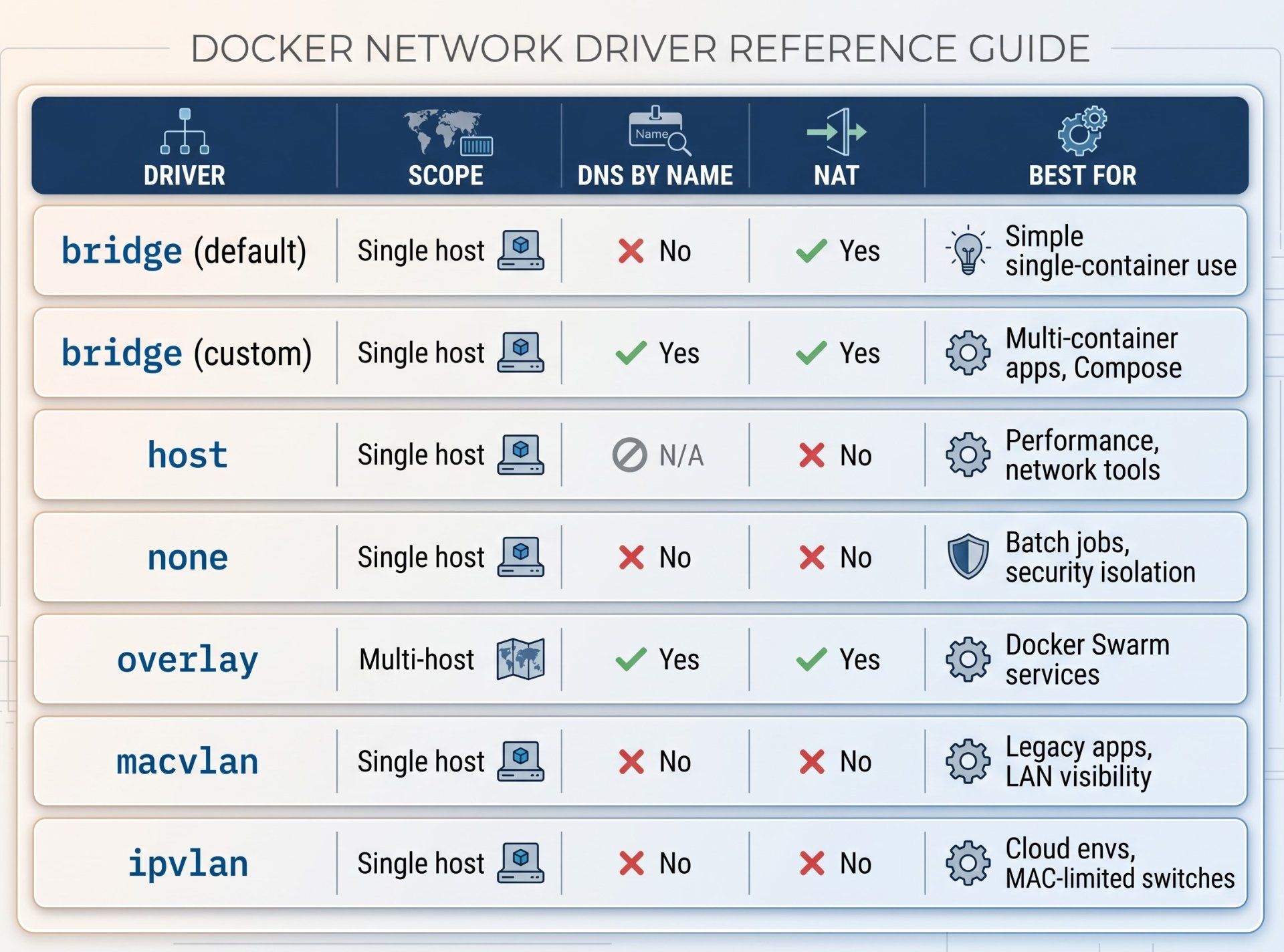
The network driver summary: Use custom bridge for everything on a single host. Use host network only for performance-critical or network-manipulation workloads. Use overlay for multi-host Swarm deployments. Use macvlan or ipvlan when containers must appear as real LAN hosts. Use none for batch jobs or security-sensitive computation that needs zero network access.
Author's Note
Chamath P.
DevOps Engineer
DevOps Engineer writing practical guides on Kubernetes, CI/CD, IaC, and SRE — based on real production experience.
This article was written with AI assistance. All technical claims and code examples have been personally verified before publishing.
Advertisements