Dockerfile Anti-patterns
Every Dockerfile sin has a pattern, a cost, and a fix. This article names 15 of the most common mistakes from bloated images to leaked secrets to broken signal handling with before-and-after code for every one.

Advertisements
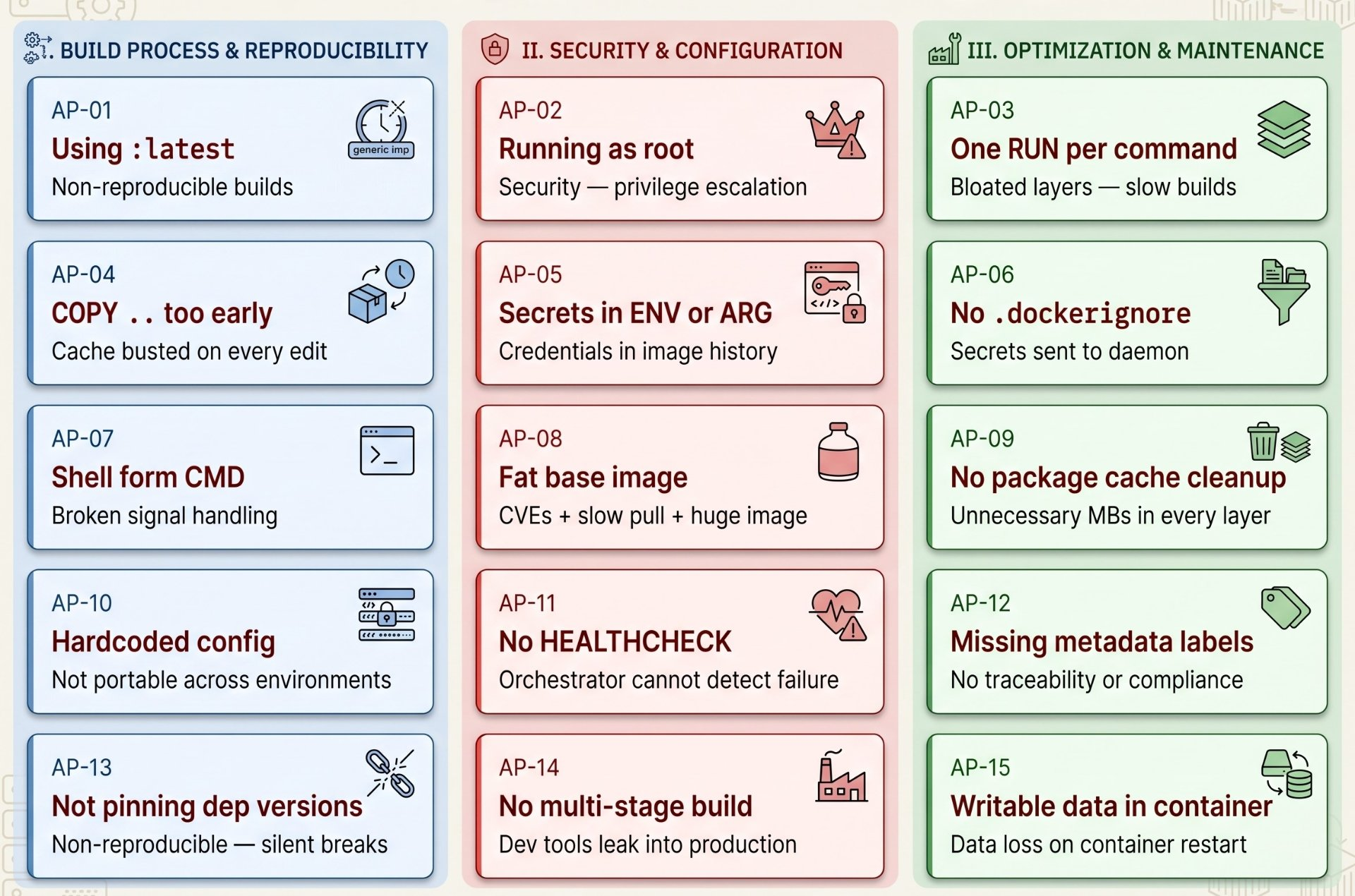
The 15 anti-patterns at a glance
AP-01
Using :latest as a base image tag
Impact: non-reproducible builds · surprise breakages · security regressions
Why it breaks
:latest is a mutable pointer. Today's node:latest is Node 22. Next month it could be Node 24 with breaking API changes. Two developers pulling the same Dockerfile at different times build different images. CI is unreliable. Rollbacks are impossible to reproduce exactly.
FROM node:latest          # mutable — changes without warning
FROM ubuntu               # no tag at all = also :latest

FROM node:20.15.1-alpine3.20  # pinned to exact version
FROM node:20.15.1-alpine3.20@sha256:a3f8...  # pin by digest = immutable
The fix
Pin to an exact version including the OS variant. For maximum reproducibility, pin by SHA256 digest. Update versions deliberately and explicitly; not because upstream silently moved the tag.
AP-02
Running the container process as root
Impact: privilege escalation · container breakout amplified · security audit failure
Why it breaks
A process running as root inside a container has UID 0 on the host (without user namespaces). If an attacker exploits your application, they inherit root and root can mount filesystems, load kernel modules, and escape the namespace. This is the most impactful security anti-pattern in Docker.
# No USER instruction = runs as root (UID 0) — WRONG
FROM node:20-alpine
WORKDIR /app
COPY . .
CMD ["node", "server.js"]

# Create a dedicated non-root user — RIGHT
FROM node:20-alpine
RUN addgroup -S appgroup && adduser -S appuser -G appgroup
WORKDIR /app
COPY --chown=appuser:appgroup . .
USER appuser
CMD ["node", "server.js"]

# node:alpine ships with a built-in 'node' user — use it:
COPY --chown=node:node . .
USER node
The fix
Always have a USER instruction in the final stage. Use --chown on COPY so the non-root user owns its own files. Never use USER root in production stages only temporarily during package installation if absolutely necessary, then drop back down.
AP-03
One RUN instruction per command
Impact: layer explosion · bloated image · slower build and pull
Why it breaks
Every Dockerfile instruction creates a new immutable layer. Each layer stores a full diff. Five separate apt-get install commands create five layers, each storing package cache files that could be cleaned up but can only be cleaned in the same layer they were created. A delete in a later layer creates a whiteout, but the original bytes still exist in the earlier layer, contributing to image size.
# WRONG — 4 layers, package cache permanently baked into layer 1
RUN apt-get update
RUN apt-get install -y curl
RUN apt-get install -y git
RUN rm -rf /var/lib/apt/lists/*   # too late — bloat already in layer 2

# CORRECT — 1 layer, cleanup in the same RUN = actually removes the bytes
RUN apt-get update \
    && apt-get install -y --no-install-recommends \
        curl \
        git \
    && rm -rf /var/lib/apt/lists/*
# --no-install-recommends avoids pulling in suggested packages you don't need
The fix
Chain related commands with && in a single RUN. Always clean up package manager caches in the same instruction that installs packages. Format with backslash continuation for readability.
AP-04
COPY . . before installing dependencies
Impact: cache invalidated on every source change · slow rebuilds on every edit
Why it breaks
Docker layer caching works by hashing layer inputs. When you COPY . . first, any change to any source file including a comment in a README invalidates that layer and every layer after it. Your package installation (the most expensive step) re-runs from scratch on every build, every time.
# WRONG — source copied before deps. Edit one file = npm install re-runs
FROM node:20-alpine
WORKDIR /app
COPY . .                    # cache miss on every source change
RUN npm ci                  # re-runs every time — always slow

# CORRECT — deps cached separately from source code
FROM node:20-alpine
WORKDIR /app
COPY package.json package-lock.json ./   # only changes when deps change
RUN npm ci                               # cached unless package*.json changes
COPY . .                                 # source copied AFTER deps installed
RUN npm run build
The fix
Always copy dependency manifests first (package.json, go.mod, requirements.txt, pom.xml), install dependencies, then copy source. Dependencies change rarely; source changes constantly. This pattern makes warm builds 10-100× faster.
AP-05
Secrets in ENV or ARG instructions
Impact: credentials permanently visible in docker history and image metadata
Why it breaks
Every ENV value is stored in the image manifest and visible via docker inspect and docker history. ARG values appear in docker history as well. Anyone with pull access to the image can extract these values. There is no way to remove them from a pushed image the secret is permanently in the registry.
# WRONG — secret permanently in image history
ARG API_KEY=sk-abc123
ENV API_KEY=${API_KEY}
RUN curl -H "Authorization: Bearer ${API_KEY}" https://api.example.com/setup

# CORRECT — BuildKit secret mount: never stored in any layer
# syntax=docker/dockerfile:1.6
RUN --mount=type=secret,id=api_key \
    curl -H "Authorization: Bearer $(cat /run/secrets/api_key)" \
    https://api.example.com/setup

# Build with: docker buildx build --secret id=api_key,env=API_KEY .

# For runtime secrets: inject via environment at docker run time
# or use a secrets manager (Vault, AWS Secrets Manager)
# NEVER bake runtime secrets into the image
The fix
Use BuildKit --mount=type=secret for build-time secrets. For runtime secrets, use environment variables injected at docker run time, or read from /run/secrets/ if using Docker Swarm or Compose secrets. Never put real credentials in the Dockerfile itself.
AP-06
Missing .dockerignore file
Impact: secrets sent to daemon · massive build context · accidental credential leaks
Why it breaks
When you run docker build ., Docker sends the entire current directory to the daemon as the build context. Without a .dockerignore, this includes .env files, .git history, node_modules (hundreds of MB), private keys, test fixtures, and anything else in the directory. Even if your Dockerfile never COPYs these files, they are transferred to the daemon and can be extracted from the build context by a malicious Dockerfile.
# Version control
.git
.gitignore

# Secrets and environment files
.env
.env.*
*.pem
*.key
secrets/

# Dependencies (rebuilt inside Docker)
node_modules/
vendor/
__pycache__/
.venv/

# Build artefacts
dist/
build/
target/
*.class

# Documentation and IDE files
*.md
.vscode/
.idea/
.DS_Store

# Test artefacts
coverage/
*.test
The fix
Create a .dockerignore file for every project that uses Docker. Treat it like .gitignore it is a security boundary, not just a performance optimisation. The build context should contain only what the Dockerfile actually needs.
AP-07
Using shell form for CMD and ENTRYPOINT
Impact: broken signal handling · graceful shutdown fails · zombie processes
Why it breaks
Shell form (CMD node server.js) launches /bin/sh -c "node server.js". PID 1 is the shell, not node. When docker stop sends SIGTERM, it goes to the shell. The shell does not forward signals to child processes by default. Node never receives SIGTERM, never shuts down gracefully, and Docker waits 10 seconds before sending SIGKILL. Connections are dropped. Data may be corrupted.
# WRONG — shell form. PID 1 = /bin/sh. Signals swallowed.
CMD node server.js
ENTRYPOINT ./entrypoint.sh

# CORRECT — exec form. PID 1 = node. Signals delivered directly.
CMD ["node", "server.js"]
ENTRYPOINT ["/app/entrypoint.sh"]

# If you MUST use a shell script as entrypoint,
# use exec on the final command to hand off PID 1:
#!/bin/sh
set -e
echo "Running setup..."
exec node server.js   # exec replaces shell — node becomes PID 1
The fix
Always use exec (JSON array) form for CMD and ENTRYPOINT. If you need a shell wrapper for setup logic, end it with exec <your-command> so the final process replaces the shell and becomes PID 1, receiving signals correctly.
AP-08
Using a full OS as base image when a minimal one works
Impact: hundreds of extra CVEs · slow pulls · massive attack surface · wasted disk
Why it breaks
ubuntu:24.04 ships with compilers, shells, package managers, cron, syslog, and hundreds of utilities your application will never use. Each one is a potential CVE. A typical ubuntu image has 20-40 known vulnerabilities out of the box. Alpine has zero to three. Distroless has zero. More packages = more attack surface = more patching burden.
# WRONG for a Go static binary — 800 MB SDK + 77 MB ubuntu = 877 MB image
FROM ubuntu:24.04
COPY myapp /myapp
CMD ["/myapp"]

# RIGHT — distroless: 2 MB, zero shell, zero CVEs
FROM gcr.io/distroless/static-debian12
COPY --from=builder /app/myapp /myapp
CMD ["/myapp"]

# Decision guide:
# Go/Rust static binary   → gcr.io/distroless/static
# Go/Rust with libc       → gcr.io/distroless/base
# Node.js                 → node:20-alpine or gcr.io/distroless/nodejs20
# Python                  → python:3.12-slim or gcr.io/distroless/python3
# Java                    → gcr.io/distroless/java21
# Needs many system tools → debian:bookworm-slim (not ubuntu)
The fix
Start minimal. Use distroless for compiled languages, Alpine for scripted languages, debian-slim when you need apt. Only move to a larger base when something genuinely requires it and document why.
AP-09
Not cleaning up package manager caches
Impact: unnecessary MBs permanently baked into every image layer
Why it breaks
Package managers download index files, source lists, and package tarballs during installation. These are cached for subsequent installs but are useless in a container image — the image is rebuilt from scratch for each version. Not cleaning them up adds tens to hundreds of MB to every image.
# apt (Debian/Ubuntu)
RUN apt-get update \
    && apt-get install -y --no-install-recommends \
        curl wget ca-certificates \
    && rm -rf /var/lib/apt/lists/*
#              ^^^^^^^^^^^^^^^^^^^^^ must be in same RUN

# apk (Alpine)
RUN apk add --no-cache curl wget ca-certificates
# --no-cache skips writing the index to disk entirely

# pip (Python)
RUN pip install --no-cache-dir -r requirements.txt

# npm
RUN npm ci && npm cache clean --force
# Or use BuildKit cache mount (zero cache in image, fast rebuilds):
RUN --mount=type=cache,target=/root/.npm npm ci --prefer-offline

# yum/dnf (RHEL/CentOS/Fedora)
RUN yum install -y curl \
    && yum clean all \
    && rm -rf /var/cache/yum
The fix
Clean caches in the same RUN instruction that installs packages. Use --no-cache (Alpine) or --no-cache-dir (pip) flags to skip writing caches in the first place. Use BuildKit cache mounts for the best of both worlds: fast rebuilds without cache bytes in the image.
AP-10
Hardcoding environment-specific configuration
Impact: separate images for dev/staging/prod · violates 12-factor principles
Why it breaks
A Dockerfile that hardcodes a database URL, log level, or feature flag for production cannot be used for development or staging without modification. You end up maintaining multiple Dockerfiles that diverge over time, or worse, building separate images for each environment which means the image that passed testing in staging is not the same image deployed to production.
# WRONG — hardcoded production config baked into image
ENV DATABASE_URL=postgres://prod-db:5432/myapp
ENV LOG_LEVEL=warn
ENV NODE_ENV=production

# CORRECT — defaults set in image, overridden at runtime
ENV LOG_LEVEL=info         # sensible default — overridden in prod
ENV NODE_ENV=production    # this one is genuinely always production
# DATABASE_URL is never in the image — always injected at runtime:
# docker run -e DATABASE_URL=postgres://... myapp
# or via Docker secrets, Kubernetes secrets, etc.
The fix
Set only non-sensitive, environment-independent defaults in ENV. Everything that changes between environments database URLs, API endpoints, feature flags, credentials must be injected at runtime, not baked into the image. Build one image, run it everywhere.
AP-11
No HEALTHCHECK instruction
Impact: orchestrators cannot detect failed-but-running containers · silent failures
Why it breaks
Without a HEALTHCHECK, Docker and orchestrators (Compose, Swarm) only know if the process is running not if it is actually healthy and serving requests. A Node.js server that has deadlocked and stopped accepting connections is still "running" from the container runtime's perspective. Depends-on conditions in Compose that use service_healthy also require a HEALTHCHECK to function.
# HTTP API
HEALTHCHECK --interval=10s --timeout=5s --retries=5 --start-period=30s \
    CMD curl -f http://localhost:3000/health || exit 1

# If curl is not in the image (distroless), use wget or the app binary
HEALTHCHECK CMD ["/app/myapp", "--health-check"]

# Postgres
HEALTHCHECK --interval=5s --timeout=3s --retries=10 \
    CMD pg_isready -U postgres || exit 1

# Redis
HEALTHCHECK --interval=5s --timeout=3s --retries=5 \
    CMD redis-cli ping || exit 1

# --start-period: grace time before failed checks count (allow for slow start)
# --interval:     how often to check
# --timeout:      how long before check is considered failed
# --retries:      how many failures before container is marked unhealthy
The fix
Every service that other services depend on must have a HEALTHCHECK. Match the check to what actually proves health not just that the process is running, but that it is responding correctly. Set --start-period to your service's typical cold-start time.
AP-12
Missing OCI metadata labels
Impact: no traceability · compliance failures · impossible to audit in production
Why it breaks
Without labels, a running container in production is a mystery. Which commit produced this image? Who built it? When? What repository is the source? Security teams, compliance auditors, and incident responders all need this information. Without it, tracing a vulnerable image back to its source is manual and slow.
LABEL org.opencontainers.image.title="My Application" \
      org.opencontainers.image.description="REST API for the payments service" \
      org.opencontainers.image.url="https://github.com/org/myapp" \
      org.opencontainers.image.source="https://github.com/org/myapp" \
      org.opencontainers.image.version="${APP_VERSION}" \
      org.opencontainers.image.revision="${GIT_COMMIT}" \
      org.opencontainers.image.created="${BUILD_DATE}" \
      org.opencontainers.image.licenses="MIT"

# Pass dynamic values at build time:
# docker build \
#   --build-arg APP_VERSION=v2.4.1 \
#   --build-arg GIT_COMMIT=$(git rev-parse HEAD) \
#   --build-arg BUILD_DATE=$(date -u +%Y-%m-%dT%H:%M:%SZ) \
#   -t myapp:v2.4.1 .
The fix
Add OCI standard labels to every production image. Use ARG to pass dynamic values (commit SHA, build date, version) at build time. These labels are queryable with docker inspect and are the foundation of image supply chain traceability.
AP-13
Not pinning dependency versions
Impact: non-reproducible builds · silent breaking changes · supply chain risk
Why it breaks
Unpinned dependencies resolve to "latest available" at build time. Two builds from the same Dockerfile can install different library versions. A transitive dependency update can silently introduce a breaking change or a vulnerability. This is a supply chain risk malicious packages have been published to npm, PyPI, and other registries targeting unpinned ranges.
# WRONG — unpinned at multiple levels
FROM python:3-slim              # which 3.x? unknown
RUN pip install flask requests  # latest at build time — non-reproducible

# CORRECT — pinned at every level
FROM python:3.12.4-slim-bookworm  # exact version
COPY requirements.txt .
RUN pip install --no-cache-dir -r requirements.txt

# requirements.txt with pinned versions and hashes:
# flask==3.0.3 \
#     --hash=sha256:a3d... \
#     --hash=sha256:b4e...
# requests==2.32.3 \
#     --hash=sha256:c5f...
# Generate with: pip-compile --generate-hashes requirements.in

# For npm: always commit package-lock.json, use npm ci not npm install
RUN npm ci   # fails if lock file is missing or inconsistent — good
The fix
Pin the base image, pin package versions in manifest files, use lockfiles (package-lock.json, requirements.txt with hashes, go.sum). Use npm ci not npm install in Docker it enforces the lockfile.
AP-14
No multi-stage build for compiled languages
Impact: build toolchain in production image · giant image · massive CVE surface
Why it breaks
A Go, Java, or C++ application needs a compiler and build tools to produce a binary. That binary then runs on a minimal runtime. Without multi-stage builds, the entire SDK Go toolchain, JDK, GCC ends up in the production image. A Go app that produces a 15 MB binary can result in a 1.1 GB production image. The compiler is not needed at runtime and is an enormous attack surface.
# WRONG — 1.1 GB image, Go compiler in production
FROM golang:1.22
WORKDIR /app
COPY . .
RUN go build -o server .
CMD ["./server"]

# CORRECT — 15 MB image, only the compiled binary
FROM golang:1.22-alpine AS builder
WORKDIR /app
COPY go.mod go.sum ./
RUN go mod download
COPY . .
RUN CGO_ENABLED=0 go build -ldflags="-w -s" -o server .

FROM gcr.io/distroless/static-debian12
COPY --from=builder /app/server /server
CMD ["/server"]
# Result: 15 MB vs 1.1 GB — 98.6% reduction
The fix
Every compiled language workload must use a multi-stage build. The builder stage has the full SDK. The final stage has only the runtime artefact. This is not a nice-to-have it is the correct way to Dockerise compiled applications. See Article 1 of this series for complete examples.
AP-15
Writing persistent data to the container layer
Impact: data loss on restart · OverlayFS performance degradation · disk waste
Why it breaks
The container's writable layer is deleted when the container is removed. Any data written there database files, uploaded files, generated reports, application logs is permanently lost. Additionally, writes to the container layer go through OverlayFS copy-on-write, which copies entire files before writing a 500 MB database file is copied in full before the first byte is written, making initial writes catastrophically slow.
# WRONG — postgres writes to container layer — data lost on docker rm
services:
  db:
    image: postgres:16-alpine
    # no volume — /var/lib/postgresql/data writes to OverlayFS upperdir

# CORRECT — named volume for database files
services:
  db:
    image: postgres:16-alpine
    volumes:
      - pgdata:/var/lib/postgresql/data   # bypasses OverlayFS entirely

volumes:
  pgdata:                                 # survives docker rm and upgrades

# Also use volumes for:
# User uploads: -v uploads:/app/uploads
# Application logs: -v logs:/var/log/myapp
# Redis data: -v redis-data:/data
The fix
Every piece of data that must survive a container restart or removal must live in a named volume or bind mount. Volumes bypass OverlayFS entirely — writes go directly to the host filesystem at full disk speed, and the data persists independently of any container lifecycle.
Author's Note
Chamath P.
DevOps Engineer
DevOps Engineer writing practical guides on Kubernetes, CI/CD, IaC, and SRE — based on real production experience.
This article was written with AI assistance. All technical claims and code examples have been personally verified before publishing.
Advertisements