Git Branch Strategy — The Complete Guide
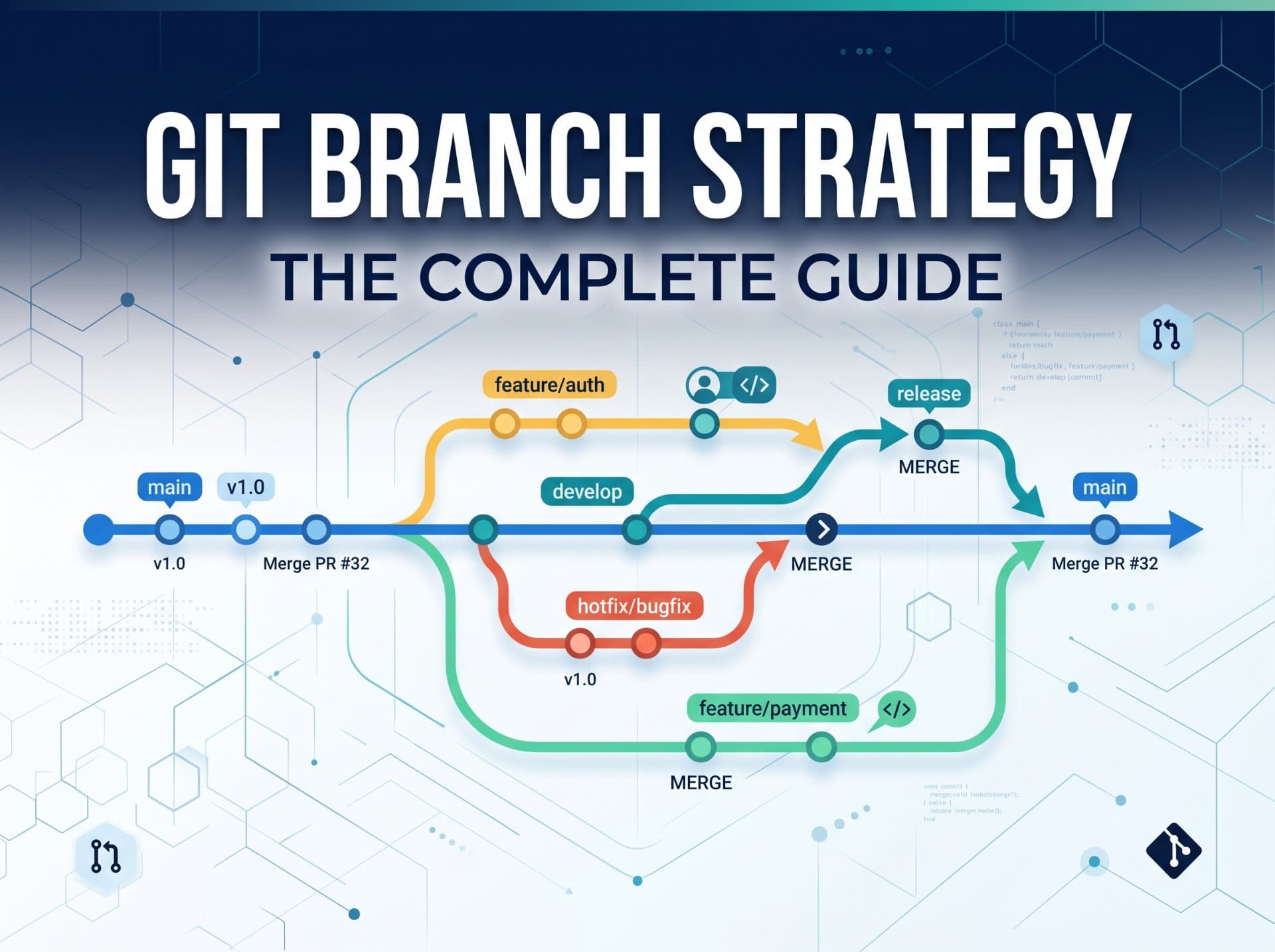
The most underrated skill in DevOps. Your branching strategy determines how fast your team ships, how safe your deployments are, how well your CI/CD works, and whether code review is a collaboration or a warzone. This guide covers everything from beginner to advanced.

Advertisements
Why branching strategy is a DevOps superpower
Most developers think of branching as a Git mechanic, something you do before you write code. But the branching strategy your team adopts is actually a set of decisions about how your team collaborates, how code is reviewed, when deployments happen, and how incidents are handled. The wrong strategy creates merge conflicts that take days to resolve, deployment pipelines that fight each other, and release processes that require all-hands coordination.
As a DevOps engineer, you sit at the intersection of every one of these concerns. You build the CI/CD pipelines that run on branches. You configure the branch protection rules that enforce quality gates. You design the deployment automation that promotes code from one environment to the next. Your understanding of branching strategy directly determines how effective all of that work is.
The highway analogy
A branching strategy is like the lane layout of a highway. Without lanes, everyone drives wherever they want fast cars block slow ones, on-ramps collide with traffic, and the whole system grinds to chaos. With well-designed lanes, fast lane, slow lane, on-ramp, exit ramp the same road carries far more traffic more safely. Your branches are the lanes. Your strategy is the road design.
The hard truth: you can have excellent code, excellent tests, and excellent infrastructure and still have a terrible delivery process because your branching strategy creates bottlenecks, conflicts, and deployment risks. Strategy is not optional. It is the foundation everything else runs on.
Core branch types — the vocabulary
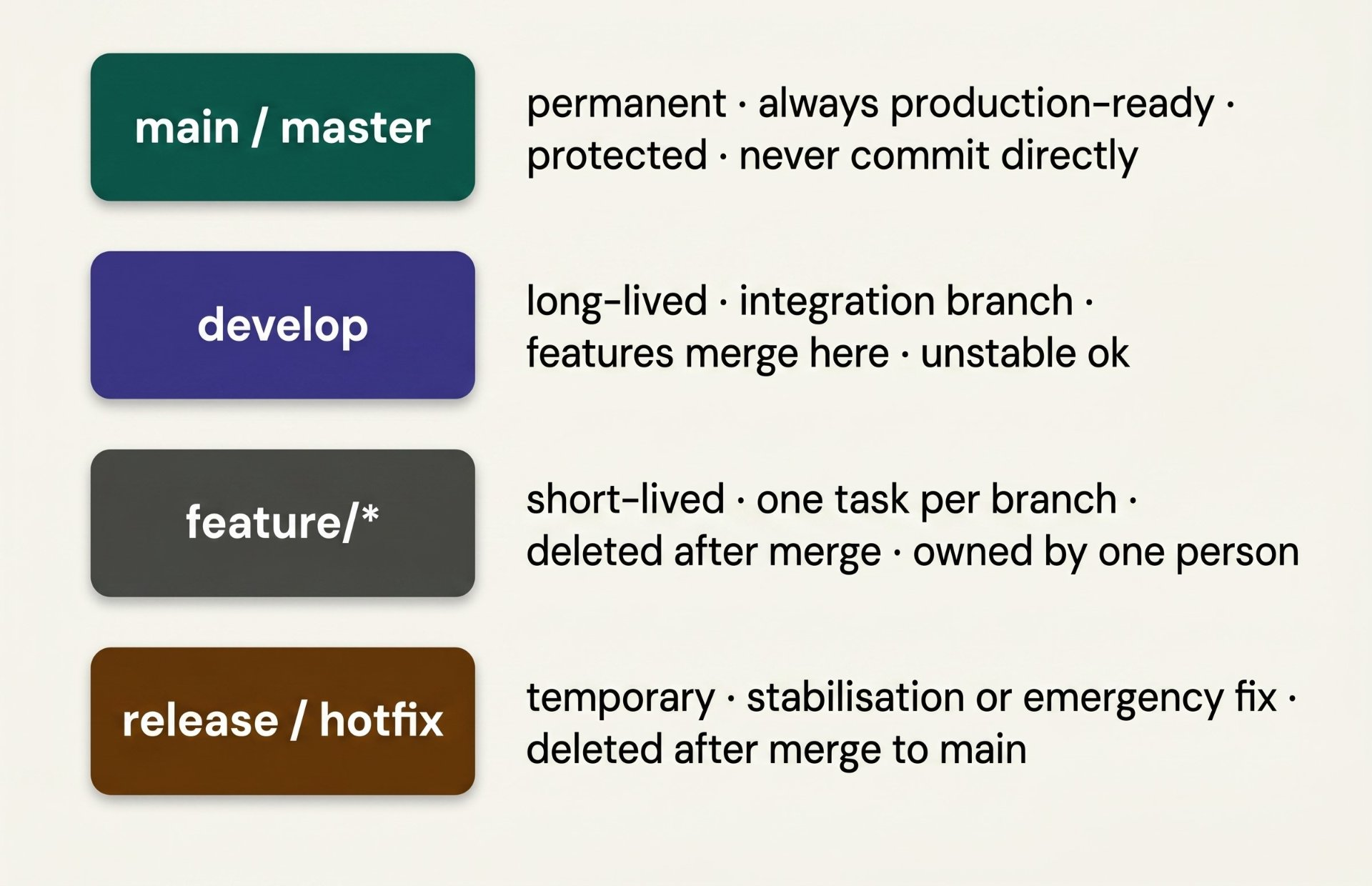
Before comparing strategies, you need to know the four fundamental branch types that every strategy combines in different ways. Understanding what each type is for prevents the most common beginner mistake: using every branch for everything.
GitFlow — the structured classic
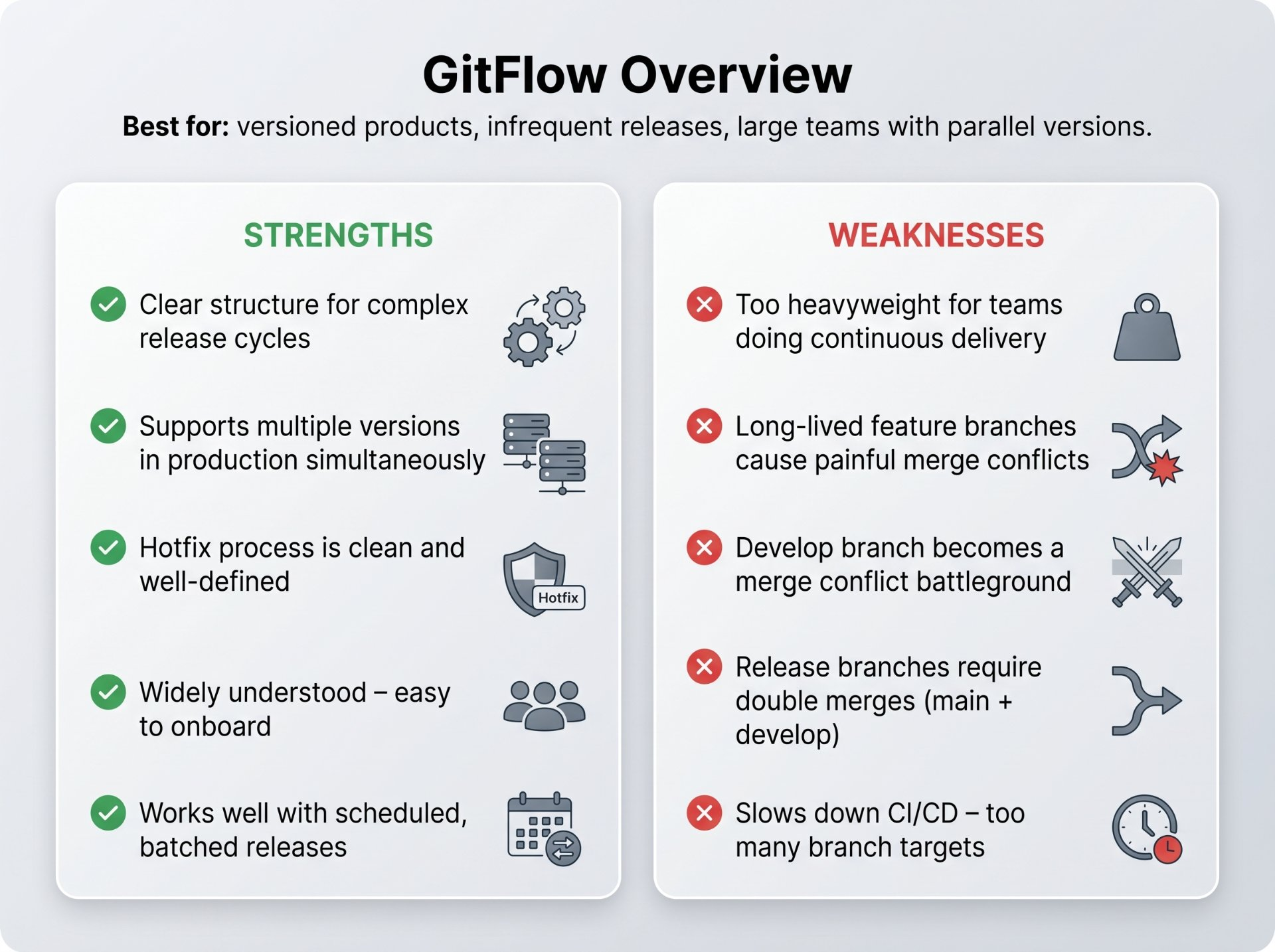
GitFlow, introduced by Vincent Driessen in 2010, was one of the first widely adopted branching strategies. It is comprehensive, structured, and explicit there is a defined branch for every scenario. If you have used Git for more than a few months, you have almost certainly encountered GitFlow or a variant of it.
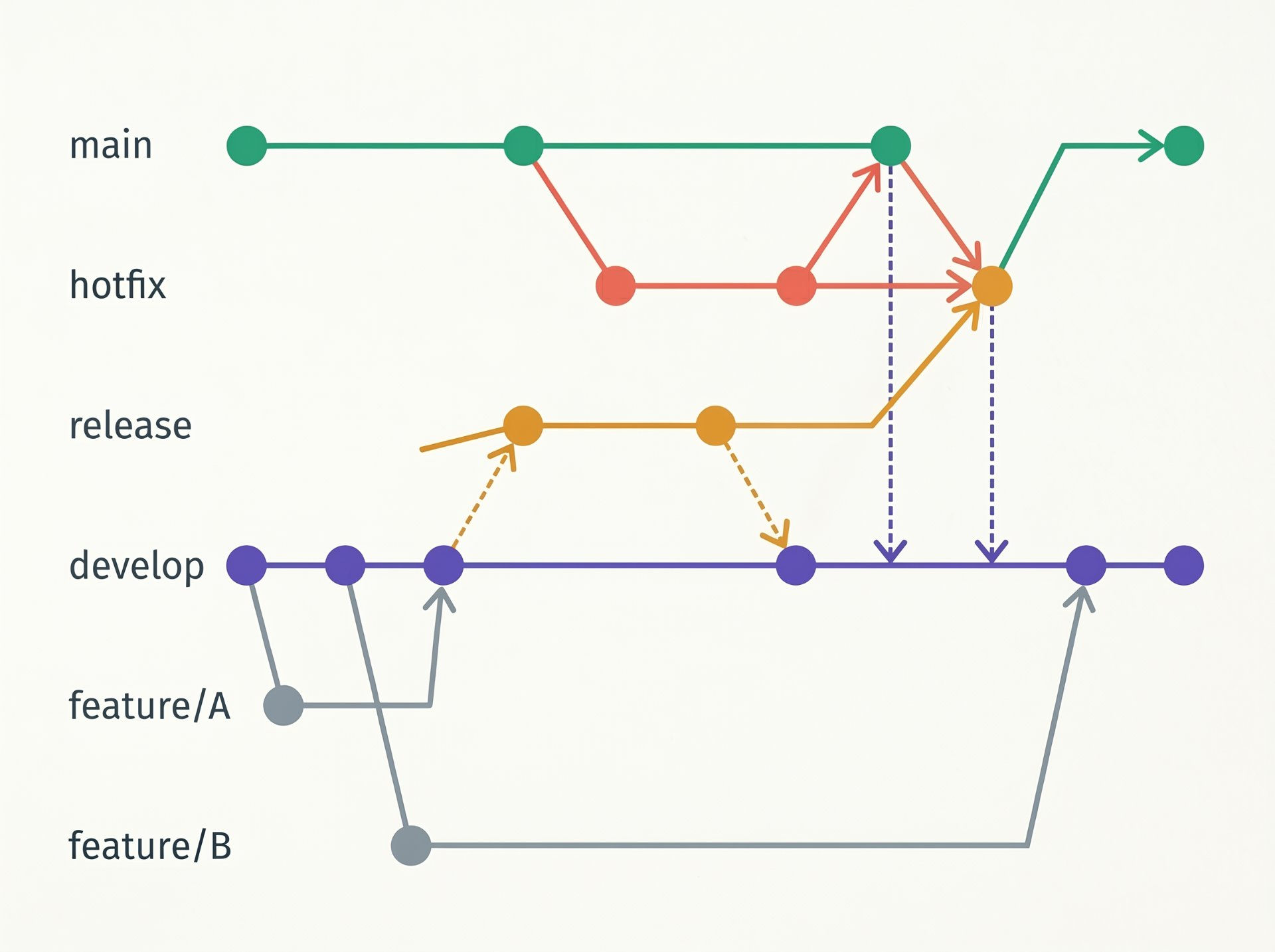
The model has five branch types: main (always production-ready), develop (integration branch), feature/* (one branch per feature), release/* (stabilisation before production), and hotfix/* (emergency fixes direct from main). The flow is strict: features branch from develop and merge back to develop; releases branch from develop and merge to both main and develop; hotfixes branch from main and merge to both main and develop.
# Starting a new feature
git checkout develop
git checkout -b feature/user-authentication

# Finishing a feature — merge back to develop
git checkout develop
git merge --no-ff feature/user-authentication
git branch -d feature/user-authentication

# Creating a release branch
git checkout develop
git checkout -b release/v2.4.0
# Only bug fixes go here — no new features

# Finishing a release — merge to main AND back to develop
git checkout main
git merge --no-ff release/v2.4.0
git tag -a v2.4.0 -m "Release v2.4.0"
git checkout develop
git merge --no-ff release/v2.4.0
git branch -d release/v2.4.0

# Hotfix — branch from main, not develop
git checkout main
git checkout -b hotfix/critical-payment-bug
# Fix, commit, then merge to BOTH main and develop
git checkout main && git merge --no-ff hotfix/critical-payment-bug
git checkout develop && git merge --no-ff hotfix/critical-payment-bug
git branch -d hotfix/critical-payment-bugGitHub Flow — lean and fast
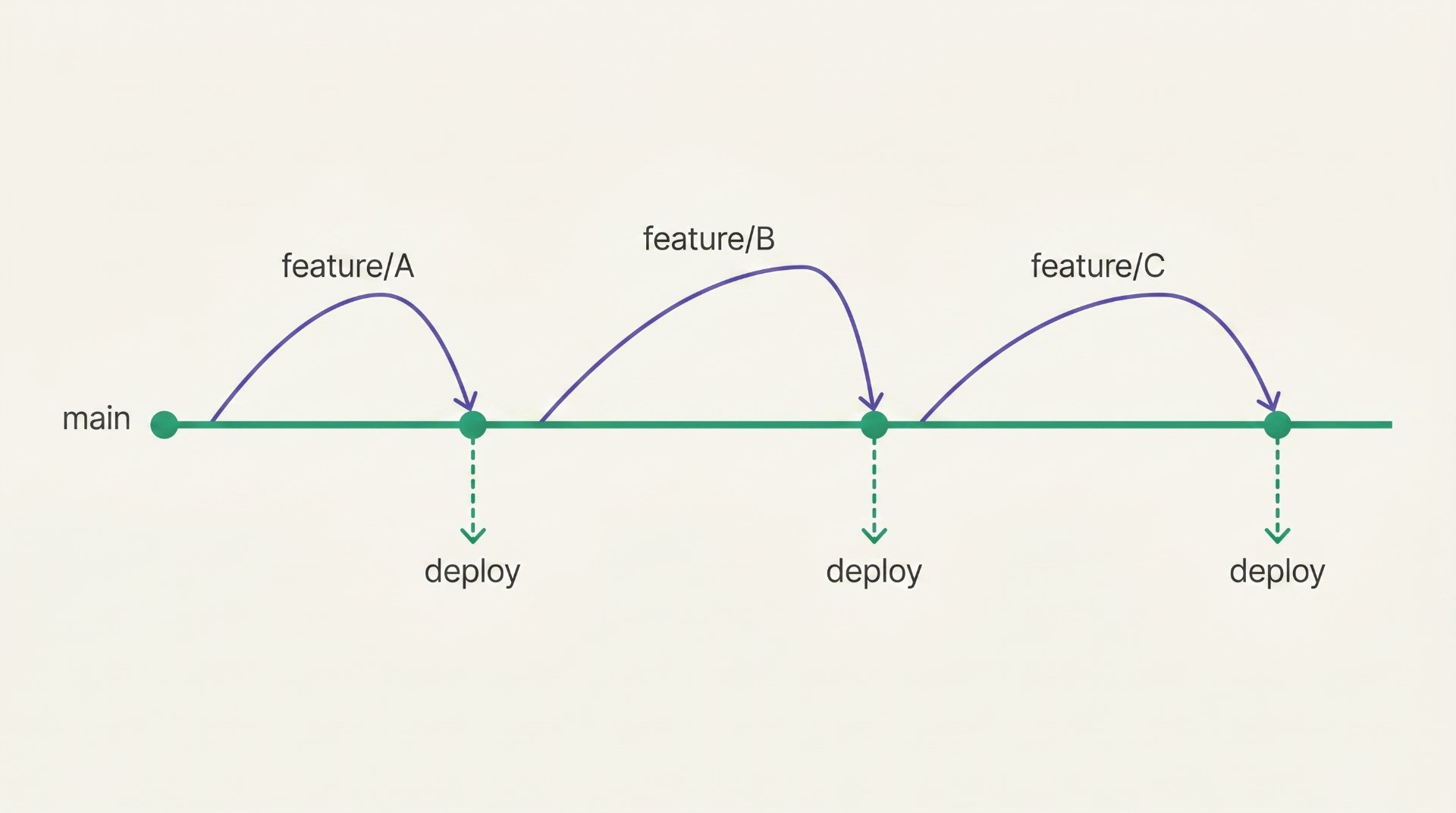
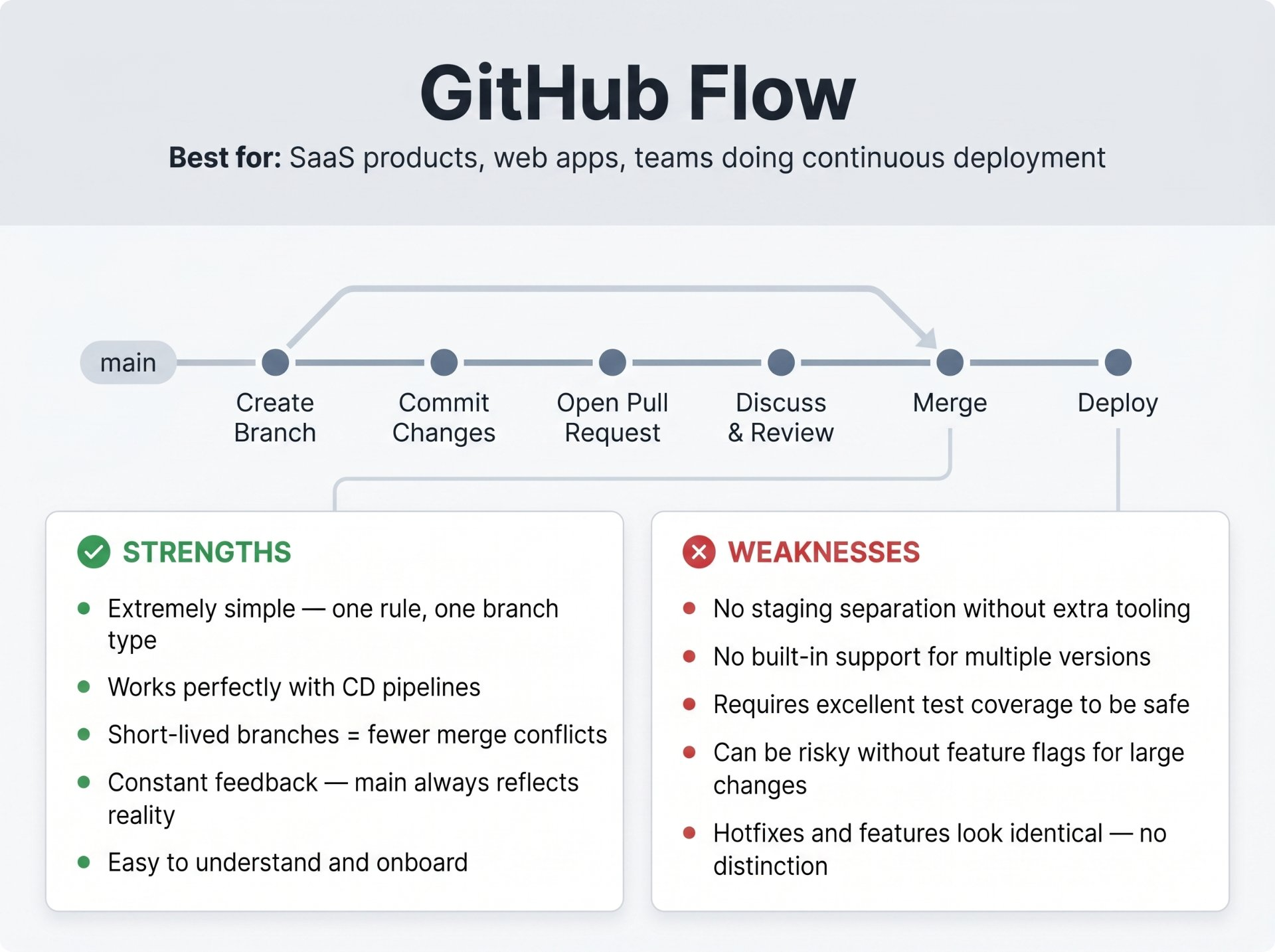
GitHub Flow is a dramatic simplification of GitFlow. It was created by GitHub for their own internal development and published in 2011. The philosophy: if you deploy frequently (multiple times per day), the entire GitFlow structure is unnecessary overhead. You only need one rule: main is always deployable and one mechanism: short-lived feature branches merged via pull request.
The entire workflow: branch from main, make your changes, open a PR, review, and merge. Main is always deployable. When you merge to main, you deploy. There are no develop branches, no release branches, no ceremony. This model works beautifully with continuous deployment pipelines where every merge to main triggers an automated deployment.
GitLab Flow — environment aware
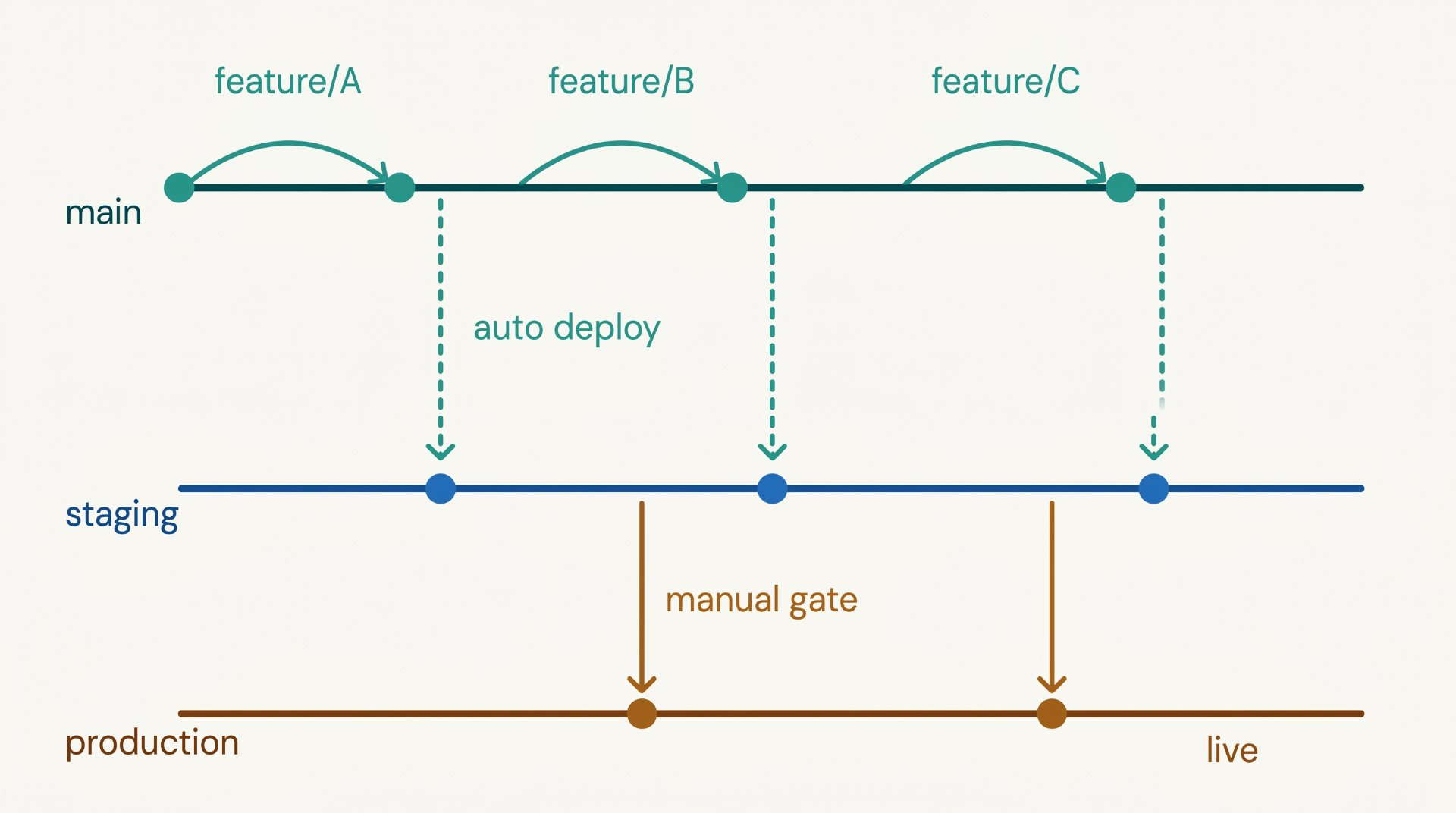
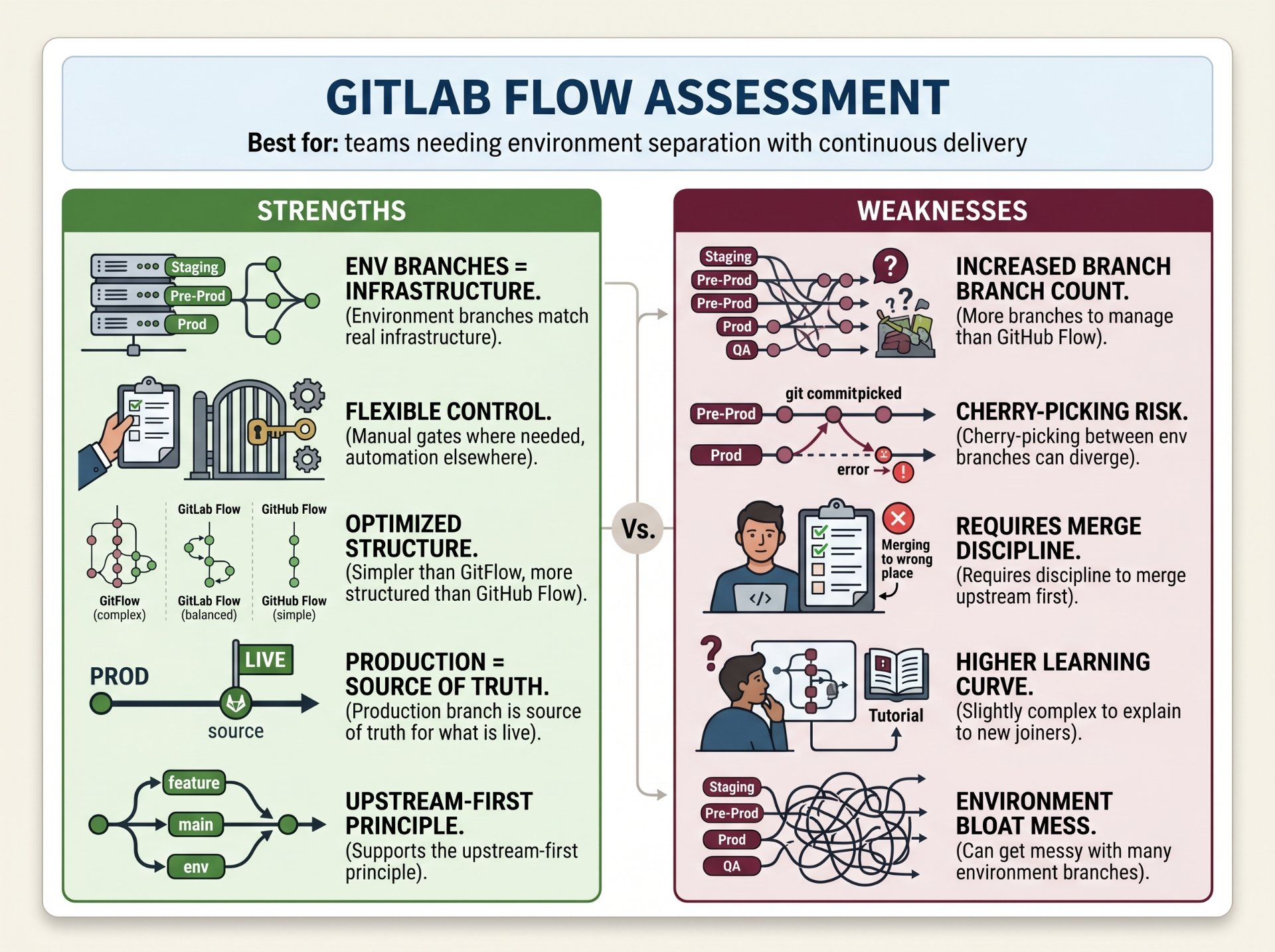
GitLab Flow is the pragmatic middle ground between GitFlow's complexity and GitHub Flow's simplicity. It was created by GitLab in 2014 as a response to a specific problem with GitHub Flow: when you merge to main, you deploy but what if you want a staging environment that is not production? What if deployments need approval or manual gates?
GitLab Flow adds environment branches, branches that represent environments (staging, production) rather than release versions. Code flows downstream: feature branches merge to main, main is deployed to staging, and when staging is validated, changes are merged or cherry-picked to the production branch. The production branch always reflects exactly what is running in production.
Trunk-Based Development — the elite approach
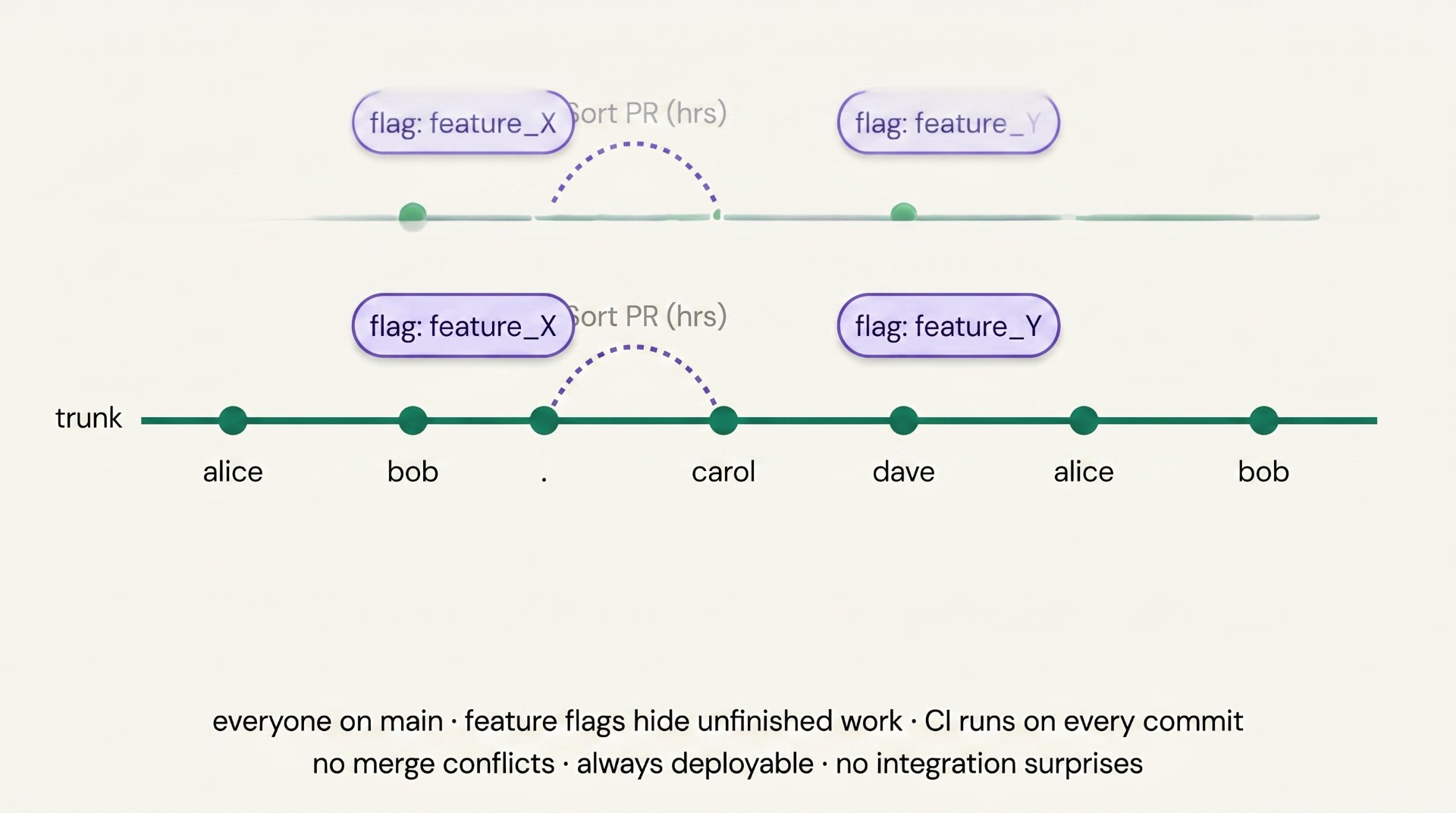
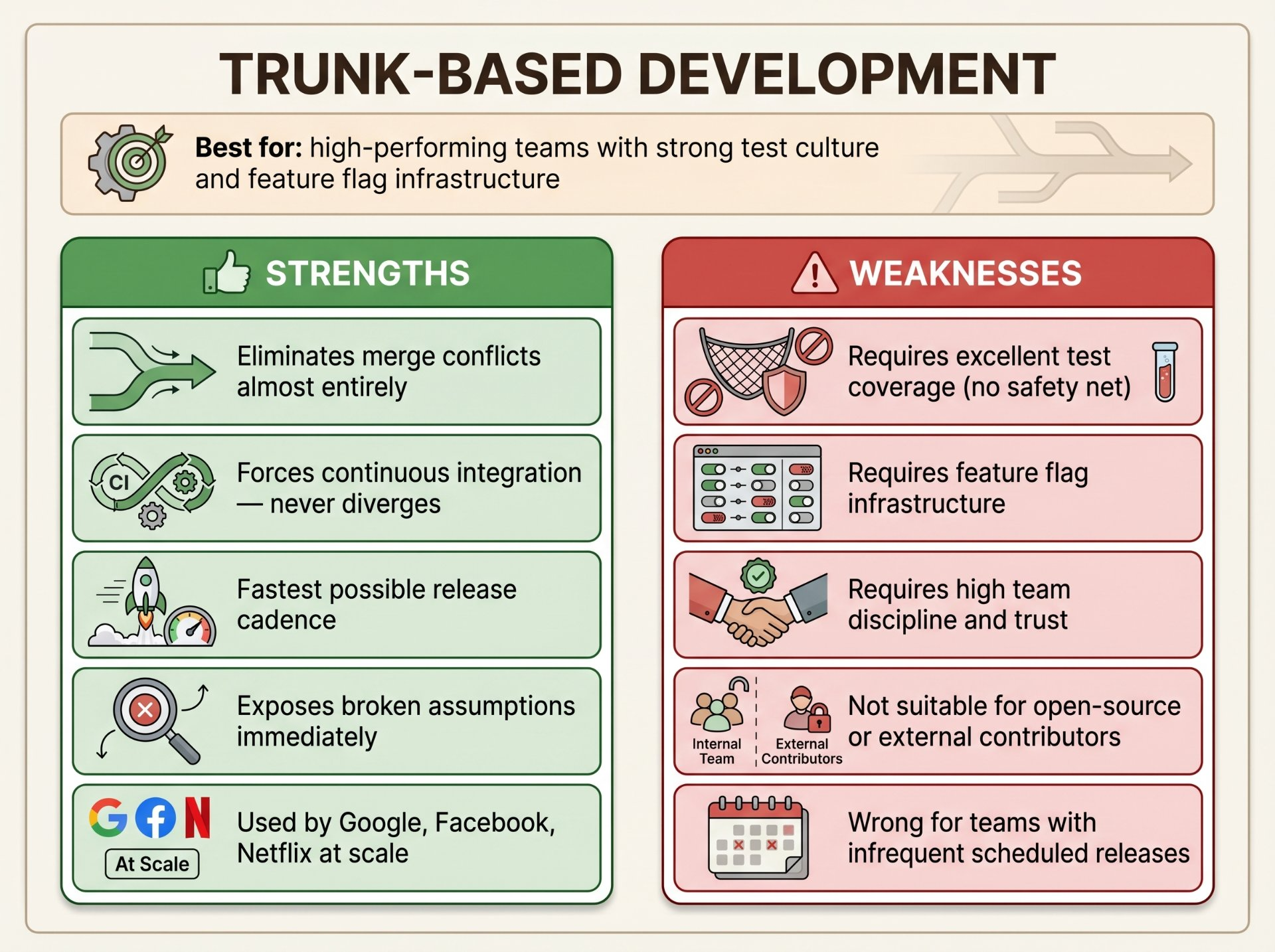
Trunk-Based Development (TBD) is the branching strategy used by Google, Facebook, and most high-performing engineering teams. The core idea is radical in its simplicity: everyone commits directly to main (the "trunk"), continuously, multiple times per day. Feature branches, if used at all, are extremely short-lived hours, not days.
This sounds terrifying until you understand the enabling practices that make it safe: feature flags hide incomplete features from users, comprehensive automated tests catch regressions immediately, CI pipelines run in minutes not hours, and every engineer is responsible for their own commit passing all checks before pushing. TBD eliminates merge conflicts almost entirely, there is nothing to merge if everyone is already on main.
Why elite teams choose TBD
Google runs TBD with a monorepo of billions of lines of code and tens of thousands of engineers. The key insight: long-lived branches are a form of technical debt. Every day a branch lives, it diverges from main. The cost of integration grows exponentially with time. TBD forces integration continuously, while the cost is still zero.
# Commit incomplete feature directly to main — flag hides it
git add src/checkout/new-payment-flow.ts
git commit -m "feat: add new payment flow behind feature flag"
git push origin main
# CI runs immediately — if it fails, fix it right now

# Feature flag check in code
// TypeScript example
if (featureFlags.isEnabled('new_payment_flow', userId)) {
  return newPaymentFlow(cart)
}
return legacyPaymentFlow(cart)

# Enable for 5% of users in your flag system
# Gradually ramp: 5% → 20% → 50% → 100%
# Rollback = set flag to 0% — no deployment neededRelease Flow — Microsoft's approach
Release Flow is the strategy Microsoft uses for Azure DevOps (formerly VSTS), developed from their experience shipping software to millions of developers. It sits between GitHub Flow and GitFlow: engineers work from main with short-lived feature branches, but releases are cut as dedicated branches that can receive cherry-picked fixes without disturbing main.
The key difference from GitFlow: release branches are cut from main (not develop), are read-only after cutting except for approved cherry-picks, and main continues to advance independently. This allows the team to keep shipping to main while a release stabilises in its own branch, the two timelines run in parallel without interfering.
# Cut a release branch from main at a chosen commit
git checkout main
git checkout -b releases/m168   # Microsoft uses sprint numbers

# Main continues advancing — team keeps shipping
git checkout main
git pull  # new features land here continuously

# A critical bug is found in the release branch
# Fix it on main FIRST (upstream-first principle)
git checkout main
git commit -m "fix: critical bug in auth flow"

# Cherry-pick the fix onto the release branch
git checkout releases/m168
git cherry-pick abc1234  # the commit SHA from main

# Deploy the release branch to production
# Tag it for traceability
git tag releases/m168.1
git push origin releases/m168 --tagsMerge vs rebase — the decision that shapes your history
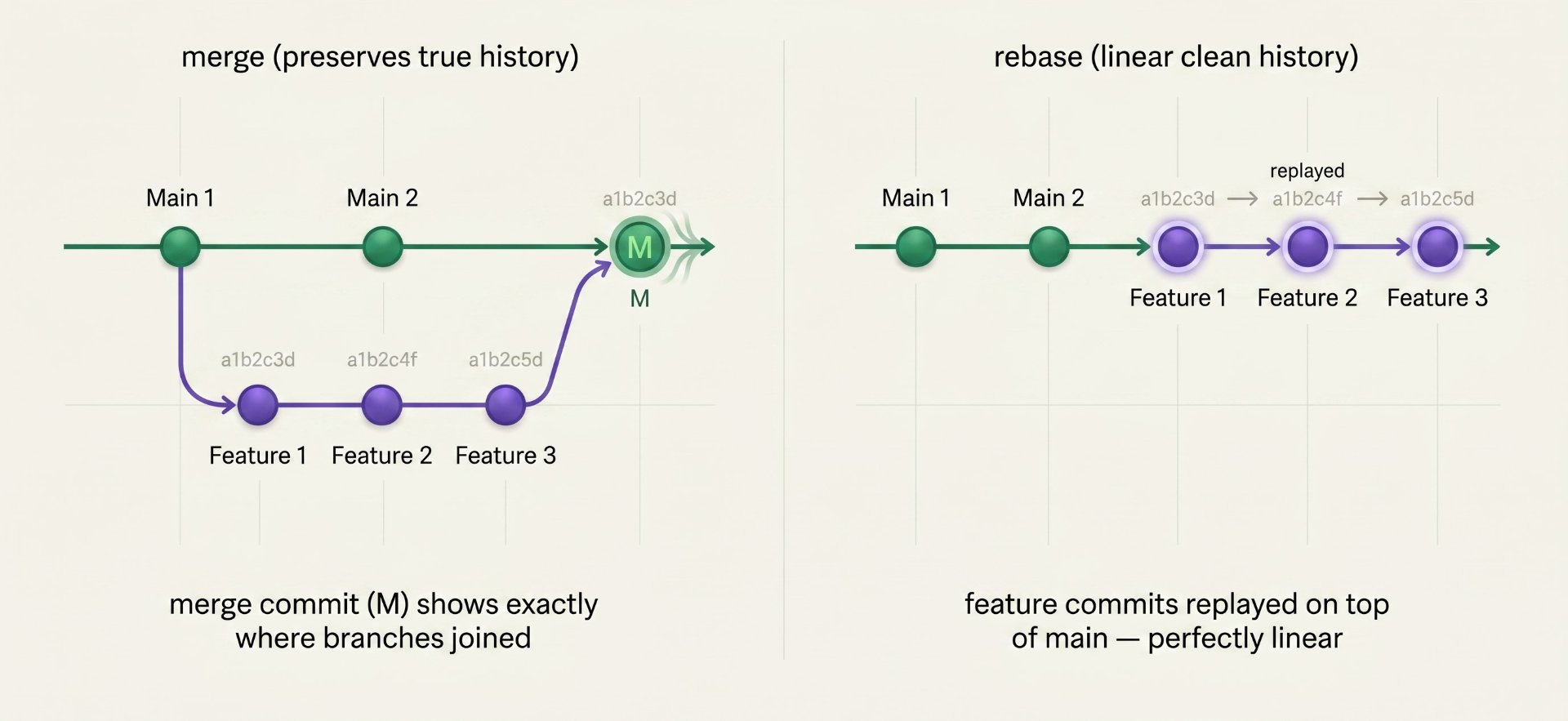
Every time a feature branch is ready, you have a choice: merge or rebase. This is one of the most debated topics in Git, and it matters more than most people realise; not for the code itself, but for the commit history, which is your team's permanent audit log.
A merge creates a merge commit that explicitly records "two branches of history joined here." The history is accurate but non-linear — the graph shows all the parallel work. A rebase rewrites the feature branch commits so they appear to have been created on top of the latest main the history is clean and linear but technically rewritten. Neither is universally better. The choice depends on your team's preference for history accuracy versus history readability.
# MERGE — use for integrating feature → main in a PR
# Creates a clear record that these commits came from a feature branch
git checkout main
git merge --no-ff feature/user-auth
# --no-ff forces a merge commit even when fast-forward is possible
# This preserves the branch topology in history

# REBASE — use to update your feature branch before raising a PR
# Replays your commits on top of the latest main
git checkout feature/user-auth
git rebase main
# Now your branch is based on the latest main — no merge conflicts in the PR

# SQUASH MERGE — use to merge many messy commits as one clean commit
git checkout main
git merge --squash feature/user-auth
git commit -m "feat: add user authentication"
# All feature commits become one — good for keeping main history clean

# NEVER rebase a branch that others have pushed to
# Rebase rewrites history — it will conflict with others' copies
git rebase main  # fine on your local feature branch
git rebase origin/shared-branch # DANGEROUS — ruins everyone's historyBranch naming conventions — consistency as engineering
Branch names are not just labels; they are inputs to your CI/CD pipelines, your PR automation, your deployment triggers, and your changelog generators. A consistent naming convention means your tooling can make decisions based on branch names automatically: feature branches run tests, release branches trigger staging deployments, hotfix branches skip the queue.
# Features
feature/user-authentication
feature/JIRA-1234-add-payment-flow
feat/redesign-checkout-page

# Bug fixes
fix/login-redirect-loop
bugfix/JIRA-5678-null-pointer-exception
fix/typo-in-error-message

# Hotfixes (production emergencies)
hotfix/critical-payment-bug
hotfix/v2.4.1-security-patch

# Releases
release/v2.4.0
release/2024-Q4
releases/sprint-42

# Experiments / proofs of concept
experiment/new-search-algorithm
spike/evaluate-redis-caching

# Chores / infrastructure
chore/upgrade-node-18
infra/add-terraform-modules
docs/update-api-documentation

# The pattern: type/short-description-in-kebab-case
# Or: type/TICKET-ID-short-description
# Never: myBranch, test123, john-temp, wip
# .git/hooks/pre-push (make executable: chmod +x)
#!/bin/bash
BRANCH=$(git rev-parse --abbrev-ref HEAD)
PATTERN="^(feature|fix|hotfix|release|chore|docs|experiment|spike)\/.+"
if [[ ! "$BRANCH" =~ $PATTERN ]]; then
echo "Branch name '$BRANCH' doesn't follow convention."
echo "Use: type/description (e.g. feature/user-auth)"
exit 1
fi
# In GitHub Actions — validate branch names in CI
- name: Validate branch name
run: |
BRANCH="${GITHUB_HEAD_REF}"
if [[ ! "$BRANCH" =~ ^(feature|fix|hotfix|release|chore|docs)/.+ ]]; then
echo "Invalid branch name: $BRANCH"
exit 1
fiBranch protection rules — engineering as policy
Branch protection rules are configuration in GitHub, GitLab, or Bitbucket that enforce your branching strategy automatically. They are the difference between "we agreed not to push directly to main" and "it is technically impossible to push directly to main." This is the DevOps principle of treating policies as code machine-enforced, not human-remembered.
resource "github_branch_protection" "main" {
  repository_id = github_repository.myapp.node_id
  pattern       = "main"

  # Must go through a PR — no direct pushes
  required_pull_request_reviews {
    required_approving_review_count = 2
    dismiss_stale_reviews           = true
    require_code_owner_reviews      = true
    require_last_push_approval      = true
  }

  # CI must pass before merge is allowed
  required_status_checks {
    strict = true   # branch must be up to date with main
    contexts = [
      "ci/tests",
      "ci/lint",
      "ci/security-scan",
      "ci/build",
    ]
  }

  # Signed commits required (cryptographic proof of author)
  require_signed_commits = true

  # No force-pushing — history is immutable
  allows_force_pushes = false
  allows_deletions    = false

  # Even admins follow the rules
  enforce_admins = true
}

# Protect release branches with a pattern
resource "github_branch_protection" "releases" {
  repository_id = github_repository.myapp.node_id
  pattern       = "release/*"

  required_pull_request_reviews {
    required_approving_review_count = 1
    dismiss_stale_reviews           = true
  }

  allows_deletions    = false
  allows_force_pushes = false
}CI/CD integration patterns — branches drive deployments
This is where branch strategy becomes operational. Your CI/CD pipeline should behave differently depending on which branch triggered it. Feature branches run tests. Main deploys to staging. Release branches deploy to production. Hotfix branches skip the queue. The branching strategy and the pipeline are one integrated system they must be designed together.
name: CI/CD pipeline

on:
  push:
    branches: [main, 'release/**', 'hotfix/**']
  pull_request:
    branches: [main, develop]

jobs:
  # Runs on EVERY branch / PR — the base quality gate
  test:
    runs-on: ubuntu-latest
    steps:
      - uses: actions/checkout@v4
      - run: npm ci && npm test && npm run lint

  # Deploys to staging ONLY when main is pushed
  deploy-staging:
    needs: test
    if: github.ref == 'refs/heads/main' && github.event_name == 'push'
    runs-on: ubuntu-latest
    environment: staging
    steps:
      - run: ./deploy.sh staging

  # Deploys to production ONLY on release/* branches
  deploy-production:
    needs: test
    if: startsWith(github.ref, 'refs/heads/release/')
    runs-on: ubuntu-latest
    environment: production   # requires manual approval in GitHub
    steps:
      - run: ./deploy.sh production

  # Hotfix path — skip staging, go direct to production
  deploy-hotfix:
    needs: test
    if: startsWith(github.ref, 'refs/heads/hotfix/')
    runs-on: ubuntu-latest
    environment: production
    steps:
- run: ./deploy.sh production --fast-trackChoosing your strategy — the honest guide
No strategy is universally correct. The right choice depends on your team size, release cadence, test culture, infrastructure, and product type. Use this table to find your starting point, then adapt.
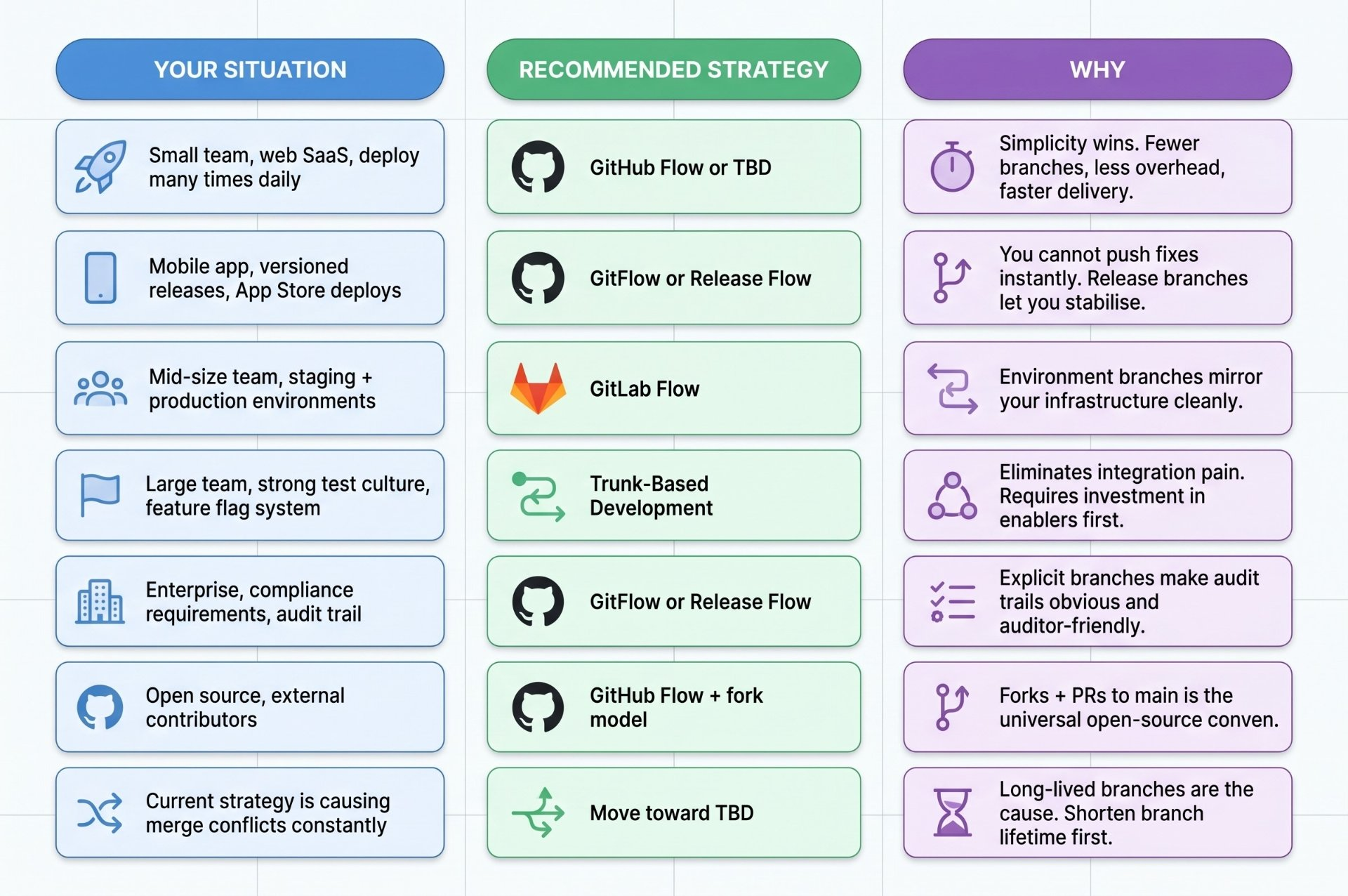
The most important rule
Whatever strategy you choose, the most important factor is not which one it is — it is how consistently your team follows it. A simple strategy applied consistently beats a sophisticated one applied inconsistently every time. Pick something your whole team understands, codify it in branch protection rules and pipeline conditions, write it down, and enforce it automatically rather than through peer pressure.
The most common mistake
Choosing a strategy based on what sounds most impressive rather than what fits your team's actual working style. Trunk-Based Development is used by Google, which is impressive but Google also has world-class test infrastructure, mandatory code review, feature flag systems, and thousands of engineers who have been practising it for years. Starting TBD without those enablers causes chaos, not productivity. Be honest about where you are, not where you aspire to be.
Author's Note
Chamath P.
DevOps Engineer
DevOps Engineer writing practical guides on Kubernetes, CI/CD, IaC, and SRE — based on real production experience.
This article was written with AI assistance. All technical claims and code examples have been personally verified before publishing.
Advertisements