Linux Kernel Namespaces Simplified
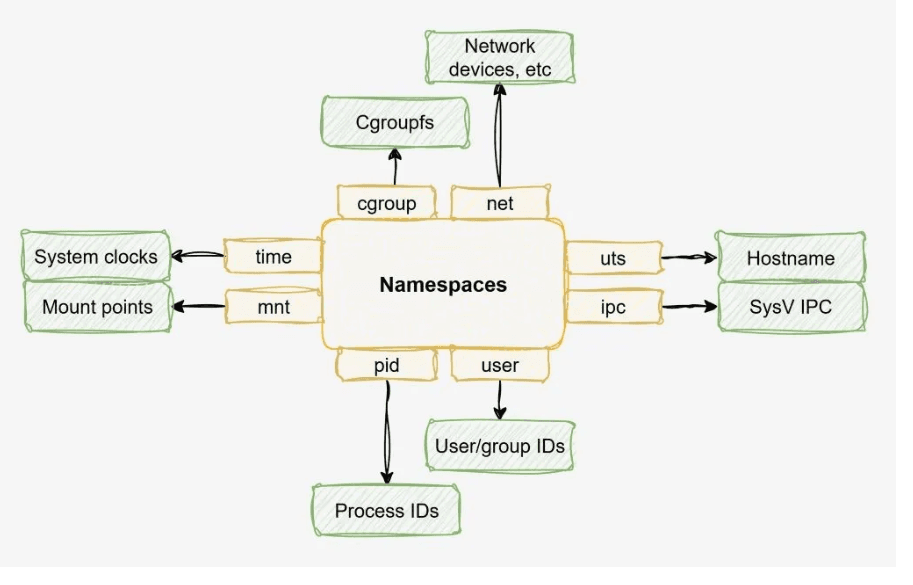
The Linux kernel has eight types of namespaces. They are the foundation of process isolation, security boundaries, and multi-tenancy on Linux completely independent of Docker or any container tool. This article explains all eight, from first principles, with analogies a beginner

Advertisements
What a namespace actually is?
Linux starts with one of everything. One list of all running processes. One network stack. One filesystem root. One hostname. One clock. All of these are global resources shared by every program running on the machine. Any process can, in principle, see all of them.
A namespace is the kernel's mechanism for creating a private, isolated view of one of those global resources. A process inside a namespace sees only its own version of the resource completely unaware that other processes have different versions of the same thing running alongside it.
The master analogy — one building, many rooms
Imagine a large office building. One building. One electrical system. One plumbing network. One security system. But inside: dozens of separate company offices, each with their own locked door, their own reception desk, their own filing cabinets, their own phone extension, their own name on the door. Company A has no idea what Company B's filing cabinet contains. They share the building but each inhabits their own private world. A Linux namespace is the locked door of one of those offices and there are eight different kinds of doors, each isolating a different resource.
The crucial point: namespaces do not virtualise hardware. There is still one CPU, one RAM, one kernel. A namespace only controls what a process is allowed to see. It is a lens, not a copy machine and it costs almost nothing to create.
The Linux kernel added namespaces incrementally over many years. Today there are exactly eight:
# Every process's namespaces live in /proc/[pid]/ns/
ls -la /proc/1/ns/

lrwxrwxrwx  cgroup -> cgroup:[4026531835]   # since Linux 4.6  (2016)
lrwxrwxrwx  ipc    -> ipc:[4026531839]      # since Linux 3.0  (2011)
lrwxrwxrwx  mnt    -> mnt:[4026531840]      # since Linux 3.8  (2013)
lrwxrwxrwx  net    -> net:[4026531992]      # since Linux 3.0  (2011)
lrwxrwxrwx  pid    -> pid:[4026531836]      # since Linux 3.8  (2013)
lrwxrwxrwx  time   -> time:[4026531834]     # since Linux 5.6  (2020)
lrwxrwxrwx  user   -> user:[4026531837]     # since Linux 3.8  (2013)
lrwxrwxrwx  uts    -> uts:[4026531838]      # since Linux 3.0  (2011)

# Each symlink points to a namespace inode: [type]:[unique ID]
# Two processes with the same inode share the same namespace
# Two processes with different inodes live in separate worlds
Notice time at the bottom — added in Linux 5.6 in 2020. Many engineers who learned Linux before 2020 have never heard of it. We will cover all eight, including this newest one.
PID namespace — process isolation
Isolates the process ID number space. Each namespace has its own PID 1, its own process tree, invisible to outsiders.
Every running program on Linux has a number its Process ID (PID). PID 1 is the ancestor of everything: the first process the kernel starts at boot. On modern systems it is systemd or init. Every other process is a descendant of PID 1, forming a tree.
Without a PID namespace, every process on the machine can see every other process. Run ps aux and hundreds of lines scroll by your web server, your database, your colleague's background job, the kernel threads, everything.
The village telephone exchange analogy
A village has one telephone exchange. Everyone has a unique extension, Extension 1 is the mayor, Extension 2 is the doctor, Extension 3 is the baker. Everyone can dial anyone. Now imagine building a private telephone exchange inside a new company office. Inside the office, Extension 1 is the CEO, Extension 2 is accounting. These extensions have nothing to do with the village exchange. They are completely separate numbering systems. You can have two "Extension 1s" one in the village, one in the company and they never collide. A PID namespace is that private exchange.
When a process is placed in a new PID namespace, it becomes PID 1 inside that namespace. It sees only itself and its children. The thousands of processes on the host are invisible to it. And from the host's side, that same process has a completely different, normal PID (say, PID 8412). Both numbers are simultaneously true different lenses on the same process.
Why PID 1 is special
In Linux, PID 1 has one critical responsibility: it must handle the SIGCHLD signal and reap "zombie" child processes when they exit. If your PID 1 inside a namespace dies, the kernel sends SIGKILL to every other process in that namespace the whole namespace collapses. This is why PID 1 in any isolated environment must be a well-written init-like process, not a naive shell script.
# Create a new PID namespace — bash becomes PID 1 inside
sudo unshare --pid --fork --mount-proc /bin/bash

# Inside the new namespace:
$ ps aux
PID   USER     COMMAND
  1   root     /bin/bash          ← you are PID 1
  2   root     ps aux
# The host's hundreds of processes? Completely invisible.

# From a SECOND terminal on the host, find the real PID:
$ pgrep -a bash | tail -3
8412 /bin/bash                   ← same bash, PID 8412 on the host

# Check the PID namespace inode — it differs from the host
[inside] $ readlink /proc/self/ns/pid
pid:[4026532234]                 ← different inode = different namespace
[host]   $ readlink /proc/1/ns/pid
pid:[4026531836]                 ← host's namespace inode
PID namespaces can be nested. A process in a child namespace is visible to its parent namespace (with a different PID) but not the reverse. The host always has the authoritative view of all PIDs across all namespaces.
Network namespace — network stack isolation
Isolates the entire network stack: interfaces, IP addresses, routing tables, firewall rules, and port space.
Your Linux machine has one network stack. One set of network interfaces (eth0, lo, etc.). One IP address per interface. One routing table. One set of iptables rules. And critically, one port space if something is listening on port 8080, nothing else can claim port 8080.
The apartment building intercom analogy
An apartment building has one physical postal address 42 Kernel Street. But each apartment has its own letterbox, its own intercom button, its own internal phone extension, and its own set of door locks. Apartment 3A has its own "Line 1, Line 2" on its phone. So does Apartment 7B. These are completely separate telephone systems living inside the same building. A network namespace is each apartment's private phone exchange it has its own interfaces, its own IP addresses, its own port numbers, completely separate from every other apartment and from the building's own address.
A network namespace gives a process its own complete, private network stack from scratch. When a new network namespace is created, it starts with only a loopback interface (lo) and nothing else no internet access, no IP, no routes. You build it up deliberately: add a virtual ethernet interface, assign an IP, add a route, and now it can communicate through carefully controlled channels.
The way two network namespaces communicate is through a virtual ethernet pair (veth pair) a virtual cable with two ends. Put one end in each namespace, assign IPs to each end, and packets flow between them like through a real cable. This is exactly how Linux networking works for virtual machines, network function virtualisation, and yes, containers.
# Create two network namespaces (named, for convenience)
sudo ip netns add red
sudo ip netns add blue

# Create a virtual ethernet pair — like a cable with two ends
sudo ip link add veth-red type veth peer name veth-blue

# Place each end inside its respective namespace
sudo ip link set veth-red  netns red
sudo ip link set veth-blue netns blue

# Assign IPs and bring the interfaces up
sudo ip netns exec red  ip addr add 10.0.0.1/24 dev veth-red
sudo ip netns exec blue ip addr add 10.0.0.2/24 dev veth-blue
sudo ip netns exec red  ip link set veth-red  up
sudo ip netns exec blue ip link set veth-blue up
sudo ip netns exec red  ip link set lo up
sudo ip netns exec blue ip link set lo up

# Prove isolation: red and blue each see only their own interface
sudo ip netns exec red  ip link show
1: lo: <LOOPBACK,UP>
2: veth-red: <BROADCAST,UP> — 10.0.0.1

sudo ip netns exec blue ip link show
1: lo: <LOOPBACK,UP>
2: veth-blue: <BROADCAST,UP> — 10.0.0.2

# They can ping each other through the virtual cable
sudo ip netns exec red ping -c 2 10.0.0.2
64 bytes from 10.0.0.2: icmp_seq=1 ttl=64 time=0.051 ms

# Clean up
sudo ip netns del red
sudo ip netns del blue
Network namespaces are used heavily in Linux networking beyond containers: network function virtualisation (NFV), software-defined networking (SDN), VPN implementations, and network testing all rely on them to create isolated, controlled network environments without needing separate physical machines.
Mount namespace — filesystem isolation
Isolates the mount table, what filesystem is mounted where. Each process sees its own private tree of directories.
In Linux, every file is accessible from a single root: /. Filesystems (hard drives, USB sticks, tmpfs, network shares) are attached to the tree by "mounting" them at a path. The global mount table is a list of everything currently mounted and where. Without isolation, every process on the machine sees the exact same filesystem tree.
The library reading rooms analogy
A library has one main collection of books, accessible from the front door. It also has private reading rooms that can be stocked with their own selection of books the books in Room A are not visible from Room B, and neither room can see all the books in the main collection unless the librarian explicitly carries a book in. A mount namespace is a private reading room: you start with an empty room (or a copy of the main catalogue) and deliberately choose what to stock it with.
A mount namespace gives a process its own private mount table. Mounts performed inside the namespace do not affect the host. The host's mounts do not automatically appear inside the namespace. A process in a mount namespace can have a completely different / from the host different /etc, different /usr, different everything.
The key operation is pivot_root (or the older chroot) replacing what the process considers to be / with a different directory. Combined with a mount namespace, this gives a process a completely independent filesystem universe with no access to the host's real files.
# Create a new mount namespace
sudo unshare --mount bash

# Inside the namespace: mount a tmpfs at /mnt/private
$ mount -t tmpfs tmpfs /mnt/private
$ echo "secret data" > /mnt/private/secret.txt
$ ls /mnt/private
secret.txt

# From a SECOND terminal on the host:
$ ls /mnt/private
(empty)         ← host cannot see the namespace's mount
$ cat /proc/mounts | grep private
(nothing)       ← the mount does not exist from the host's view

# Checking mount propagation modes (shared, private, slave, unbindable)
$ cat /proc/self/mountinfo | head -5
# Each mount entry shows its propagation type
# 'shared' = visible to parent namespace
# 'private' = invisible — default in new namespaces
Mount propagation — the advanced knob
Mount namespaces support four propagation modes:
shared(mounts propagate in both directions),slave(mounts flow in from the master but not back out),private(no propagation at all), andunbindable(cannot be bind-mounted elsewhere). These let you build sophisticated setups where some mounts are intentionally visible across namespace boundaries for example, a log directory that both a host and an isolated process can write to.
UTS namespace — hostname isolation
Isolates the system hostname and NIS domain name. Each process sees its own machine identity.
UTS stands for "UNIX Time-sharing System" a historical name inherited from an old operating system architecture. Despite the ancient name, its job is simple: it isolates the hostname (what the machine calls itself) and the NIS domain name.
Every Linux machine has a hostname, a name used to identify the machine on the network and in logs. Without UTS namespaces, there is one hostname for the whole machine, visible to every process.
The stage name analogy
A singer's legal name is "Robert Zimmerman" but on stage they go by "Bob Dylan." Inside the concert hall, the programme, the posters, and the announcer all say "Bob Dylan." Outside, at the tax office, the passport office, and the hospital, the name is "Robert Zimmerman." Both names refer to the same person, but the context determines which name is seen. A UTS namespace gives a process its own stage name its own hostname completely separate from the machine's real hostname.
# Check current hostname
hostname
production-server-07

# Create a new UTS namespace
sudo unshare --uts bash

# Inside the namespace: change the hostname
$ hostname my-isolated-env
$ hostname
my-isolated-env

# Exit the namespace and check the host — unchanged
$ exit
hostname
production-server-07   # host is completely unaffected

# Real-world use: syslog, kernel messages, and application logs
# all read the hostname — UTS namespaces let each tenant have
# a meaningful, unique identity in logs without changing the host
UTS namespaces are small but important for observability. Application logs, syslog entries, and kernel messages all embed the hostname. Without UTS isolation, every isolated process on a shared server would log the same hostname, making multi-tenant log analysis confusing. With a UTS namespace, each process group sees and logs its own meaningful name.
IPC namespace — inter-process messaging isolation
Isolates System V IPC objects and POSIX message queues the mechanisms processes use to pass messages and share memory directly.
IPC: Inter-Process Communication is how processes on the same machine talk to each other at very high speed, without going through files or network sockets. Linux provides several IPC mechanisms: System V message queues, semaphores, and shared memory segments. All of these are globally accessible by default any process can read a message queue created by any other process, if it knows the key.
The office pneumatic tube system analogy
Old office buildings had pneumatic tube systems pressurised tubes connecting different departments. You could put a document in a capsule, dial a department code, and the document would shoot across the building. But it was one shared system. Any department could potentially intercept any capsule if they knew the code. An IPC namespace gives each group of processes their own completely separate tube network Department A's tubes are physically disconnected from Department B's. There is no way to intercept, read, or inject into another group's messages.
IPC namespaces isolate three things: System V message queues (a numbered inbox/outbox system for processes), System V semaphores (shared counters used to coordinate access to resources), and System V and POSIX shared memory segments (a region of RAM that multiple processes can read and write simultaneously for very fast data exchange).
# On the host: create a System V message queue
ipcmk -Q
Message queue id: 3

# List it — it exists on the host
ipcs -q
------ Message Queues --------
key        msqid    owner    perms
0x7a3f1c2d 3        root     644

# Create a new IPC namespace and enter it
sudo unshare --ipc bash

# Inside the new namespace: the host's message queue is invisible
$ ipcs -q
------ Message Queues --------
key        msqid    owner
(empty)    ← the host's queue ID 3 does not exist here

# Create a queue inside the namespace
$ ipcmk -Q
Message queue id: 0     ← starts fresh from 0 — separate numbering

# Exit — the host's original queue is still there, untouched
$ exit
ipcs -q
key        msqid    owner
0x7a3f1c2d 3        root   ← still here, unaffected
Why IPC isolation matters for security
Without IPC namespaces, a process could attach to another process's shared memory segment by guessing the key effectively reading or corrupting another program's internal state. This is a real attack vector in multi-tenant systems. IPC namespaces eliminate this entirely: each isolated group's shared memory, semaphores, and message queues are invisible to all other groups, even on the same physical machine.
User namespace — identity and privilege isolation
Maps user IDs and group IDs between the namespace and the host. Lets an unprivileged user appear as root inside their own namespace.
In Linux, every process runs as a user with a User ID (UID) and a Group ID (GID). UID 0 is root the superuser with unlimited power over the system. Privilege is tied directly to these numbers: if your UID is 0, you can do anything.
User namespaces break this. They allow UID and GID numbers to mean different things inside a namespace compared to outside. A process can have UID 0 (root) inside a user namespace while its actual UID on the host is 1000 a completely ordinary, unprivileged user. The kernel maintains a mapping table between the two views.
The LARP game analogy
Live-action role-playing (LARP): you are a software developer. You go to a LARP event and play a powerful wizard. Inside the game, you can cast spells, command armies, open sealed vaults. Other players treat you as all-powerful. But when the event ends and you drive home, you are a software developer. You cannot actually cast spells or open bank vaults. Your "wizard powers" only existed within the game world, enforced by a social contract. A user namespace is the game world: your process has root powers inside, but those powers are bounded by the namespace outside, the kernel knows you are UID 1000.
# Check who you are on the host
id
uid=1000(alice) gid=1000(alice)   # ordinary user

# Create a user namespace as an unprivileged user — no sudo needed!
unshare --user --map-root-user bash

# Inside the namespace: you ARE root
$ id
uid=0(root) gid=0(root)          # root inside the namespace

# But from the host, you are still uid=1000
# Check the UID mapping — the kernel's translation table
$ cat /proc/self/uid_map
         0       1000          1
# "UID 0 inside maps to UID 1000 outside, for 1 UID"

# A full range mapping (typical for rootless containers):
# 0   100000   65536
# "UIDs 0-65535 inside map to UIDs 100000-165535 outside"

# Capabilities: inside the namespace, you have all capabilities
$ cat /proc/self/status | grep Cap
CapEff: 000001ffffffffff   ← all capabilities effective inside namespace
# But these capabilities only apply within the user namespace's scope
User namespaces enable everything else without root
User namespaces are the only namespace type that an unprivileged user can create without any special privileges. And crucially, once inside a user namespace where you appear as root, you can create all the other namespace types PID, network, mount, UTS, IPC which normally require root. This is the foundation of fully rootless isolation: one user namespace grants the privilege needed to build a complete isolated environment, all without ever having real host root.
Cgroup namespace — resource view isolation
Isolates a process's view of the cgroup hierarchy. A process sees only its own cgroup subtree, not the full host hierarchy.
Cgroups (control groups) are the kernel mechanism for limiting and accounting for resource usage CPU time, memory, disk I/O, network bandwidth. They are organised in a hierarchy: every process belongs to a cgroup, which may be nested inside a parent cgroup.
Without a cgroup namespace, a process can read /proc/self/cgroup and see its full path in the host's cgroup hierarchy, revealing the entire organisational structure of the host system. This is an information leak: a process could learn it is running inside a "container" managed by a particular system, see how the host has organised its resource allocation, and potentially exploit that knowledge.
The company org chart analogy
Imagine a company with a full organisational chart: CEO at the top, then VPs, then directors, then managers, then individual contributors. A new contractor joins and is placed in Team Delta under Manager Carol under Director Bob. Without privacy, the contractor can see the entire company org chart. With privacy, they see only their own team's sub-chart: Carol at the top, their teammates around them. They have no idea how large the company is, who is above Carol, or how many other teams exist. A cgroup namespace virtualises this view each process sees its own cgroup as if it were the root of the hierarchy.
# On the host, see your full cgroup path
cat /proc/self/cgroup
0::/user.slice/user-1000.slice/session-3.scope
# Full path from the root of the hierarchy — exposes structure

# Create a new cgroup namespace
sudo unshare --cgroup bash

# Inside the cgroup namespace: the process sees itself at the root
$ cat /proc/self/cgroup
0::/
# The full host path is hidden — the process thinks it IS the root
# It cannot see /user.slice/user-1000.slice/... — that context is gone

# Also hides resource limits from /sys/fs/cgroup
# The process can only see its own subtree's files,
# not the host's full cgroup filesystem
Cgroup namespace ≠ cgroup itself
This is a common confusion. A cgroup namespace only controls what part of the cgroup hierarchy a process can see. Actual resource limits (memory caps, CPU quotas) are set by creating cgroups and writing to
/sys/fs/cgroup/that is the cgroup subsystem itself. The cgroup namespace is purely about view isolation and information hiding, not about enforcing resource constraints.
Time namespace — clock isolation
Isolates two monotonic clocks: CLOCK_MONOTONIC and CLOCK_BOOTTIME. Each namespace can have its own clock offset.
The time namespace is the newest of the eight, added in Linux 5.6 in 2020. Most engineers even experienced ones have never heard of it. To understand why it exists, you need to understand Linux clocks.
Linux exposes several clocks. CLOCK_REALTIME is wall-clock time the actual date and time, which can be adjusted by NTP or by a system administrator. CLOCK_MONOTONIC is a clock that always moves forward it never jumps backward, making it ideal for measuring elapsed time. CLOCK_BOOTTIME is like CLOCK_MONOTONIC but also counts time spent in system suspend.
The jet lag analogy
When you fly from London to Tokyo, your body clock says it is 3am but the local time says it is 11am. Your internal sense of "how long since I woke up" (monotonic) is accurate to your own experience, even though the wall clock shows a completely different time. A time namespace lets a process have its own internal sense of "how long since I started" its own monotonic clock that can be offset from the host. Useful for: restoring a suspended process that should think it woke up right where it left off, testing time-sensitive code without changing the system clock, or checkpointing and restoring a process on a different machine.
Critically, the time namespace does not isolate CLOCK_REALTIME (wall time). Wall time is always shared across the whole system you cannot give a process a fake date. The time namespace only offsets the two monotonic clocks, which measure elapsed time since system boot or process start.
# Check kernel version — time namespace requires 5.6+
uname -r
6.5.0-27-generic   # good

# See the host's monotonic clock (seconds since boot)
cat /proc/self/timens_offsets
monotonic           0         0
boottime            0         0
# No offset — same as the global clock

# Create a time namespace with a 1-hour offset on the monotonic clock
# (offset is in seconds nanoseconds format)
sudo unshare --time bash

# Inside the namespace, set a custom offset
$ echo "monotonic 3600 0" > /proc/self/timens_offsets
$ cat /proc/self/timens_offsets
monotonic           3600      0     ← 1 hour ahead on monotonic clock
boottime               0      0

# Real-world use case: CRIU (Checkpoint/Restore In Userspace)
# When restoring a checkpointed process on a different machine,
# CRIU uses time namespaces to make the process believe
# it woke up exactly where it left off — even hours or days later
The main use case: process checkpoint and restore
CRIU (Checkpoint/Restore In Userspace) is the primary real-world user of time namespaces. When you checkpoint a long-running process, freeze it, move it to another machine, and restore it, the process's internal timers would be wrong it would think far more time had passed than subjectively should have. A time namespace with the right offset corrects this: the process wakes up thinking only a moment has passed, even if the actual elapsed time was much longer. This is critical for live migration of processes between servers.
All 8 together — the complete reference
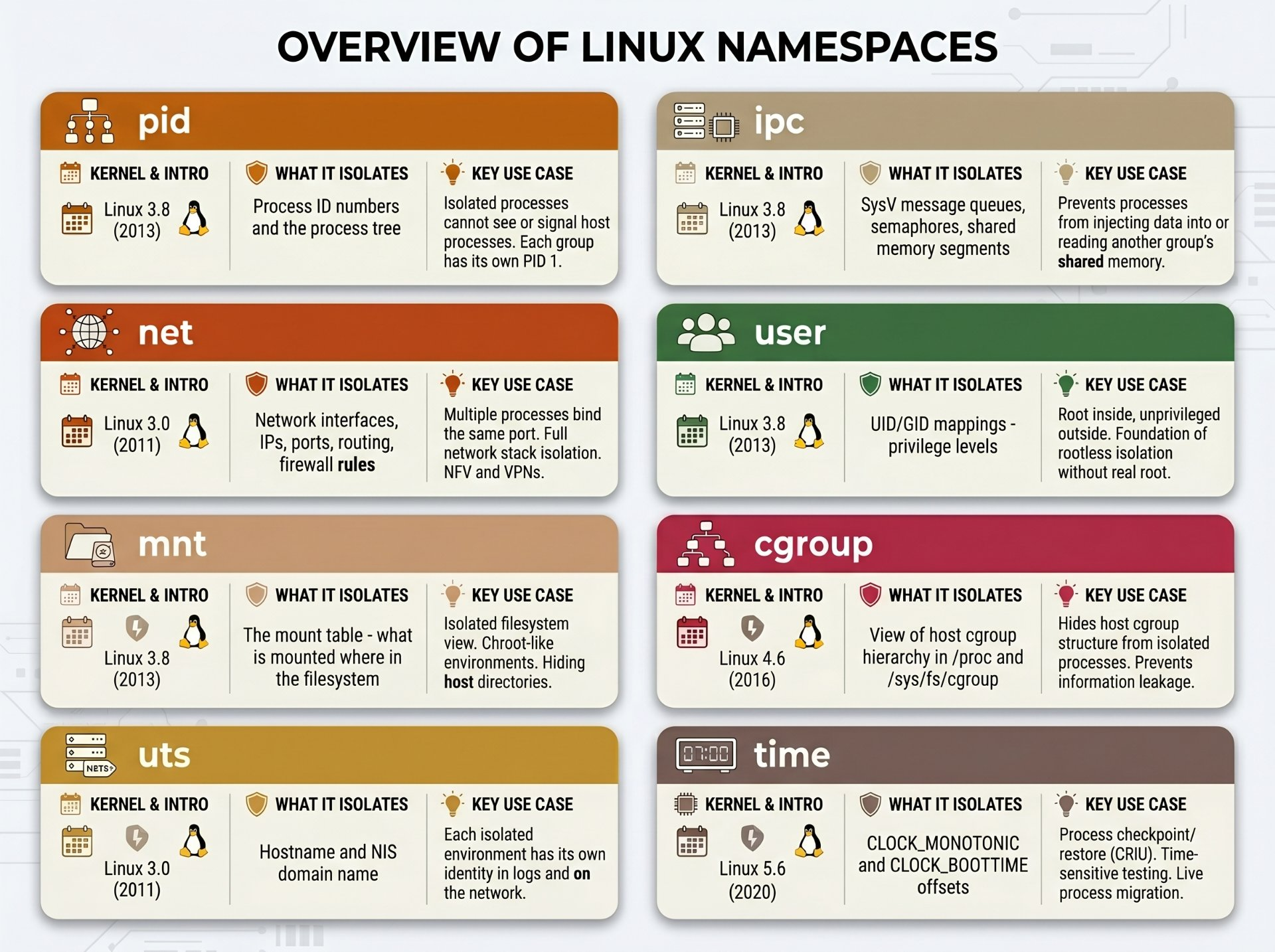
Here is the complete view: all eight namespaces, what they isolate, when they were added, and their most important real-world use cases condensed into one table.
# Apply all 8 namespaces simultaneously to a single bash process
# This is the raw kernel foundation of what any container runtime does
sudo unshare \
  --pid \         # 1. own process tree (bash = PID 1)
  --net \         # 2. own network stack
  --mount \       # 3. own mount table
  --uts \         # 4. own hostname
  --ipc \         # 5. own IPC objects
  --user \        # 6. own UID/GID mapping
  --map-root-user \  # 6a. map us to root inside
  --cgroup \      # 7. own cgroup view
  --time \        # 8. own clock offsets
  --fork \        # fork so PID assignment works
  --mount-proc \  # mount fresh /proc for correct ps
  /bin/bash

# Prove all 8 are active — each has a different inode from the host
$ for ns in pid net mnt uts ipc user cgroup time; do
    printf "%-8s %s\n" "$ns" "$(readlink /proc/self/ns/$ns)"
  done
pid      pid:[4026532234]     ← isolated
net      net:[4026532235]     ← isolated
mnt      mnt:[4026532236]     ← isolated
uts      uts:[4026532237]     ← isolated
ipc      ipc:[4026532238]     ← isolated
user     user:[4026532239]    ← isolated
cgroup   cgroup:[4026532240]  ← isolated
time     time:[4026532241]    ← isolated
The fundamental truth: every container runtime Docker, Podman, LXC, systemd-nspawn, firejail is ultimately just a program that calls
clone()orunshare()with a combination of these eight flags. The Linux kernel has no concept of a "container." It only knows namespaces. All the rest is userspace tooling built on top of these eight primitives.
Author's Note
Chamath P.
DevOps Engineer
DevOps Engineer writing practical guides on Kubernetes, CI/CD, IaC, and SRE — based on real production experience.
This article was written with AI assistance. All technical claims and code examples have been personally verified before publishing.
Advertisements