Master/worker architecture — why nginx handles load the way it does
You know reverse proxying. You can write a conf file. Now let's go deeper: the architecture underneath, the configuration model that actually controls behaviour, location matching rules that most engineers get subtly wrong, security that goes beyond the basics, and production deb


Advertisements
Master/worker architecture — why nginx handles load the way it does
nginx's performance model is not magic; it is a deliberate architectural choice. One master process manages everything: reads config, binds privileged ports, spawns and monitors workers. The workers do the actual work. They never share memory for connection state. They communicate with the outside world through OS-level mechanisms, not each other.
What makes workers fast is the event loop. Each worker is a single-threaded process running a non-blocking event loop. Instead of spawning a thread or process per connection (the Apache prefork model), one worker handles thousands of connections simultaneously by reacting to kernel events epoll on Linux, kqueue on BSD. A connection that is waiting for an upstream response simply suspends until data arrives. The CPU is never sitting idle waiting on I/O.
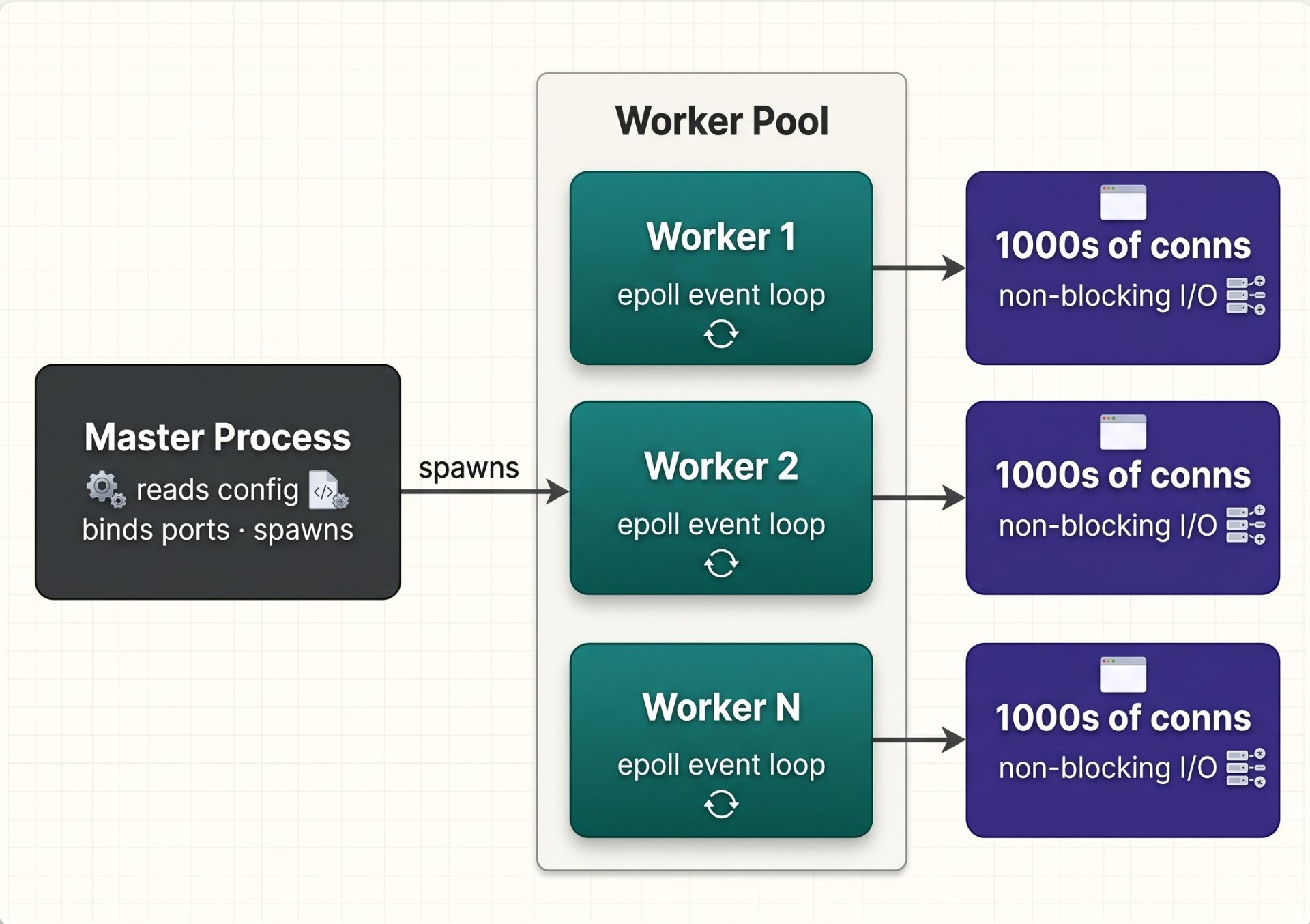
The practical implications for you: worker_processes auto sets worker count to the number of CPU cores. This is almost always right you want one worker per core so OS scheduling doesn't fragment CPU cache. The one exception is I/O-heavy proxying where workers spend most time waiting on upstreams in that case more workers than cores can help, but benchmark before assuming.
# Worker count — auto = number of CPU cores (almost always correct)
worker_processes auto;

# Total max connections = worker_processes × worker_connections
# With 4 cores and 4096 conns per worker: 16,384 simultaneous connections
events {
    worker_connections 4096;

    # epoll is Linux's scalable I/O notification mechanism
    # nginx detects it automatically, but explicit is better
    use epoll;

    # Accept multiple connections per epoll event instead of one at a time
    # Significant throughput improvement under high load
    multi_accept on;
}

# File descriptor limit — must be at least 2× worker_connections
# (each connection needs 2 FDs: client + upstream)
# Also set in /etc/security/limits.conf and systemd unit
worker_rlimit_nofile 65535;Configuration model & directive inheritance — the rules most people guess at
nginx's configuration is a nested context tree. Directives cascade down from parent to child contexts, but the inheritance rules are not uniform, they depend on whether a directive is a simple directive or an array directive. Getting this wrong causes subtle bugs where you think you have set something at the server level and it is silently not applying to a specific location.
The inheritance rule
Simple directives (single value like gzip on, proxy_read_timeout) are inherited by child contexts unless the child overrides them. Array directives (that accumulate values like add_header, proxy_set_header) are NOT inherited — if you define them at the child level, the parent's values are completely replaced, not merged. This is the source of "why aren't my security headers appearing on some routes?" bugs.
# MAIN context — affects the whole process
worker_processes auto;
error_log /var/log/nginx/error.log warn;

events {
    worker_connections 4096;
}

# HTTP context — all HTTP traffic
http {
    # Defined here → inherited by ALL server blocks
    gzip on;
    keepalive_timeout 65;
    server_tokens off;

    # add_header here → ONLY applies if the server/location block
    # does NOT define its own add_header directives
    add_header X-Frame-Options SAMEORIGIN always;

    include /etc/nginx/conf.d/*.conf;  # modular configs

    server {
        listen 443 ssl;
        server_name app.example.com;

        # This server block adds its OWN add_header directives.
        # The http-level add_header above is NOW IGNORED for this server.
        # You MUST repeat all headers you want here.
        add_header Strict-Transport-Security "max-age=31536000" always;
        add_header X-Frame-Options SAMEORIGIN always;  # repeat it!

        location /api/ {
            # Same rule — if you add add_header here, ALL server-level
            # add_headers are dropped for this location. Repeat them.
            proxy_pass http://app_upstream;
        }

        location /static/ {
            # No add_header here → inherits server block's headers. Good.
            root /var/www;
            expires 30d;
        }
    }
}
The add_header trap — catches everyone eventually
Because add_header is an array directive, defining it in a location block silently drops all the add_header directives from the parent server block for that location. Security headers you set at the server level vanish. The fix: either define all security headers in every location that needs them, or use proxy_hide_header / the headers-more module, or better use a common include file that you explicitly include in every location that needs headers.
The include pattern — how to actually structure large configs
/etc/nginx/
├── nginx.conf               # main config — minimal, includes everything
├── conf.d/
│   ├── app.example.com.conf # one file per vhost
│   └── api.example.com.conf
└── includes/
    ├── security_headers.conf # shared security headers snippet
    ├── ssl_params.conf       # shared TLS settings
    ├── proxy_params.conf     # shared proxy headers
    └── gzip.conf             # shared compression settings

# Then in any server or location block:
location /api/ {
    include includes/security_headers.conf;  # explicit, always present
    include includes/proxy_params.conf;
    proxy_pass http://app_upstream;
}Location matching — the complete rules with priority
This is the most misunderstood part of nginx configuration. Most engineers either copy patterns without understanding them or rely on trial and error. The location matching algorithm is deterministic and learnable, understand it once and you will never be surprised by routing behaviour again.
nginx evaluates location blocks in a specific priority order that is not simply "top to bottom." There are four modifier types, and the algorithm has two phases.
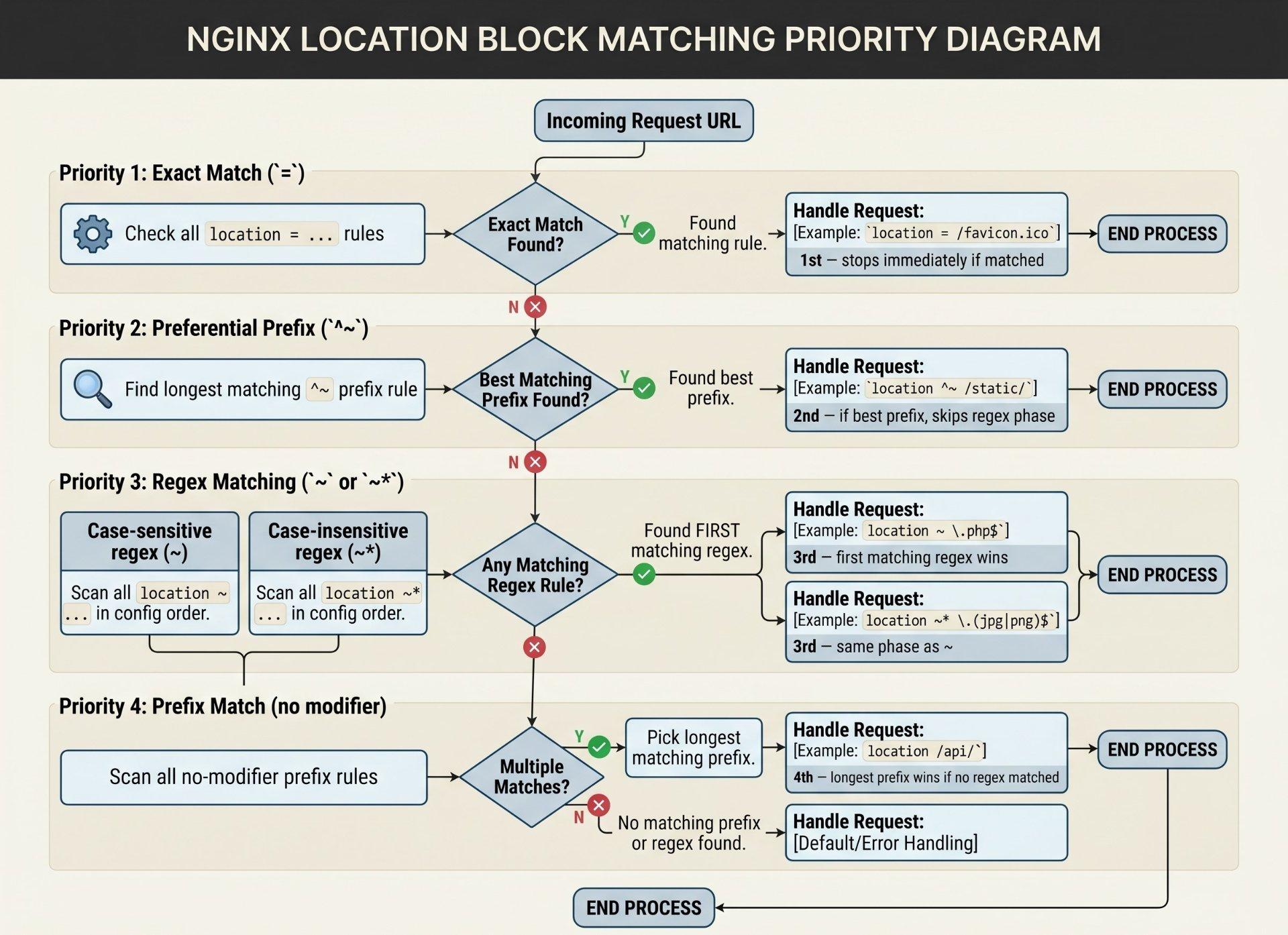
The two-phase algorithm in plain English: nginx first scans all prefix locations (no modifier and ^~) and finds the longest matching one. If that match used ^~ or =, the search stops that location wins. If the longest prefix match was a plain prefix (no modifier), nginx remembers it, then scans all regex locations in order. If any regex matches, it wins. If no regex matches, the remembered prefix location wins.
# 1. Exact match — highest priority, stops immediately
# Perfect for frequently-hit static files you want served with zero overhead
location = /favicon.ico {
    log_not_found off;
    access_log off;
    expires 1y;
}

location = /robots.txt {
    allow all;
    log_not_found off;
}

# 2. Preferential prefix (^~) — wins over ALL regex if it's the longest prefix
# Use this to guarantee /static/ is never caught by a PHP or extension regex
location ^~ /static/ {
    root /var/www;
    expires 30d;
    add_header Cache-Control "public, immutable";
}

# 3. Regex (case-sensitive ~)
# These are checked IN ORDER — first match wins
# IMPORTANT: put more specific patterns FIRST
location ~ /api/v2/auth/ {
    proxy_pass http://auth_upstream;
    # more specific — must be before the general /api/ regex
}
location ~ /api/ {
    proxy_pass http://api_upstream;
}

# 4. Case-insensitive regex (~*)
location ~* \.(jpg|jpeg|png|gif|webp|svg|ico)$ {
    expires 30d;
    add_header Cache-Control "public";
}

# 5. Plain prefix (no modifier) — fallback, longest match wins
# Useful as a catch-all or for routing to your main app
location / {
    try_files $uri $uri/ /index.php?$query_string;
}
The regex ordering trap
Regex locations are evaluated top-to-bottom and the first match wins. Unlike prefix locations where nginx finds the longest match globally, regex locations have no "best match" logic. If you put a broad regex before a specific one, the broad one will always win. Always order regex locations from most specific to least specific.
Upstream blocks — the full configuration
Most engineers write bare-minimum upstream blocks. The upstream directive has significant depth that directly impacts how your application behaves under load and during failures.
# Define the upstream group
upstream app_backend {
    # ── Load balancing algorithm ──────────────────────────────────
    # (default) round-robin: distributes evenly across healthy servers
    # least_conn: sends to server with fewest active connections
    # ip_hash: same client IP always goes to same server (session affinity)
    # hash $request_uri: consistent hash on URI (good for cache servers)
    least_conn;

    # ── Servers ───────────────────────────────────────────────────
    server 10.0.0.1:8080 weight=3;   # gets 3× the traffic of weight=1
    server 10.0.0.2:8080 weight=1;
    server 10.0.0.3:8080 backup;     # only used when all primaries are down
    server 10.0.0.4:8080 down;       # marked as permanently unavailable

    # ── Passive health checking (open-source) ─────────────────────
    # After 3 failures in 30s, mark server as unavailable for 30s
    server 10.0.0.1:8080
        max_fails=3
        fail_timeout=30s;

    # ── Keepalive connections to upstream ─────────────────────────
    # This is one of the most impactful performance settings.
    # Keeps N idle connections open to each upstream.
    # Eliminates TCP handshake overhead for every request.
    # MUST add Connection "" and HTTP/1.1 headers in location block.
    keepalive 32;

    # Time to keep an idle upstream connection alive
    keepalive_timeout 60s;

    # Max requests per keepalive connection before closing and reopening
    keepalive_requests 100;
}

server {
    location /api/ {
        proxy_pass http://app_backend;

        # Required for upstream keepalive to work:
        proxy_http_version 1.1;               # keepalive needs HTTP/1.1
        proxy_set_header Connection "";        # clear Connection: close

        # ── Timeouts — tune for your app's actual behaviour ────────────
        proxy_connect_timeout 5s;    # TCP connection to upstream (keep short)
        proxy_send_timeout    60s;   # time between writes to upstream
        proxy_read_timeout    60s;   # time waiting for upstream response
        # For slow endpoints (PDF gen, reports): increase read_timeout only

        # ── Error handling — try next server on failure ─────────────────
        # Only retry on these conditions — NOT on 5xx (could duplicate POSTs)
        proxy_next_upstream error timeout non_idempotent;
        proxy_next_upstream_tries 3;
        proxy_next_upstream_timeout 10s;

        # ── Standard proxy headers ──────────────────────────────────────
        proxy_set_header Host $host;
        proxy_set_header X-Real-IP $remote_addr;
        proxy_set_header X-Forwarded-For $proxy_add_x_forwarded_for;
        proxy_set_header X-Forwarded-Proto $scheme;
    }
}
proxy_next_upstream and POST requests
Be careful with proxy_next_upstream on non-idempotent requests. If nginx retries a failed POST to the next upstream, you may get duplicate orders, duplicate charges, duplicate records. Either exclude POST from retry with proxy_next_upstream error timeout (no non_idempotent), or ensure your upstream handles idempotency keys.
TLS — the correct modern configuration
Most nginx TLS configs online are outdated. They include TLS 1.0/1.1 for "compatibility," weak ciphers, and missing OCSP stapling. Here is a configuration that achieves an A+ on SSL Labs while remaining compatible with any client from the last five years.
# ── Protocols — drop TLS 1.0 and 1.1 (both deprecated/broken) ────
ssl_protocols TLSv1.2 TLSv1.3;

# ── Cipher suites ──────────────────────────────────────────────────
# Prefer ECDHE (provides forward secrecy)
# AES-GCM (authenticated encryption, hardware-accelerated)
# CHACHA20 (fallback for devices without AES hardware — e.g. old mobile)
ssl_ciphers ECDHE-ECDSA-AES128-GCM-SHA256:ECDHE-RSA-AES128-GCM-SHA256:ECDHE-ECDSA-AES256-GCM-SHA384:ECDHE-RSA-AES256-GCM-SHA384:ECDHE-ECDSA-CHACHA20-POLY1305:ECDHE-RSA-CHACHA20-POLY1305:DHE-RSA-AES128-GCM-SHA256;

# Let the server choose the cipher (not the client)
# Client preference can be exploited to downgrade to weaker ciphers
ssl_prefer_server_ciphers off;  # off = TLS 1.3 handles this better

# ── Session cache — reduces TLS handshake cost for repeat visitors ──
ssl_session_cache shared:SSL:10m;   # shared across workers, 10 MB
ssl_session_timeout 1d;
ssl_session_tickets off;            # tickets have forward secrecy issues

# ── OCSP Stapling — serves cert validity proof with the response ─────
# Without this, clients must make a separate request to the CA
# to check if the cert is revoked. Stapling bundles that response.
ssl_stapling on;
ssl_stapling_verify on;
resolver 8.8.8.8 1.1.1.1 valid=300s;  # nginx uses this to fetch OCSP
resolver_timeout 5s;

# ── DH params for DHE ciphers (2048-bit minimum) ────────────────────
# Generate: openssl dhparam -out /etc/nginx/dhparam.pem 2048
ssl_dhparam /etc/nginx/dhparam.pem;
server {
listen 443 ssl http2;
listen [::]:443 ssl http2;
server_name app.example.com;
ssl_certificate /etc/letsencrypt/live/app.example.com/fullchain.pem;
ssl_certificate_key /etc/letsencrypt/live/app.example.com/privkey.pem;
# Include the shared TLS config
include includes/ssl_params.conf;
# ── HSTS — tell browsers to always use HTTPS ─────────────────────
# 63072000 = 2 years. Once sent, browser enforces for that duration.
# includeSubDomains: all subdomains also get HTTPS-only
# preload: submit to Chrome's hardcoded HSTS list (permanent — plan carefully)
add_header Strict-Transport-Security "max-age=63072000; includeSubDomains; preload" always;
}
# HTTP → HTTPS redirect (301 permanent)
server {
listen 80;
listen [::]:80;
server_name app.example.com;
return 301 https://$host$request_uri;
}HSTS preload is very hard to undo
Adding preload to your HSTS header and submitting to hstspreload.org embeds your domain in every Chrome/Firefox/Safari installation. If you ever need to serve HTTP (for any reason), you cannot the browser will refuse. Only add preload if you are absolutely certain you will use HTTPS forever on this domain and all its subdomains.
Security headers & hardening — the complete production checklist
# ── Version hiding ────────────────────────────────────────────────
# Stop advertising the nginx version in responses and error pages
server_tokens off;

# ── Clickjacking protection ───────────────────────────────────────
# DENY = page cannot be framed at all
# SAMEORIGIN = only your own domain can frame it
add_header X-Frame-Options "SAMEORIGIN" always;

# ── MIME type sniffing prevention ─────────────────────────────────
# Stops browsers from guessing content types — prevents some XSS attacks
add_header X-Content-Type-Options "nosniff" always;

# ── XSS protection (legacy browsers) ─────────────────────────────
# Modern browsers rely on CSP instead, but this helps older ones
add_header X-XSS-Protection "1; mode=block" always;

# ── Referrer policy ───────────────────────────────────────────────
# Controls how much URL info is sent in the Referer header
# strict-origin-when-cross-origin: full URL within your site,
# only origin (no path) to external sites
add_header Referrer-Policy "strict-origin-when-cross-origin" always;

# ── Permissions Policy (formerly Feature-Policy) ─────────────────
# Disable browser features your app doesn't need
# Reduces attack surface for malicious JS or iframes
add_header Permissions-Policy "camera=(), microphone=(), geolocation=(), payment=()" always;

# ── Content Security Policy ───────────────────────────────────────
# The most powerful header — restricts where resources can load from
# Start with report-only to understand violations before enforcing
add_header Content-Security-Policy-Report-Only "default-src 'self'; script-src 'self'; style-src 'self' 'unsafe-inline'; img-src 'self' data: https:; font-src 'self'; connect-src 'self' wss:; frame-ancestors 'none'; report-uri /csp-report" always;

# When ready to enforce (remove -Report-Only):
# add_header Content-Security-Policy "..." always;

# ── Remove server info headers ────────────────────────────────────
# If proxying, upstream may add its own server header
proxy_hide_header X-Powered-By;
proxy_hide_header Server;

# ── Limit request methods ─────────────────────────────────────────
# Only allow methods your app actually uses
# Return 405 for anything else
if ($request_method !~ ^(GET|HEAD|POST|PUT|PATCH|DELETE|OPTIONS)$ ) {
    return 405;
}
# ── Request size limits ───────────────────────────────────────────
# Prevents large payload attacks. 0 = unlimited (dangerous)
# Set at http level, override per location where needed
client_max_body_size 10m;
# For file upload endpoints only:
location /upload {
client_max_body_size 100m;
proxy_pass http://upload_service;
}
# ── Timeouts — prevent slowloris attacks ─────────────────────────
# Time to read the client request headers
client_header_timeout 10s;
# Time to read the client request body
client_body_timeout 10s;
# Time to send the response to the client
send_timeout 10s;
# Time an idle keepalive connection stays open
keepalive_timeout 65s;
# ── Buffer sizes — prevents buffer overflow attacks ──────────────
client_body_buffer_size 16k;
client_header_buffer_size 1k;
large_client_header_buffers 4 8k; # max 4 buffers of 8k for headers
# ── Block common attack patterns ─────────────────────────────────
# Reject requests with invalid/missing Host header
server {
listen 80 default_server;
server_name _;
return 444; # 444 closes connection without response (nginx extension)
}
# ── Hide sensitive files ──────────────────────────────────────────
location ~ /\. {
deny all; # blocks .git, .env, .htaccess, etc.
return 404;
}
location ~ ~$ {
deny all; # blocks editor backup files (file.conf~)
}Rate limiting — the full picture
nginx rate limiting is more nuanced than most tutorials show. There are two directives :limit_req (request rate) and limit_conn (simultaneous connections) and they solve different problems. You almost always want both.
# ── Define rate limit zones ───────────────────────────────────────
# In the http block (not server or location)

# Per-IP request rate: 10 requests/second, 10MB memory for tracking
# 10MB holds ~160,000 IP addresses
limit_req_zone $binary_remote_addr zone=req_per_ip:10m rate=10r/s;

# Per-IP connection limit
limit_conn_zone $binary_remote_addr zone=conn_per_ip:10m;

# More granular: rate limit per user (requires auth — uses $http_x_user_id)
limit_req_zone $http_x_user_id zone=req_per_user:10m rate=60r/m;

# For API endpoints with API keys
limit_req_zone $http_x_api_key zone=req_per_key:10m rate=100r/m;

# ── Apply in location blocks ──────────────────────────────────────
location /api/ {
    # burst=20: allow bursts up to 20 requests above the rate
    # nodelay: process burst requests immediately instead of queuing
    # Without nodelay, nginx queues excess requests (adds latency)
    # With nodelay, excess requests are processed immediately or rejected
    limit_req zone=req_per_ip burst=20 nodelay;
    limit_conn conn_per_ip 20;

    # Return 429 (Too Many Requests) instead of default 503
    limit_req_status 429;
    limit_conn_status 429;

    proxy_pass http://app_backend;
}

# Login endpoint — much stricter
location /auth/login {
    limit_req zone=req_per_ip burst=5 nodelay;
    limit_conn conn_per_ip 5;
    limit_req_status 429;

    proxy_pass http://auth_backend;
}

# Completely bypass rate limiting for trusted IPs (internal monitoring, etc.)
geo $limit {
    default 1;
    10.0.0.0/8     0;    # internal network — no rate limit
    192.168.0.0/16 0;
}
map $limit $limit_key {
    0 "";                   # empty key = not tracked = not limited
    1 $binary_remote_addr;  # real IP = tracked and limited
}
limit_req_zone $limit_key zone=req_exempt:10m rate=10r/s;Performance tuning — the directives that actually matter
http {
    # ── File serving optimisations ────────────────────────────────
    # sendfile: use kernel-level file copying instead of read()+write()
    # Critical for static file serving. Off by default.
    sendfile on;

    # tcp_nopush: batch sendfile() calls into full TCP segments
    # Reduces packets. Requires sendfile on.
    tcp_nopush on;

    # tcp_nodelay: disable Nagle's algorithm for keepalive connections
    # Sends small packets immediately — reduces latency for interactive apps
    tcp_nodelay on;

    # ── Gzip compression ─────────────────────────────────────────────
    gzip on;
    gzip_vary on;               # add Vary: Accept-Encoding header
    gzip_proxied any;           # compress responses from proxied requests
    gzip_comp_level 6;          # 1-9. 6 is sweet spot: good ratio, fast
    gzip_min_length 1024;       # don't compress tiny responses
    gzip_types
        text/plain
        text/css
        text/javascript
        text/xml
        application/json
        application/javascript
        application/xml
        application/xml+rss
        image/svg+xml
        font/woff2;
    # Never gzip: images (jpeg, png, gif), videos, already-compressed formats

    # ── Open file cache ──────────────────────────────────────────────
    # Caches file descriptors and metadata to avoid repeated syscalls
    # Significant improvement for high-traffic static file serving
    open_file_cache max=1000 inactive=20s;
    open_file_cache_valid 30s;
    open_file_cache_min_uses 2;
    open_file_cache_errors on;

    # ── Buffer tuning ────────────────────────────────────────────────
    # proxy_buffering: buffer upstream response before sending to client
    # Good for slow clients, bad for streaming/WebSocket
    proxy_buffering on;
    proxy_buffer_size 4k;
    proxy_buffers 8 16k;
    proxy_busy_buffers_size 32k;

    # For streaming endpoints (SSE, long-poll), disable buffering:
    # location /events/ { proxy_buffering off; proxy_pass http://app; }
}Logging — structured, smart, and searchable
# ── JSON log format — plays well with ELK, Loki, CloudWatch ─────
log_format json_combined escape=json
  '{'
    '"time":"$time_iso8601",'
    '"remote_addr":"$remote_addr",'
    '"request":"$request",'
    '"status":$status,'
    '"body_bytes_sent":$body_bytes_sent,'
    '"request_time":$request_time,'
    '"upstream_addr":"$upstream_addr",'
    '"upstream_response_time":"$upstream_response_time",'
    '"upstream_status":"$upstream_status",'
    '"http_referer":"$http_referer",'
    '"http_user_agent":"$http_user_agent",'
    '"http_x_forwarded_for":"$http_x_forwarded_for",'
    '"request_id":"$request_id"'  # unique ID per request (nginx 1.11.0+)
  '}';

access_log /var/log/nginx/access.log json_combined buffer=16k flush=2s;
# buffer=16k: batch writes for performance
# flush=2s: flush to disk every 2 seconds maximum (log recency tradeoff)

# ── Conditional logging — skip health checks and monitoring ──────
# Health check requests from load balancers pollute logs
map $request_uri $loggable {
    default          1;
    /health          0;  # exact path
    /metrics         0;
    ~^/ping          0;  # regex: anything starting with /ping
}

access_log /var/log/nginx/access.log json_combined if=$loggable;

# ── Log real client IP when behind a load balancer ───────────────
# If nginx is behind AWS ALB, Cloudflare, etc., $remote_addr is the LB IP
# Use set_real_ip_from to trust X-Forwarded-For from known LB ranges
set_real_ip_from 10.0.0.0/8;
set_real_ip_from 172.16.0.0/12;
set_real_ip_from 172.217.0.0/16;   # Cloudflare IPs (partial list)
real_ip_header X-Forwarded-For;
real_ip_recursive on; # peel back multiple forwarded IPs to find real clientDebugging playbook — diagnosing what is actually wrong
The essential commands
# Test config — ALWAYS before reloading
nginx -t

# Test config and print the full effective config (includes all include files)
# This is invaluable for seeing what nginx actually parsed
nginx -T

# nginx -T | grep to find specific directive values
nginx -T 2>/dev/null | grep proxy_read_timeout

# Reload config without dropping connections (graceful reload)
nginx -s reload
# Or via systemd (preferred — also handles PID file correctly):
systemctl reload nginx

# Check which nginx binary and version you are running
nginx -V   # also shows compile-time flags — tells you which modules are built in

# Check running processes
ps aux | grep nginx
# Output: one master process (root) + N worker processes (nginx user)

# Watch the error log in real time during testing
tail -f /var/log/nginx/error.log

# Filter to just the request that is failing
tail -f /var/log/nginx/access.log | grep "POST /api/checkout"
Diagnosing 502 and 504 errors
# Temporary debug logging — never leave on in production
# This logs the full request/response cycle for ONE IP
error_log /var/log/nginx/debug.log debug;

# More surgical: only debug for a specific client IP
# (requires nginx compiled with --with-debug)
events {
    debug_connection 203.0.113.42;   # only debug requests from this IP
}

# For proxy errors: enable upstream response headers in error log
# Set in the location block temporarily
location /api/ {
    proxy_pass http://app_backend;
    # See the exact upstream error
    error_log /var/log/nginx/upstream_debug.log info;
}
# 502 Bad Gateway = nginx got a bad/no response FROM upstream
# Causes: upstream is down, crashed, or returning garbage
# Check: is the upstream actually running?
curl -v http://localhost:8080/health # directly hit the upstream
# 504 Gateway Timeout = upstream took too long to respond
# Causes: slow query, slow processing, network latency
# Check: is proxy_read_timeout too short for this endpoint?
# Check: is the upstream actually slow?
time curl http://localhost:8080/api/slow-endpoint
# Error log shows upstream address and error type
# Example: "connect() failed (111: Connection refused) while connecting
# to upstream, client: 1.2.3.4, server: app.example.com,
# request: GET /api/v1/users, upstream: http://10.0.0.1:8080/api/v1/users"
# → The upstream at 10.0.0.1:8080 is not accepting connections
# Check current upstream connections from nginx perspective
ss -tn | grep :8080
# Check nginx is listening on the right ports
ss -tlnp | grep nginxRewrite debugging
# Enable rewrite logging — outputs to error.log at notice level
# Shows which location was selected and what rewrites were applied
rewrite_log on;
error_log /var/log/nginx/error.log notice;

# Then in the log you will see lines like:
# "rewrite '/api/v1/users' to '/api/v1/users' last"
# "location: /api/v1/users => location /api/"

# Add a response header to show which server/location matched
# Useful when debugging complex multi-server setups
add_header X-Debug-Location $uri always;
add_header X-Debug-Server $host always;Advanced patterns & tricks — the things that make configs elegant
The map directive — conditional logic without if
The if directive inside location blocks is infamous in nginx it has subtle bugs and is explicitly warned against in the nginx documentation. The map directive is almost always the right alternative for conditional logic.
# map is evaluated once per request at the http level
# It maps an input variable to an output variable using match rules

# ── Example 1: Vary cache by device type ─────────────────────────
map $http_user_agent $device_type {
    default         "desktop";
    ~*mobile        "mobile";
    ~*tablet        "tablet";
}
# Then use $device_type in cache keys or proxy headers
proxy_cache_key "$scheme$request_method$host$request_uri$device_type";

# ── Example 2: Maintenance mode for specific paths ────────────────
map $request_uri $maintenance {
    default         0;
    ~^/checkout     1;
    ~^/payment      1;
}

server {
    if ($maintenance) {
        return 503;  # safe to use if inside server, not location
    }
}

# ── Example 3: Map upstream backend by subdomain ─────────────────
map $host $backend_pool {
    default                  "app_backend";
    "api.example.com"        "api_backend";
    "admin.example.com"      "admin_backend";
    ~^(?P.+)\.app\.  "tenant_backend";
}

location / {
    proxy_pass http://$backend_pool;
}

# ── Example 4: Different timeouts per endpoint ────────────────────
map $uri $proxy_timeout {
    default           60;
    ~^/api/reports    300;   # reports are slow — give them 5 minutes
    ~^/api/export     600;   # exports can take even longer
}

location /api/ {
    proxy_read_timeout $proxy_timeout;
    proxy_pass http://app_backend;
}
try_files — understanding the full syntax
# try_files checks files/directories in order, serves the first that exists
# The last parameter is a fallback (URI or named location)

# ── Classic SPA / PHP routing ─────────────────────────────────────
location / {
    root /var/www/html;
    try_files $uri $uri/ /index.html;
    # 1. Try the exact file ($uri)
    # 2. Try it as a directory ($uri/)
    # 3. Fall back to index.html (SPA entry point)
}

# ── Named location fallback (@) ───────────────────────────────────
# Named locations are internal — not accessible from outside
location / {
    try_files $uri $uri/ @backend;
}

location @backend {
    proxy_pass http://app_backend;
    # This handles PHP/dynamic routes while nginx serves static files directly
}

# ── Return 404 if file not found (instead of falling through) ─────
location /downloads/ {
    root /var/www;
    try_files $uri =404;  # = prefix means return that HTTP status code
}

# ── WordPress / multi-site pattern ───────────────────────────────
location / {
    try_files $uri $uri/ /index.php?$args;
}
location ~ \.php$ {
    fastcgi_pass unix:/run/php/php8.2-fpm.sock;
    fastcgi_param SCRIPT_FILENAME $document_root$fastcgi_script_name;
    include fastcgi_params;
}
Passing a unique request ID end to end
# $request_id is a 32-hex-char unique ID generated by nginx per request
# Available since nginx 1.11.0

# Add to response so clients can reference it in support tickets
add_header X-Request-ID $request_id always;

# Pass to upstream so logs across services can be correlated
proxy_set_header X-Request-ID $request_id;

# If the client sends their own request ID, use it (or fall back to nginx's)
map $http_x_request_id $final_request_id {
    default     $request_id;
    ~.+         $http_x_request_id;  # use client's ID if present
}
proxy_set_header X-Request-ID $final_request_id;

# Include in access log for end-to-end tracing
# Now you can grep a request ID across nginx logs AND app logs
WebSocket proxying — what actually needs to change
# WebSocket requires the HTTP Upgrade handshake to be proxied correctly
# The Connection header must become "Upgrade" not the default close/keep-alive

map $http_upgrade $connection_upgrade {
    default upgrade;
    ''      close;
}

server {
    location /ws/ {
        proxy_pass http://app_backend;
        proxy_http_version 1.1;

        # The two headers that make WebSocket work:
        proxy_set_header Upgrade $http_upgrade;
        proxy_set_header Connection $connection_upgrade;

        # WebSocket connections are long-lived
        # Increase timeouts or they get killed after 60s
        proxy_read_timeout 3600s;
        proxy_send_timeout 3600s;

        # Disable buffering for real-time communication
        proxy_buffering off;
    }
}Author's Note
Chamath P.
DevOps Engineer
DevOps Engineer writing practical guides on Kubernetes, CI/CD, IaC, and SRE — based on real production experience.
This article was written with AI assistance. All technical claims and code examples have been personally verified before publishing.
Advertisements