SSL/TLS Certificates — What Every DevOps Engineer Must Know
Certbot in dev is where most engineers stop. This article goes the full distance: PKI and the chain of trust, certificate types and when each matters, file format conversions that always confuse, challenge types, certbot depth, cloud-native management etc.

Advertisements
PKI and the chain of trust — the mental model that unlocks everything
Every certificate problem, an expired cert, a trust error, a chain misconfiguration makes sense once you understand Public Key Infrastructure. Without the mental model, you are guessing. With it, you are diagnosing.
PKI is a hierarchy of trust. At the top is a Root Certificate Authority (Root CA) an organisation whose certificate is hardcoded into every operating system and browser (Mozilla, Apple, Microsoft, Google all maintain their own trusted root stores). Nobody signs the root CA's certificate except itself it is self-signed. You trust it because your OS vendor decided to trust it.
Root CAs do not sign website certificates directly. Instead they sign Intermediate CA certificates subordinate authorities that do the day-to-day signing. This isolation means if an intermediate is compromised, the root can revoke it without re-issuing thousands of leaf certificates. Let's Encrypt, for example, uses several intermediate CAs (R3, E1, etc.) that are signed by their root (ISRG Root X1).
The certificate your server presents, the leaf certificate is signed by an intermediate. When a browser connects, it verifies: is this leaf cert signed by a known intermediate? Is that intermediate signed by a trusted root? If yes the chain of trust is complete and the connection is secure.
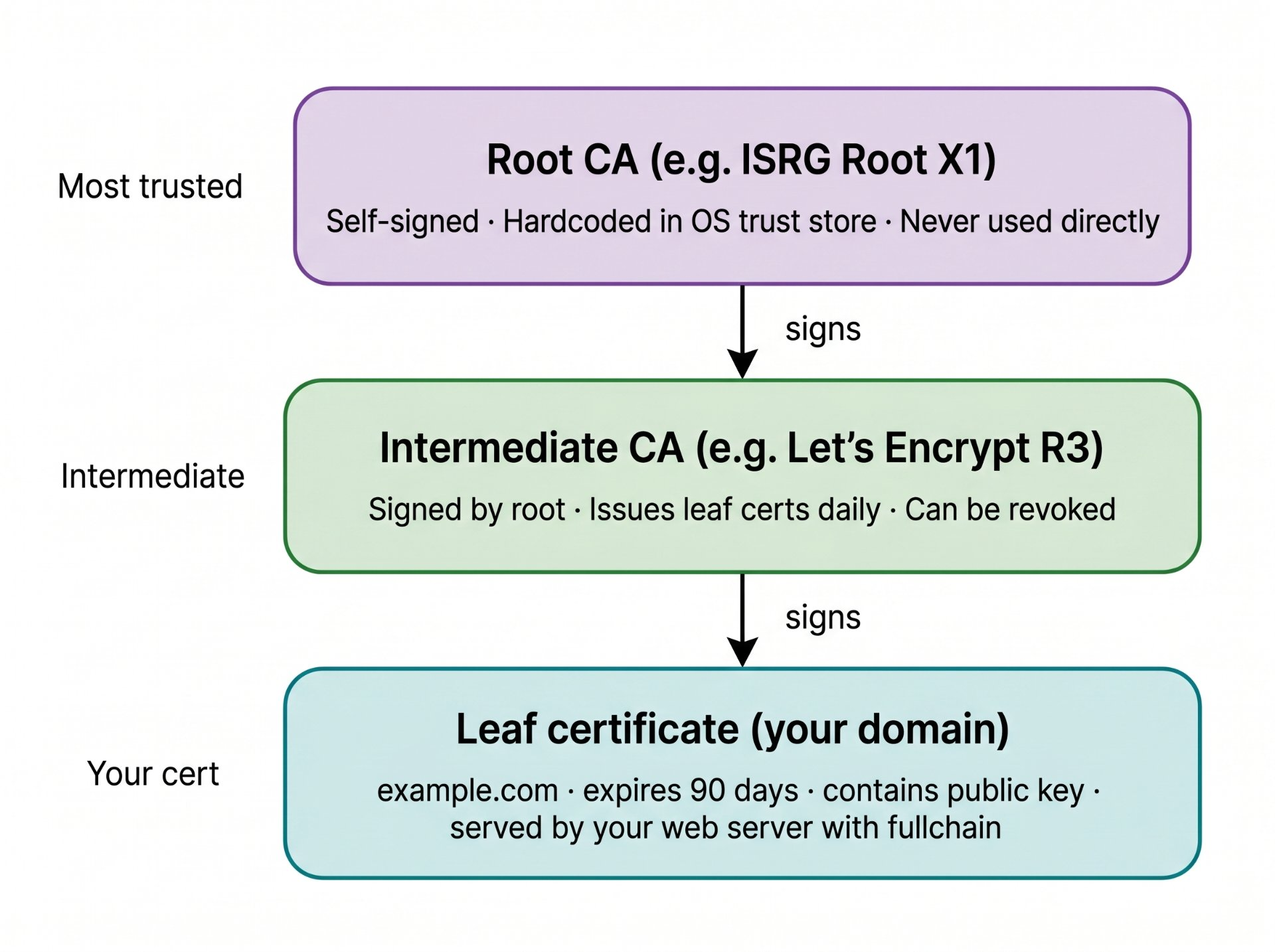
fullchain.pem (leaf + intermediate) not just cert.pem (leaf only).The most common misconfiguration
Serving only the leaf certificate (cert.pem) without the intermediate chain (fullchain.pem). Desktop browsers often have the intermediate cached so it looks fine in testing then mobile devices, curl, and API clients that do not have the intermediate cached return "unable to verify certificate chain." Always configure your server with fullchain.pem, which includes both the leaf certificate and all intermediates up to (but not including) the root.
Certificate types — choosing the right one
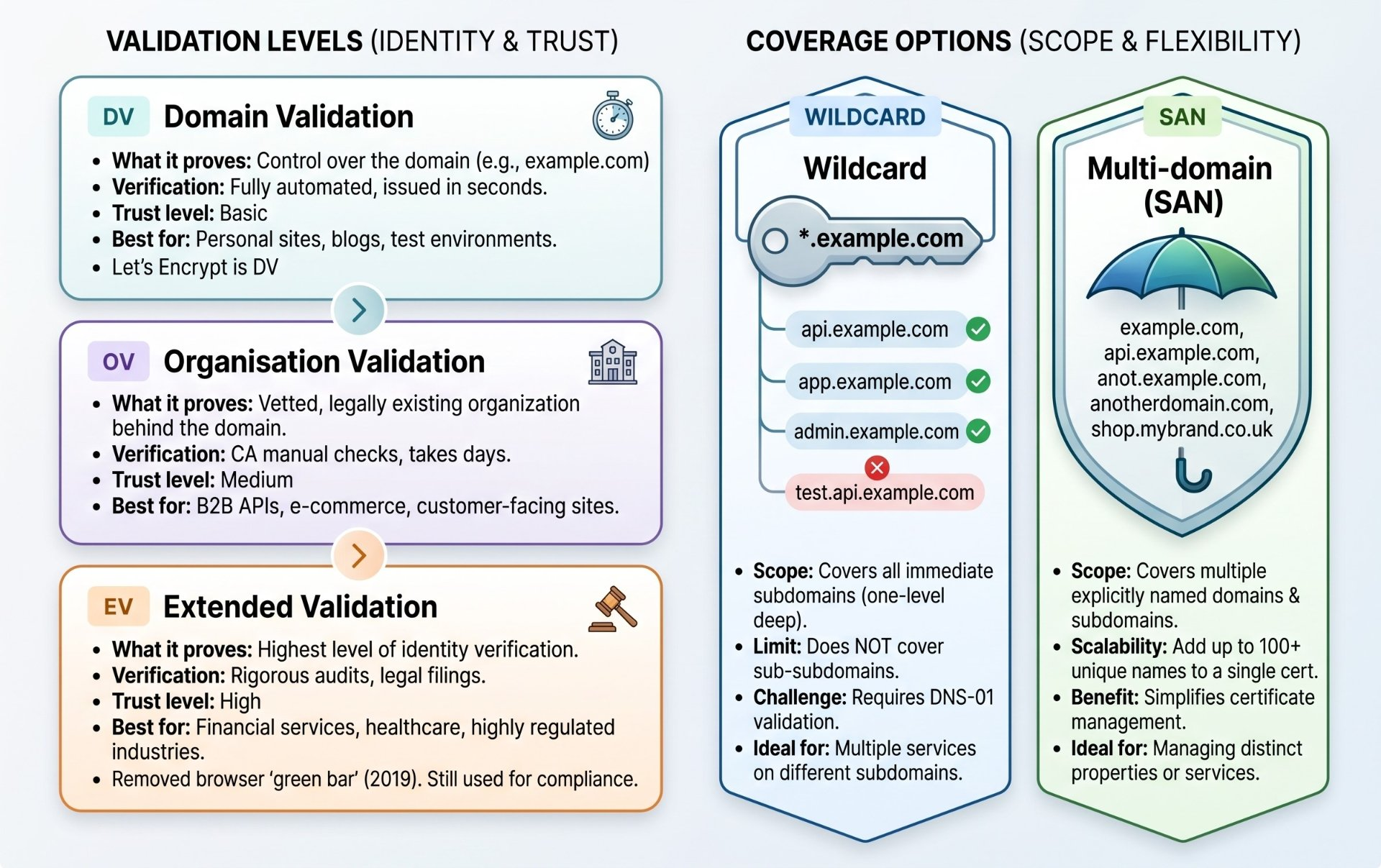
The wildcard restriction you must know
A wildcard certificate for *.example.com covers app.example.com, api.example.com, admin.example.com but NOT example.com itself (the apex domain) and NOT deep.api.example.com (two levels down). To cover both the apex and wildcard, get a SAN cert that includes both example.com and *.example.com. Let's Encrypt supports this in a single certbot command.
File formats — the .pem .crt .key .p12 confusion, solved forever
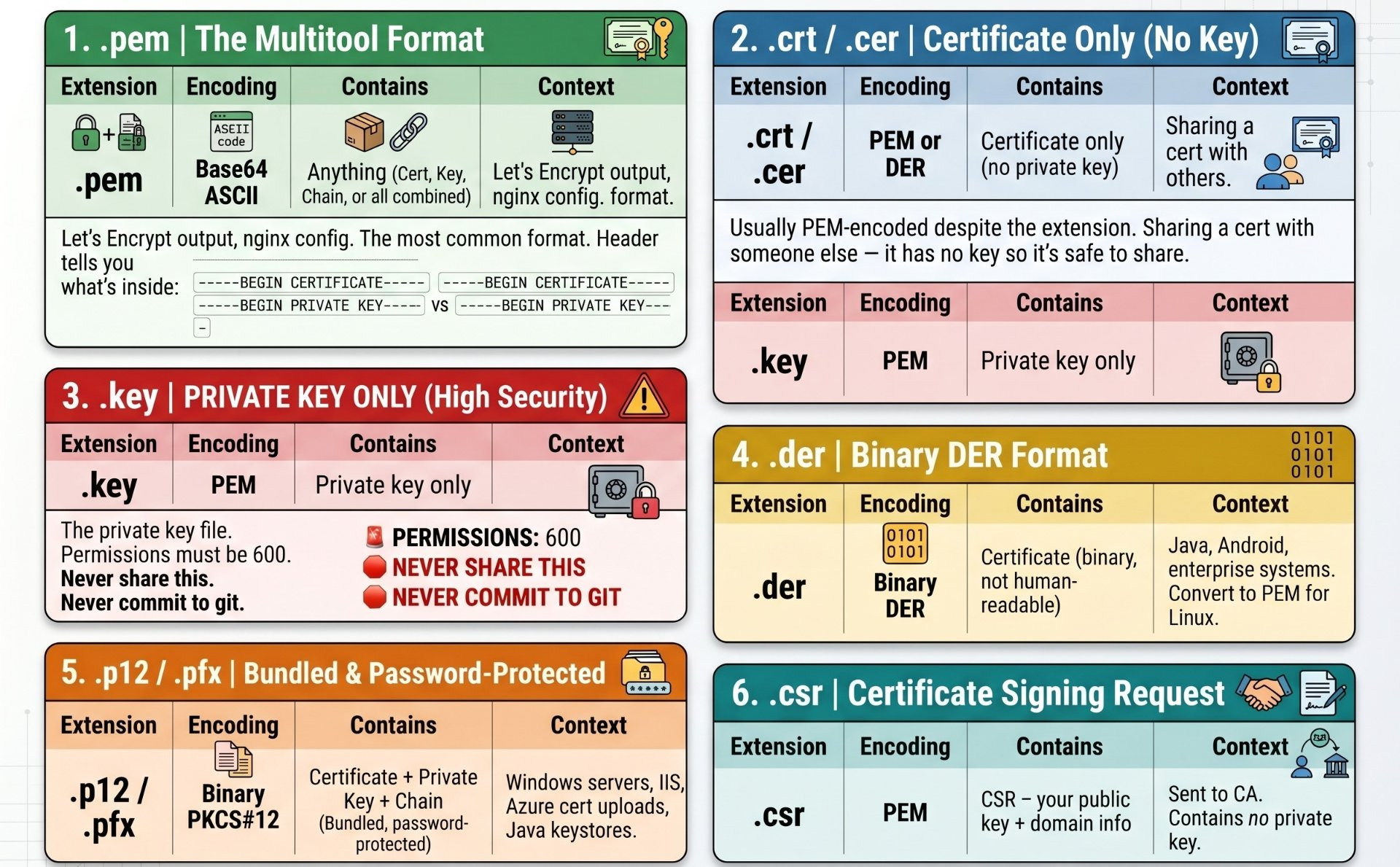
This trips up every engineer at least once. The confusion exists because there are two independent dimensions: the encoding format (how bytes are structured) and the content type (what those bytes represent). They are often conflated.
# ── Inspect any cert or key before doing anything ─────────────
# See what's in a .pem file
openssl x509 -in cert.pem -text -noout

# See the header to know what type of PEM it is
head -1 fullchain.pem
# → -----BEGIN CERTIFICATE----- (it's a cert)
# → -----BEGIN PRIVATE KEY----- (it's a key)
# → -----BEGIN RSA PRIVATE KEY-- (old-style RSA key)

# ── PEM ↔ DER ─────────────────────────────────────────────────
# PEM to DER (for Java/Android)
openssl x509 -in cert.pem -outform DER -out cert.der

# DER to PEM (from Java/enterprise)
openssl x509 -in cert.der -inform DER -outform PEM -out cert.pem

# ── PEM → PKCS#12 / .p12 (for Windows / Azure / Java) ────────
# Bundles cert + key + chain into one password-protected file
openssl pkcs12 -export \
  -out bundle.p12 \
  -inkey privkey.pem \
  -in cert.pem \
  -certfile chain.pem \
  -name "my-cert-alias"
# You will be prompted for an export password

# ── PKCS#12 → PEM (extract from Windows-exported .pfx) ────────
# Extract certificate
openssl pkcs12 -in bundle.p12 -nokeys -out cert.pem
# Extract private key (will be encrypted — add -nodes to remove encryption)
openssl pkcs12 -in bundle.p12 -nocerts -nodes -out privkey.pem

# ── Verify a cert and key match each other ────────────────────
# If these hashes match, the cert and key are a pair
openssl x509 -noout -modulus -in cert.pem | md5sum
openssl rsa  -noout -modulus -in privkey.pem | md5sum
# Both should print the same MD5 hash

# ── Create a complete fullchain.pem from parts ────────────────
cat cert.pem chain.pem > fullchain.pem
# leaf cert first, then intermediate chain. This is correct order.ACME challenge types — understanding HTTP-01 vs DNS-01
The ACME protocol (Automatic Certificate Management Environment) is how Let's Encrypt and other CAs prove you own a domain before issuing a certificate. There are three challenge types each proves ownership differently, has different requirements, and is appropriate for different situations.
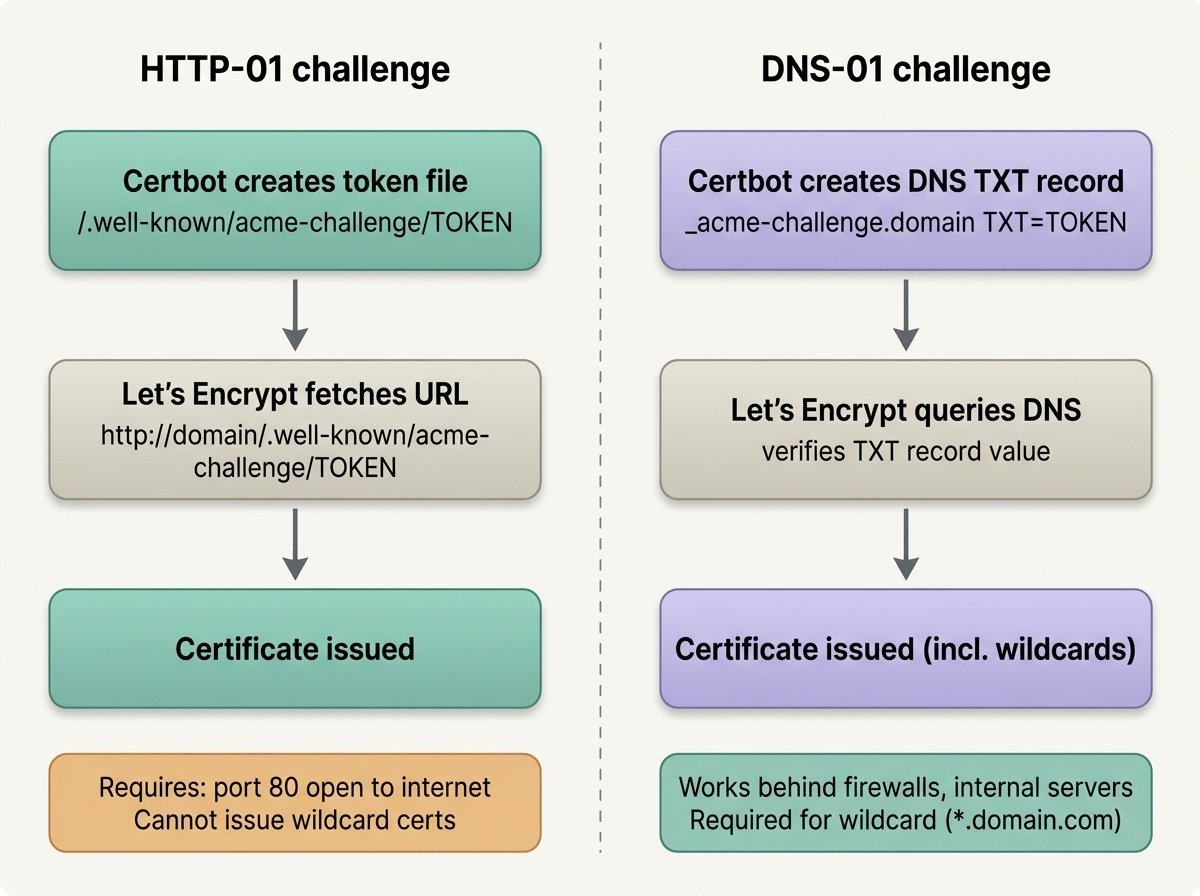
# ── Use HTTP-01 when: ─────────────────────────────────────────
# - Port 80 is open to the internet
# - Simple single-domain certificates
# - You don't need wildcard certs
# - Fully automated (no DNS API needed)

# ── Use DNS-01 when: ──────────────────────────────────────────
# - You need wildcard certificates (*.example.com)
# - Server is behind a firewall / no public port 80
# - Internal servers that CA can't reach via HTTP
# - Issuing certs before a server is live
# - Your DNS provider has an API (Route53, Cloudflare, etc.)

# ── Use TLS-ALPN-01 when: ─────────────────────────────────────
# - Only port 443 is available (no 80, no DNS API)
# - Much less common — most tools support HTTP-01 or DNS-01Certbot deep dive — beyond basic usage
# ── Issuing certificates ──────────────────────────────────────

# Standard single domain — HTTP-01, auto-configures nginx
certbot --nginx -d example.com

# Multi-domain SAN certificate (both apex and www in one cert)
certbot --nginx -d example.com -d www.example.com

# Wildcard — requires DNS-01 (manual or with DNS plugin)
certbot certonly \
  --manual \
  --preferred-challenges dns \
  -d example.com \
  -d "*.example.com"
# certbot will prompt you to add a TXT record, then verifies it

# Wildcard with Route53 DNS plugin (fully automated)
pip install certbot-dns-route53
certbot certonly \
  --dns-route53 \
  -d example.com \
  -d "*.example.com"
# Requires AWS credentials with Route53 write access
# Supported plugins: cloudflare, route53, digitalocean, azure, gcp, etc.

# Certonly — get cert without touching webserver config
# Better for production where you control nginx yourself
certbot certonly --nginx -d example.com

# Standalone — certbot spins up its own temp HTTP server
# Use when nginx is not running yet
certbot certonly --standalone -d example.com

# ── Where certbot stores certs ────────────────────────────────
# /etc/letsencrypt/live/example.com/
#   cert.pem        — leaf certificate only
#   chain.pem       — intermediate chain only
#   fullchain.pem   — leaf + chain (use this in nginx)
#   privkey.pem     — private key (use this in nginx)
# These are symlinks to /etc/letsencrypt/archive/example.com/

# ── Renewal ───────────────────────────────────────────────────
# Test renewal without actually renewing (dry run)
certbot renew --dry-run

# Renew all certs (renews if within 30 days of expiry)
certbot renew

# Force renewal even if not near expiry
certbot renew --force-renewal --cert-name example.com

# List all certificates and their expiry dates
certbot certificates
Renewal automation and deployment hooks
This is the part most tutorials skip. Getting a cert is one thing, automatically renewing it and reloading nginx without downtime is what production requires. Certbot provides hooks: scripts that run before or after renewal.
# ── Deploy hook — runs after successful renewal ───────────────
# Create: /etc/letsencrypt/renewal-hooks/deploy/reload-nginx.sh
#!/bin/bash
set -e
systemctl reload nginx
echo "nginx reloaded after cert renewal for: $RENEWED_DOMAINS"
echo "Cert expiry: $(date)"

# Make it executable
chmod +x /etc/letsencrypt/renewal-hooks/deploy/reload-nginx.sh

# Hook types:
# renewal-hooks/pre/    — runs before ANY renewal attempt
# renewal-hooks/deploy/ — runs after SUCCESSFUL renewal
# renewal-hooks/post/   — runs after ANY attempt (success or fail)

# ── Systemd timer (better than cron) ─────────────────────────
# certbot installs this automatically on modern systems
systemctl status certbot.timer
systemctl list-timers certbot*

# If not present, the timer unit at /etc/systemd/system/certbot.timer:
# [Timer]
# OnCalendar=*-*-* 00,12:00:00    # runs twice daily
# RandomizedDelaySec=43200        # random offset (avoids Let's Encrypt load spikes)
# Persistent=true

# ── Renewal config per certificate ────────────────────────────
# /etc/letsencrypt/renewal/example.com.conf
# Inspect to see how certbot will renew this cert:
cat /etc/letsencrypt/renewal/example.com.conf

# ── Test the full renewal flow without issuing ────────────────
certbot renew --dry-run --cert-name example.com
# Install cloudflare DNS plugin
pip install certbot-dns-cloudflare
# Create credentials file (never commit this)
mkdir -p /etc/letsencrypt
cat > /etc/letsencrypt/cloudflare.ini << 'EOF'
dns_cloudflare_api_token = YOUR_CLOUDFLARE_API_TOKEN
EOF
chmod 600 /etc/letsencrypt/cloudflare.ini
# Cloudflare API token needs Zone:DNS:Edit permission on your zone only
# Create a scoped token — not your global API key
# Issue wildcard + apex in one cert, fully automated
certbot certonly \
--dns-cloudflare \
--dns-cloudflare-credentials /etc/letsencrypt/cloudflare.ini \
--dns-cloudflare-propagation-seconds 60 \
-d example.com \
-d "*.example.com" \
-m [email protected] \
--agree-tos \
--non-interactive
# This cert covers: example.com, app.example.com,
# api.example.com, admin.example.com, etc.
# Renewal is fully automatic — no manual DNS edits ever neededCloud-native cert management — AWS ACM and Azure
AWS Certificate Manager (ACM)
ACM is the right answer for any certificate used with AWS services: ALB, CloudFront, API Gateway, Elastic Beanstalk. It provisions, renews, and manages certificates automatically. You never touch a private key. You never configure renewal. The trade-off: ACM certificates cannot be exported you cannot take the private key and install it on an EC2 instance directly.
# ── Request a certificate ─────────────────────────────────────
aws acm request-certificate \
  --domain-name example.com \
  --subject-alternative-names "*.example.com" "www.example.com" \
  --validation-method DNS \
  --region us-east-1

# Output includes CertificateArn and DNS validation CNAME records
# {
#   "CertificateArn": "arn:aws:acm:us-east-1:123456:certificate/abc-123"
# }

# ── Get the DNS validation record ─────────────────────────────
aws acm describe-certificate \
  --certificate-arn arn:aws:acm:us-east-1:123456:certificate/abc-123 \
  --query 'Certificate.DomainValidationOptions'

# ACM gives you a CNAME to add to your DNS
# Once the CNAME exists, ACM validates and issues — then renews automatically forever

# ── Attach to an ALB listener ─────────────────────────────────
aws elbv2 add-listener-certificates \
  --listener-arn arn:aws:elasticloadbalancing:... \
  --certificates CertificateArn=arn:aws:acm:us-east-1:123456:certificate/abc-123

# ── Terraform (recommended for IaC) ──────────────────────────
# resource "aws_acm_certificate" "cert" {
#   domain_name       = "example.com"
#   validation_method = "DNS"
#   subject_alternative_names = ["*.example.com"]
#   lifecycle { create_before_destroy = true }
# }
Azure App Service and Key Vault
# ── App Service Managed Certificates (free, auto-renew) ───────
# For custom domains on Azure App Service — no config needed
az webapp config ssl create \
  --resource-group myRG \
  --name myApp \
  --hostname app.example.com

# ── Import an external cert into Key Vault ────────────────────
# Convert to PFX first (Key Vault needs PKCS#12)
openssl pkcs12 -export \
  -out cert.pfx \
  -inkey privkey.pem \
  -in fullchain.pem \
  -passout pass:mypassword

az keyvault certificate import \
  --vault-name myKeyVault \
  --name my-cert \
  --file cert.pfx \
  --password mypassword

# ── Key Vault certificate policy — auto-renew with Let's Encrypt
# Key Vault can integrate with DigiCert and GlobalSign natively
# for auto-issuance and renewal. For Let's Encrypt, use cert-manager
# or a custom rotation function.cert-manager for Kubernetes — the production standard
cert-manager is the de-facto standard for certificate management in Kubernetes. It runs as a controller, watches Certificate resources, issues and renews certificates automatically, and stores them as Kubernetes Secrets that pods and Ingress resources can consume.
# ── Install cert-manager ──────────────────────────────────────
kubectl apply -f https://github.com/cert-manager/cert-manager/releases/latest/download/cert-manager.yaml

# ── Create a ClusterIssuer for Let's Encrypt (HTTP-01) ────────
apiVersion: cert-manager.io/v1
kind: ClusterIssuer
metadata:
  name: letsencrypt-prod
spec:
  acme:
    server: https://acme-v02.api.letsencrypt.org/directory
    email: [email protected]
    privateKeySecretRef:
      name: letsencrypt-prod-account-key
    solvers:
      - http01:
          ingress:
            class: nginx

---
# ClusterIssuer for wildcard (DNS-01 with Cloudflare)
apiVersion: cert-manager.io/v1
kind: ClusterIssuer
metadata:
  name: letsencrypt-wildcard
spec:
  acme:
    server: https://acme-v02.api.letsencrypt.org/directory
    email: [email protected]
    privateKeySecretRef:
      name: letsencrypt-wildcard-key
    solvers:
      - dns01:
          cloudflare:
            apiTokenSecretRef:
              name: cloudflare-api-token
              key: api-token

---
# Ingress — cert-manager reads the annotation and auto-issues the cert
apiVersion: networking.k8s.io/v1
kind: Ingress
metadata:
  name: myapp-ingress
  annotations:
    # This annotation tells cert-manager which issuer to use
    cert-manager.io/cluster-issuer: "letsencrypt-prod"
spec:
  tls:
    - hosts:
        - app.example.com
      secretName: app-example-com-tls   # cert-manager creates this Secret
  rules:
    - host: app.example.com
      http:
        paths:
          - path: /
            pathType: Prefix
            backend:
              service:
                name: myapp-service
                port:
                  number: 80

# ── Check certificate status ──────────────────────────────────
kubectl get certificate -n myapp
kubectl describe certificate app-example-com-tls -n myapp
kubectl get certificaterequest -n myapp # see ACME challenge progressOpenSSL debugging toolkit — every command you will ever need
# ── Inspect a certificate (local file) ───────────────────────
openssl x509 -in cert.pem -text -noout
# Shows: subject, issuer, validity dates, SANs, key usage, extensions

# Show only the expiry date
openssl x509 -in cert.pem -noout -enddate
# → notAfter=Sep 15 12:00:00 2025 GMT

# Show SANs (Subject Alternative Names)
openssl x509 -in cert.pem -noout -ext subjectAltName

# ── Connect to a live server and inspect cert ────────────────
# The most important debugging command you will use
openssl s_client -connect example.com:443 -servername example.com

# Show the full chain the server is presenting
openssl s_client -connect example.com:443 -servername example.com \
  -showcerts 2>/dev/null | openssl x509 -noout -text | grep -A2 Issuer

# Check expiry of a live server cert
openssl s_client -connect example.com:443 -servername example.com \
  2>/dev/null | openssl x509 -noout -enddate

# ── Verify chain of trust ─────────────────────────────────────
# Does the cert chain up to a trusted root?
openssl verify -CAfile /etc/ssl/certs/ca-certificates.crt fullchain.pem
# → fullchain.pem: OK

# Verify against a specific CA bundle (useful for internal PKI)
openssl verify -CAfile internal-ca.pem cert.pem

# ── Generate a self-signed cert (for internal/testing) ────────
openssl req -x509 -newkey rsa:4096 -keyout key.pem -out cert.pem \
  -days 365 -nodes \
  -subj "/C=US/ST=CA/L=SF/O=MyOrg/CN=example.com" \
  -addext "subjectAltName=DNS:example.com,DNS:*.example.com,IP:10.0.0.1"

# ── Generate a CSR (for commercial CA purchase) ───────────────
# Step 1: generate private key
openssl genrsa -out privkey.pem 4096

# Step 2: generate CSR with SANs
openssl req -new -key privkey.pem -out request.csr \
  -subj "/C=US/O=Acme Corp/CN=example.com" \
  -addext "subjectAltName=DNS:example.com,DNS:www.example.com"

# Step 3: inspect the CSR before sending
openssl req -in request.csr -text -noout

# ── Check cert and key match ──────────────────────────────────
diff \
  <(openssl x509 -noout -modulus -in cert.pem | md5sum) \
  <(openssl rsa  -noout -modulus -in privkey.pem | md5sum) \
  && echo "MATCH" || echo "MISMATCH — wrong key for this cert"

# ── Check what protocols and ciphers a server accepts ─────────
nmap --script ssl-enum-ciphers -p 443 example.com

# ── Test TLS version support ──────────────────────────────────
openssl s_client -connect example.com:443 -tls1   2>&1 | grep "Cipher\|Protocol"
openssl s_client -connect example.com:443 -tls1_1 2>&1 | grep "Cipher\|Protocol"
openssl s_client -connect example.com:443 -tls1_2 2>&1 | grep "Cipher\|Protocol"
openssl s_client -connect example.com:443 -tls1_3 2>&1 | grep "Cipher\|Protocol"

# ── Debug OCSP stapling ───────────────────────────────────────
openssl s_client -connect example.com:443 -status -servername example.com \
  2>/dev/null | grep -A 10 "OCSP Response"
# Should show "OCSP Response Status: successful" if stapling worksCertificate expiry monitoring — alert before users notice
Certificate expiry is one of those incidents that is completely preventable and yet happens constantly even at large companies. The fix is simple: monitor and alert with enough lead time to act.
# ── Quick manual check ────────────────────────────────────────
# How many days until a domain's cert expires?
check_expiry() {
  local domain=$1
  local expiry=$(openssl s_client -connect ${domain}:443 \
    -servername ${domain} 2>/dev/null \
    | openssl x509 -noout -enddate \
    | cut -d= -f2)
  local days=$(( ($(date -d "$expiry" +%s) - $(date +%s)) / 86400 ))
  echo "${domain}: ${days} days remaining (expires: ${expiry})"
}

check_expiry example.com
check_expiry api.example.com

# ── Shell script: alert if cert expires within 30 days ────────
#!/bin/bash
DOMAINS=("example.com" "api.example.com" "admin.example.com")
THRESHOLD=30
ALERT_EMAIL="[email protected]"

for domain in "${DOMAINS[@]}"; do
  expiry=$(openssl s_client -connect ${domain}:443 -servername ${domain} \
    2>/dev/null | openssl x509 -noout -enddate 2>/dev/null | cut -d= -f2)

  if [ -z "$expiry" ]; then
    echo "WARNING: Could not check cert for ${domain}" | \
      mail -s "CERT CHECK FAILED: ${domain}" $ALERT_EMAIL
    continue
  fi

  days_left=$(( ($(date -d "$expiry" +%s) - $(date +%s)) / 86400 ))

  if [ "$days_left" -lt "$THRESHOLD" ]; then
    echo "Certificate for ${domain} expires in ${days_left} days!" | \
      mail -s "CERT EXPIRY WARNING: ${domain}" $ALERT_EMAIL
  fi
done

# Run daily via cron:
# 0 8 * * * /usr/local/bin/check-certs.sh

# ── Prometheus + Grafana ──────────────────────────────────────
# blackbox_exporter probes TLS endpoints and exposes expiry metric
# prometheus.yml scrape config:
# - job_name: 'ssl_expiry'
#   metrics_path: /probe
#   params:
#     module: [http_2xx]
#   static_configs:
#     - targets: ['example.com:443']
#   relabel_configs:
#     - target_label: __address__
#       replacement: blackbox-exporter:9115

# Alert rule in Prometheus:
# - alert: SSLCertExpiringSoon
#   expr: probe_ssl_earliest_cert_expiry - time() < 86400 * 30
#   for: 1h
#   labels: { severity: warning }
#   annotations:
#     summary: "SSL cert for {{ $labels.instance }} expires in {{ $value | humanizeDuration }}"
Alert thresholds that work in practice
Let's Encrypt certs last 90 days and certbot starts renewal at 30 days remaining. Alert at 30 days so you know renewal is running. Alert again at 14 days if it has not renewed, something is wrong with the automation. Alert at 7 days as a critical — act now. Alert at 3 days as a production emergency. Four alert thresholds, each requiring a different response. Never wait until expiry to find out renewal broke.
Internal PKI and mTLS — certificates for service-to-service
Public certificates from Let's Encrypt are for domains reachable from the internet. Internal services your app talking to your database, one microservice calling another need certificates too, but Let's Encrypt cannot issue them (it cannot reach postgres.internal). This is where internal PKI comes in.
Creating a simple internal CA
# ── Step 1: Create the Root CA ────────────────────────────────
mkdir -p /etc/pki/mycompany/{ca,certs,keys}

# Generate CA private key (keep this VERY secure)
openssl genrsa -aes256 -out /etc/pki/mycompany/ca/ca.key 4096

# Generate self-signed CA certificate (10 year validity for an internal CA)
openssl req -x509 -new -nodes \
  -key /etc/pki/mycompany/ca/ca.key \
  -sha256 -days 3650 \
  -out /etc/pki/mycompany/ca/ca.crt \
  -subj "/C=US/O=MyCompany Internal CA/CN=MyCompany Root CA"

# ── Step 2: Issue a cert for an internal service ──────────────
# Generate key for the service
openssl genrsa -out /etc/pki/mycompany/keys/postgres.key 2048

# Create CSR with SANs for internal DNS names and IPs
openssl req -new \
  -key /etc/pki/mycompany/keys/postgres.key \
  -out /tmp/postgres.csr \
  -subj "/CN=postgres.internal" \
  -addext "subjectAltName=DNS:postgres.internal,DNS:postgres,IP:10.0.1.5"

# Sign with your CA
openssl x509 -req -in /tmp/postgres.csr \
  -CA /etc/pki/mycompany/ca/ca.crt \
  -CAkey /etc/pki/mycompany/ca/ca.key \
  -CAcreateserial \
  -out /etc/pki/mycompany/certs/postgres.crt \
  -days 365 -sha256 \
  -extfile <(echo "subjectAltName=DNS:postgres.internal,DNS:postgres,IP:10.0.1.5")

# ── Step 3: Distribute trust — add CA cert to trust store ─────
# On Debian/Ubuntu
cp /etc/pki/mycompany/ca/ca.crt /usr/local/share/ca-certificates/mycompany-ca.crt
update-ca-certificates

# On RHEL/CentOS
cp /etc/pki/mycompany/ca/ca.crt /etc/pki/ca-trust/source/anchors/mycompany-ca.crt
update-ca-trust
mTLS — mutual authentication between services
Mutual TLS (mTLS) means both sides of a connection present a certificate. In regular TLS, only the server proves its identity. With mTLS, the client also proves its identity. This is the foundation of zero-trust service meshes (Istio, Linkerd) and anywhere you need cryptographic proof of which service is making a call.
# Server must present its cert (normal TLS)
ssl_certificate     /etc/pki/certs/api.crt;
ssl_certificate_key /etc/pki/keys/api.key;

# Client must also present a cert signed by your internal CA
ssl_client_certificate /etc/pki/mycompany/ca/ca.crt;
ssl_verify_client on;           # reject connections without valid client cert
ssl_verify_depth  2;            # how deep to check the chain

# ssl_verify_client optional; → accept but not require (can inspect $ssl_client_verify)

location /internal/ {
    # Block if client cert is not verified
    if ($ssl_client_verify != SUCCESS) {
        return 403 "Client certificate required";
    }

    # Pass client cert info to the upstream as headers
    proxy_set_header X-Client-Cert-DN   $ssl_client_s_dn;
    proxy_set_header X-Client-Cert-Verify $ssl_client_verify;

    proxy_pass http://internal_backend;
}Common production mistakes — the ones that cause incidents
Mistake 1 — serving cert.pem instead of fullchain.pem
Already covered but worth emphasising: serving only the leaf certificate without the intermediate chain causes "unable to verify certificate" errors for clients that do not have the intermediate cached. Always use fullchain.pem in your web server config. Check with openssl s_client from a fresh machine.
Mistake 2 — private key in version control
The private key (privkey.pem) must never be committed to git, stored in S3 without encryption, or logged. If it is compromised, an attacker can impersonate your server. Revoke and reissue immediately if this happens. Use a secrets manager (AWS Secrets Manager, HashiCorp Vault, Azure Key Vault) to store private keys never environment variables or config files in repos.
Mistake 3 — not testing renewal before production
Certbot's renewal machinery is only proven when it runs. Test it with certbot renew --dry-run monthly. Run it and watch the systemd timer execute. Check the deploy hooks actually reload nginx. The first time you discover your renewal is broken should not be when the cert expires in production.
Mistake 4 — port 80 firewalled, HTTP-01 silently fails
If you use HTTP-01 but your firewall blocks port 80, certbot will fail at renewal without obvious error until the cert actually expires. Either keep port 80 open (nginx can redirect to 443 after the challenge passes), switch to DNS-01, or set up alerting that certbot renewal succeeded.
Mistake 5 — Let's Encrypt rate limits in production
Let's Encrypt enforces rate limits: 50 certificates per registered domain per week, 5 duplicate certificates per week, 5 failed validation attempts per account per domain per hour. Hitting these in production is very disruptive. Always use the staging environment (--staging) when testing new certbot configurations. Staging has much higher limits and issues fake (untrusted) certificates so you can test the whole flow without consuming production quota.
Mistake 6 — wildcard cert on a server that can't DNS-01
Committing to a wildcard certificate on a server without a DNS provider API means every renewal requires manual DNS record creation. This is unsustainable you will miss a renewal. Either choose a DNS provider with an API and install the certbot plugin, or use individual single-domain certificates with HTTP-01 instead of a wildcard.
Author's Note
Chamath P.
DevOps Engineer
DevOps Engineer writing practical guides on Kubernetes, CI/CD, IaC, and SRE — based on real production experience.
This article was written with AI assistance. All technical claims and code examples have been personally verified before publishing.
Advertisements