The Silent Imposter: Understanding and Preventing CSRF Attacks in Go
CSRF Tokens


Advertisements
Web security can often feel like an alphabet soup of acronyms. Today, we are decoding one of the most common yet dangerous ones: CSRF (Cross-Site Request Forgery).
If you are building web applications that handle user data, understanding CSRF isn’t optional; it’s essential. Here is your guide to what it is, why it matters, and how to stop it using Go.
What is CSRF?
The Problem: The “Confused Deputy”
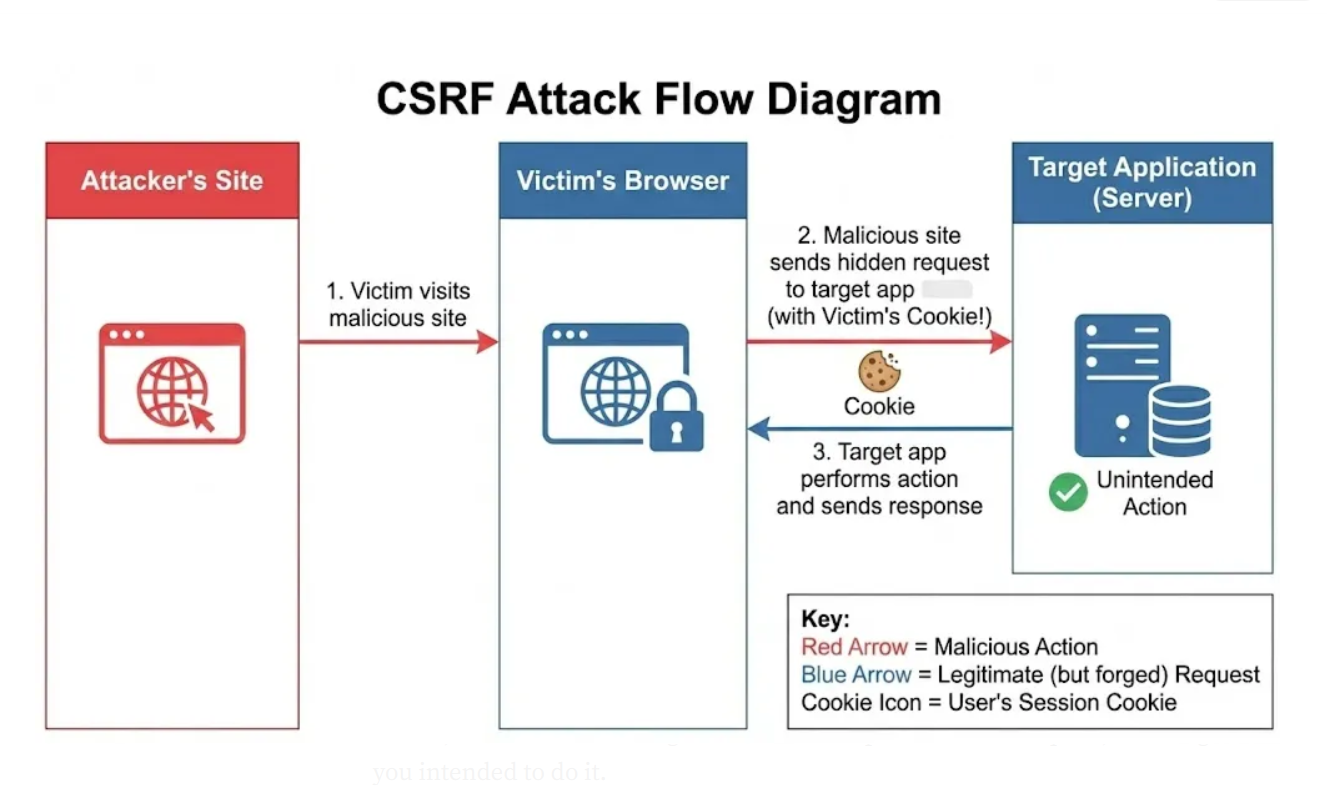
Cross-Site Request Forgery (CSRF) is an attack where a malicious website tricks a trusted user into performing an unwanted action on a different site where the user is currently authenticated.
Here is the technical breakdown: When you log into a website (like your bank), the server gives your browser a session cookie. For every subsequent request you make, your browser automatically sends that cookie along to prove who you are.
The flaw? The browser sends that cookie automatically, regardless of where the request originated. If you visit a malicious site, it can send a hidden request to your bank. Your browser dutifully attaches your valid session cookie, and the bank seeing the valid cookie processes the request, thinking you intended to do it.
Let’s understand this in a simpler way…
The Analogy: The “Fake Letter”
Imagine you are the CEO of a company. You have a very efficient secretary (the Server) who recognizes you by your official company letterhead (the Cookie).
The Setup: You go to a coffee shop (a malicious site) and leave your letterhead stamp on the table while you get a refill.
The Attack: A fraudster grabs your stamp, writes a letter saying “Wire $1,000 to the fraudster,” stamps it with your official seal, and mails it to your secretary.
The Result: The secretary receives the letter. They see the official stamp. They assume you wrote it. They wire the money.
The secretary wasn’t verifying that you handed them the letter; they only verified the stamp.
So How to prevent this?
The “Secret Handshake” (Anti-CSRF Tokens)
To fix this, we introduce a CSRF Token.
Going back to our analogy: You and your secretary agree on a unique, random code word that changes every single day (e.g., “Blueberry”). Now, valid instructions must have two things:
The official stamp (Cookie).
The code word “Blueberry” written in the margin (CSRF Token).
If the fraudster tries to mail a stamped letter, it will fail because they don’t know today’s code word. The secretary sees the stamp but notices the missing code word and shreds the letter.
What are the Benefits of CSRF Protection?
mplementing CSRF protection isn’t just about checking a security box; it provides tangible value:
Data Integrity: It prevents attackers from modifying data (changing passwords, deleting accounts, or transferring funds) without the user’s consent.
Reputation Management: A successful CSRF attack destroys user trust. Preventing it safeguards your brand’s reputation.
Compliance: Many data protection standards (like PCI-DSS for payments or GDPR for privacy) require strict access controls. CSRF protection is a standard part of security audits.
Reduced Support Load: Preventing unauthorized actions means fewer support tickets from users claiming they “never made that transaction.”
···
How to Implement CSRF Protection in Go
While you can write your own middleware to check headers and tokens, security is best handled by battle-tested libraries. In the Go ecosystem, the standard standard is gorilla/csrf.
Step 1: Install the Library
go get output github.com/gorilla/csrf
Step 2: Set Up the Middleware
You need to wrap your HTTP handler with the CSRF middleware. This middleware generates a token and validates incoming requests.
package main

import (
    "fmt"
    "html/template"
    "net/http"

    "github.com/gorilla/csrf"
    "github.com/gorilla/mux"
)

func main() {
    r := mux.NewRouter()

    // 1. Initialize the CSRF middleware
    // In production, "32-byte-long-auth-key" should be a secure environment variable!
    CSRF := csrf.Protect([]byte("32-byte-long-auth-key"), csrf.Secure(false))
    // Note: csrf.Secure(false) is for development (HTTP). Set to true in production (HTTPS).

    r.HandleFunc("/signup", ShowSignupForm).Methods("GET")
    r.HandleFunc("/signup", ProcessSignup).Methods("POST")

    // 2. Wrap your router with the middleware
    fmt.Println("Server starting on :8000...")
    http.ListenAndServe(":8000", CSRF(r))
}

func ShowSignupForm(w http.ResponseWriter, r *http.Request) {
    // We will inject the token into the HTML here
    t, err:= template.ParseFiles("signup.html")
    if err != nil {
      http.Error(w, "Template error", http.StatusInternalServerError)
      return
    }

   t.Execute(w, map[string]interface{}{
        "csrfField": template.HTML(csrf.TemplateField(r)),
    })
}

func ProcessSignup(w http.ResponseWriter, r *http.Request) {
    // If we get here, the CSRF check passed!
    fmt.Fprintf(w, "Signup successful! The token was valid.")
}
Step 3: Add the Token to Your HTML Form
<!DOCTYPE html>
<html>
<head>
    <title>Signup</title>
</head>
<body>
    <h1>Create an Account</h1>
    <form action="/signup" method="POST">
      {{ .csrfField }}
      <label>Username:</label>
      <input type="text" name="username">
      <button type="submit">Submit</button>
    </form>
</body>
</html>
How It Works in Code?
Generation: When
ShowSignupFormis called,csrf.Token(r)generates a unique token for that user session.Injection: We inject that token into the HTML form as a hidden value.
Validation: When the user clicks “Submit”, the browser sends the form data (including the hidden token) and the cookies. The
csrf.Protectmiddleware intercepts the request. It compares the token in the form against the expected token for that session. If they match, the request proceeds. If not, it blocks it.
Author's Note
Chamath P.
DevOps Engineer
DevOps Engineer writing practical guides on Kubernetes, CI/CD, IaC, and SRE — based on real production experience.
This article was written with AI assistance. All technical claims and code examples have been personally verified before publishing.
Advertisements